Overview
Order flow represents scenario(s) to confirm and deploy application ordered by customer at AVAplace customers market. See Getting Started - Business Integration article.
Order status flow
When the customer creates a new order then the OrderReleased notification is sent. Partner receives notification, gets and validates order details and sends status to acknowledge that order was received as soon as possible. Then partner can evaluate the order to decide if they accept or reject customer's request and in a positive case will start to deploy and initialize application for customer. Customer is still waiting until done. Finally partner confirms that application is ready to use and customer can start to work in application.
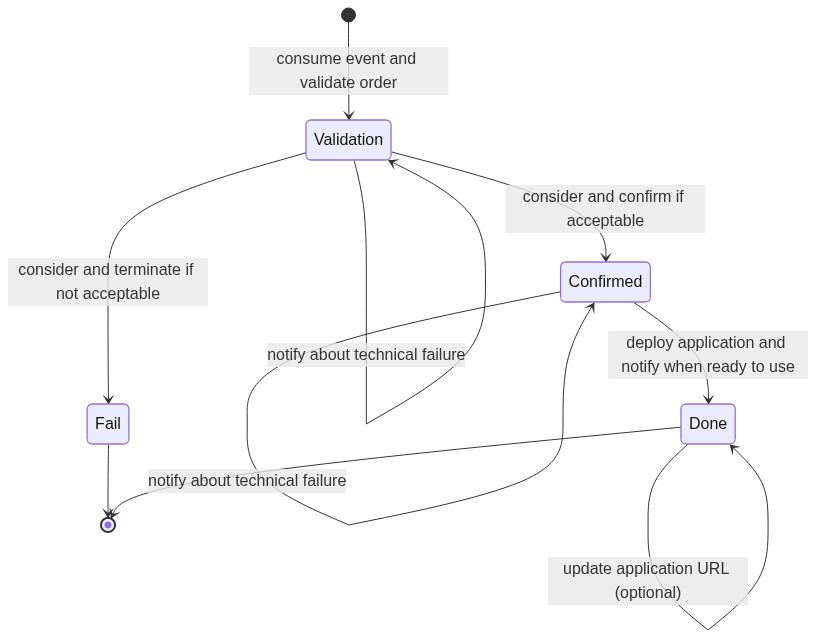
Statuses:
- `` - customer order was released ('no state' = initial state)
Validation- status acknowledging that order was received and negotiation with customer has been startedFail- terminal status when order evaluation was terminated because negotiation with customer was unsuccessfulConfirmed- status confirming that order evaluation was successful and deployment of customer application has been startedDone- terminal status acknowledging that deployment was successful and application is ready to use by customer
PlatformStore.Order API endpoints
PlatformStore.Order API base URL: https://{hostname}/api/asol/ord
- Get a collection of orders in descending order (the newest order first)
GET /api/v1/Order
orderAccessType- (mandatory) the type of perspective applied to filter orders for current tenantVendor=> the released orders of applications provided by partner
includeTestingOrders- the filter to include testing orders (optional, default: false)offset+limit- the client paging parameters (default values: offset = 0 and limit = 100)- sample response (shortened):
{
  "totalCount": 5,
  "items": [
    {
      "id": "b8240b7c-3040-500f-82f8-052e6fde6e8c",
      "orderNumber": "202305090001",
      "licenceId": "b8240b7c-3040-500f-82f8-052e6fde6e8c",
      "licenceCode": "B8240B7C-3040-500F-82F8-052E6FDE6E8C",
      "vendor": {
        "code": "64949541|CZ"
      },
      ...
    },
    ...
  ]
}
- Get the order detail using the order number
GET /api/v1/Order/OrderNumber/{orderNumber}
orderNumber- (mandatory) the order numberorderAccessType- (mandatory) the type of perspective applied to filter orders for current tenantVendor=> the released orders of applications provided by partner
- sample response (shortened):
{
  "id": "b8240b7c-3040-500f-82f8-052e6fde6e8c",
  "orderNumber": "202305090001",
  "licenceId": "b8240b7c-3040-500f-82f8-052e6fde6e8c",
  "licenceCode": "B8240B7C-3040-500F-82F8-052E6FDE6E8C",
  "vendor": {
    "code": "64949541|CZ"
  },
  ...
}
- Get the order detail using the order identifier
GET /api/v1/Order/{id}
id- (mandatory) the order identifierorderAccessType- the type of perspective applied to filter orders for current tenant (mandatory)Vendor=> the released orders of applications provided by partner
- Get a collection of order statuses using the order identifier (the newest status first)
GET /api/v1/Order/{id}/Status
id- (mandatory) the order identifierorderAccessType- the type of perspective applied to filter orders for current tenant (mandatory)Vendor=> the released orders of applications provided by partner
includeLogs- the filter to include informative items (optional, default: false)offset+limit- the client paging parameters (default values: offset = 0 and limit = 100)- sample response (shortened):
{
  "totalCount": 3,
  "items": [
    {
      "orderId": "b8240b7c-3040-500f-82f8-052e6fde6e8c",
      "createdOn": "2023-05-09T06:17:11.889Z",
      "systemStatus": "Done",
      "severity": "Info",
      "source": "BypassOrderStatusFlow",
      "message": "Auto",
      "details": [],
      "customProperties": []
    },
    ...
  ]
}
- Set the new status of order using the order identifier
POST /api/v1/Order/{id}/SetStatus
id- (mandatory) the order identifierorderAccessType- the type of perspective applied to filter orders for current tenant (mandatory)Vendor=> the released orders of applications provided by partner
- request body properties:
systemStatus- (optional) the new system status value (mandatory when requested to change system status in the state machine)severity- the severity of status information (info, warning, error = technical failure)statusCode- the informative code of external operation (e.g. rest api call result)source- the informative code of source application (e.g. agent code) calling set statusmessage- (mandatory) the user messagedetails- (optional) the array of technical details (e.g. details about technical failure)customProperties- (optional) the collection of key/value pairs
- sample request body:
{
  "systemStatus": "Validation",
  "severity": "Info",
  "statusCode": 0,
  "source": "My.OrderExternalAgent",
  "message": "OK",
  "details": [
    "nothing", "important"
  ],
  "customProperties": [
    {
      "key": "ApplicationUrl",
      "value": "https://myuser.myapp.com"
    }
  ]
}
- sample response:
{
  "id": "b3d6cd2d-4a49-44d7-b721-ad69063d0818"
}
Technical failure
Technical failure is any status message with severity Error.
Technical failure can't change either the custom properties or the current system status of order, so systemStatus value is optional and just informative.
Note: It is recommended to send Validation system status with severity Info to acknowledge that order was received
and then validate order and send information about technical failure in the second status message call.
- sample request body of technical failure:
{
  "systemStatus": "Validation",
  "severity": "Error",
  "statusCode": 400,
  "source": "My.OrderExternalAgent",
  "message": "Company identifier is already used.",
  "details": [
    "more", "details", "about", "failure"
  ]
}
Update ApplicationUrl
Update custom properties (e.g. ApplicationUrl) can be called as standalone status message without system status.
Update custom properties can be called repetitively (the last wins) for any status value.
Severity of status message must be Info or 'Warning'.
Note: Typically are custom properties set when Done status message is set.
- sample request body of custom properties update:
{
  "severity": "Info",
  "source": "My.OrderExternalAgent",
  "message": "Update URL",
  "customProperties": [
    {
      "key": "ApplicationUrl",
      "value": "https://myuser.myapp.com"
    }
  ]
}
PlatformStore.Order events
This event can be consumed via messaging, see 1st method of communication - Message Publisher / Consumer.
ASOL.PlatformStore.OrderReleased
Message notifies that application order has been created and released by customer.
Event definitions
- messageType:
ASOL.PlatformStore.OrderReleased- contractType:
OrderReleased - exchange:
ASOL.PlatformStore.Orders.Contracts.Events:OrderReleased - queueName: ``
- contractType:
Event headers
X-VendorCode- the owner organization code of partner/vendor (i.e. mandant code)X-Tenant-Id- the tenant identifier of customer
Event classes
ASOL.PlatformStore.Orders.Contracts.Events.OrderReleased
Event properties
orderId- the order identifier (guid)productId- the product identifier (guid)vendorCode- the owner organization code of partner/vendor, e.g. "64949541|CZ"
Order model
OrderModel is the essential contract of business integration process. It will change and extend in future, but it is necessary to keep compatibility as much as possible using defensive development practices.
General principles for maintaining compatibility
- Properties can be set as obsolete and replaced with new ones in future
- Collections and lists can't guarantee item order
- Hint: use filtering expression to find appropriate item(s), not index
- Enumerations can add additional items and the existing ones will be preserved as obsolete
- Use KISS principles and minimize impact of potential changes, see: basic, intermediate and advanced level(s)
- Hint: read properties necessary to fulfill needs of your business integration process only
Basic level properties
These properties are necessary to fulfill any business integration process.
The basic level properties of ASOL.PlatformStore.Order.Contracts.OrderModel contract class:
Id- the unique identifier of order (primary key)OrderNumber- the order number (human-readable identifier)CreatedOn- UTC datetime when order was createdCreatedBy- contact information about customer (i.e. person) purchasing productCustomer- information about customer company purchasing productSupplier- information about supplier company supplying productVendor- information about vendor company providing productProductId- the unique identifier of purchased productOrderLines- the collection of product items (e.g. features, packages, subscriptions) delivered with productCurrentStatusInfo- contains current system status (seeSystemStatusproperty), can be null when order is released, but not acknowledged
Intermediate level properties
These properties are necessary to fulfill basic scenarios of business integration process using 'non-standard' product order.
The intermediate level properties of ASOL.PlatformStore.Order.Contracts.OrderModel contract class:
IsNonStandard- boolean flag to recognize 'standard' and 'non-standard' product orderNonStandardStatusInfo- contains current system status (seeSystemStatusproperty), used for 'non-standard' product order onlyFirstInvoiceDate- UTC datetime of the first invoice (optional)TotalPriceWithoutVatandVat- the indicative summarized price, used only in simple scenarios- Hint: to get the most accurate values, it is better to use
BillingPeriodCode,Price,BasePriceandLicenceCountof the items inOrderLinescollection
- Hint: to get the most accurate values, it is better to use
Advanced level properties
These properties are available to provide maximal details for the most complex business integration process.
The advanced level properties of ASOL.PlatformStore.Order.Contracts.OrderModel contract class:
OrderSummary- the complex structure describing sections of product order, can contain alsoCustomsection for advanced scenarios of 'non-standard' product order