Publish data
Overview
The publisher sends modified data to input queue and process them using data-transformation to update virtual datastores. The transformation defines the way (so called 'entity mappings') how the input data are converted into integration datamodel(s). It is common that a single input data are transformed into multiple datamodels or multiple input data organized into a single unit of work.
Each data-record is identified by internal identifier (i.e. recordId) provided by DataService and by external identifier (i.e. externalId) provided by publisher. The externalId represents the fully qualified identifier able to find original record in application which data-record published.
This document describes the SourcingData endpoints for publishing data to the DataService input queue.
Note: For the v2 API with improved agent identification and client support, see Publish Data API v2 Documentation.
Status Flow
When the publisher sends modified data to input queue a new queue item is created. The status of item in input queue is changed during processing following this state machine. Publisher can be notified by event when status of queue-item was changed, see Input Queue Events.
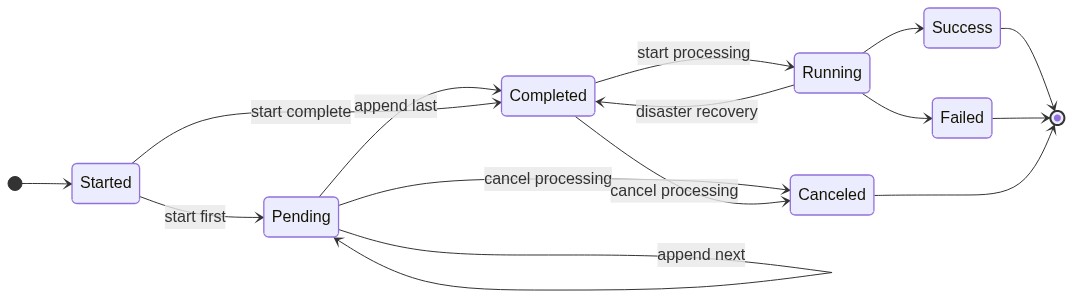
Statuses:
| Status | Description |
|---|---|
Started | Just started (initial state) |
Pending | Waiting for additional data during enqueuing process |
Completed | Finished enqueuing process and ready to process data |
Canceled | Canceled by user or by system to avoid unrecoverable failure (terminal state) |
Running | Just processing data |
Success | Data processing was successful and data has been updated (terminal state) |
Failed | Data processing was unsuccessful and data wasn't changed (terminal state) |
Endpoints
Base URL: https://{hostname}/api/asol/ds
1. Get Input Queue Status
Retrieves the status of input queue items sorted from the latest to history.
Endpoint: GET /api/v1/SourcingData/EnqueueDataBySourceId/{sourceId}
Path Parameters:
| Parameter | Type | Required | Description |
|---|---|---|---|
sourceId | Guid | Yes | The identifier of data-source (e.g. DataSourceId of data-integration agent) |
Query Parameters:
| Parameter | Type | Required | Description |
|---|---|---|---|
offset | int | No | Number of records to skip (default: 0) |
limit | int | No | Maximum number of records to return (default: 100) |
Response Statuses:
| Status Code | Description |
|---|---|
200 OK | Successfully retrieved collection |
Response Body:
| Property | Type | Description |
|---|---|---|
queueItemId | Guid | The identifier of queue-item |
operationId | Guid | The identifier of virtual operation, see Operating log |
createdOn | DateTime | The datetime in UTC when queue-item was created |
completedOn | DateTime | The datetime in UTC when queue-item was completed and ready to process |
finishedOn | DateTime | The datetime in UTC when processing of queue-item was finished |
status | string | The status of queue-item |
wasSuccess | bool | The flag if queue-item was successfully processed and data has been updated |
wasFailure | bool | The flag if queue-item was unsuccessfully processed (i.e. failed or canceled) |
errorMessage | string | The error message with failure details (available for Failed and Canceled statuses) |
{
  "totalCount": 49,
  "items": [
    {
      "queueItemId": "35d5d447-b500-4828-8099-a26845c85cb8",
      "operationId": "4ca3fe2c-d164-4621-bb6c-b8da412e43b5",
      "createdOn": "2023-07-25T20:20:33.919Z",
      "completedOn": "2023-07-25T20:20:33.919Z",
      "finishedOn": "2023-07-25T20:21:09.718Z",
      "status": "Success"
    }
  ]
}
Example Request:
GET /api/v1/SourcingData/EnqueueDataBySourceId/6a06af09-3d17-4bae-a9f4-37ebcaf7a873?offset=0&limit=10
2. Add New Item to Input Queue
Creates a new item in the input queue with data records.
Endpoint: POST /api/v1/SourcingData/EnqueueDataBySourceId/{sourceId}/start
Path Parameters:
| Parameter | Type | Required | Description |
|---|---|---|---|
sourceId | Guid | Yes | The identifier of data-source (e.g. DataSourceId of data-integration agent) |
Query Parameters:
| Parameter | Type | Required | Description |
|---|---|---|---|
operationId | Guid | No | The identifier of virtual operation, see Operating log |
Request Body Properties:
| Property | Type | Required | Description |
|---|---|---|---|
entityMappingId | string | No | The identifier for entity mapping of transformation, the entityId is used when not defined |
entityId | string | Yes | The identifier of source entity (e.g. table name/id), used to build externalId |
recordId | string | Yes | The identifier of source record (e.g. primary key), used to build externalId |
referenceId | Guid | No | The reference identifier of original record from primary data-source |
mandantCode | string | No | The code of organization representing mandant in tenant context (or null for non-mandant data-record) |
fields | array | No | The data (i.e. payload) of data-record, array of key(string)+value(any) pairs processed by data-transformation(s). Only one of the fields or data can be set at the same time. |
data | object | No | The data (i.e. payload) of data-record, object containing fields and their values processed by data-transformation(s). Only one of the fields or data can be set at the same time. |
customData | object | No | The data (i.e. payload) of data-record specific for the current tenant and organization, object containing fields and their values processed by data-transformation(s), Only one of the fields or data can be set at the same time. |
isDeleted | bool | No | The flag if data-record will be upserted or deleted |
incompleteData | bool | No | The flag if data are complete or incomplete, see Status Flow |
Request Body:
{
  "items": [
    {
      "entityMappingId": "OrganizationUnit-Deps",
      "entityId": "ORG_DEPT",
      "recordId": "1234",
      "referenceId": "4998966b-d957-4bab-97e0-33863b322d19",
      "mandantCode": "64949541|CZ",
      "isDeleted": false,
      "fields": [
        { "key": "Code", "value": "Montovna" },
        { "key": "Name", "value": "Montážní hala" },
        {
          "key": "Type",
          "value": "Workroom.OrganizationUnitType.00000000-0000-0000-0000-000000000000"
        }
      ],
      "customData": {
        "CEO": "Robert Vrátník"
      }
    }
  ],
  "incompleteData": false
}
or
{
  "items": [
    {
      "entityMappingId": "OrganizationUnit-Deps",
      "entityId": "ORG_DEPT",
      "recordId": "1234",
      "referenceId": "4998966b-d957-4bab-97e0-33863b322d19",
      "mandantCode": "64949541|CZ",
      "isDeleted": false,
      "data": {
        "Code": "Montovna",
        "Name": "Montážní hala",
        "Type": "Workroom.OrganizationUnitType.00000000-0000-0000-0000-000000000000"
      },
      "customData": {
        "CEO": "Robert Vrátník"
      }
    }
  ],
  "incompleteData": false
}
Response Statuses:
| Status Code | Description |
|---|---|
201 Created | Queue-item created and processed synchronously |
202 Accepted | Queue-item created and will be processed asynchronously |
Response Body:
{
  "sourceId": "6a06af09-3d17-4bae-a9f4-37ebcaf7a873",
  "queueItemId": "35d5d447-b500-4828-8099-a26845c85cb8",
  "operationId": "4ca3fe2c-d164-4621-bb6c-b8da412e43b5",
  "createdOn": "2023-07-25T20:20:33.919Z",
  "completedOn": "2023-07-25T20:20:33.919Z",
  "finishedOn": "2023-07-25T20:21:09.718Z",
  "status": "Success",
  "wasSuccess": true,
  "wasFailure": null,
  "errorMessage": null
}
Example Request:
POST /api/v1/SourcingData/EnqueueDataBySourceId/6a06af09-3d17-4bae-a9f4-37ebcaf7a873/start
3. Append Records to Existing Queue Item
Appends additional records to an existing item in the input queue. The queue-item must be in Pending state.
Endpoint: POST /api/v1/SourcingData/EnqueueDataBySourceId/{sourceId}/append/{queueItemId}
Path Parameters:
| Parameter | Type | Required | Description |
|---|---|---|---|
sourceId | Guid | Yes | The identifier of data-source (e.g. DataSourceId of data-integration agent) |
queueItemId | Guid | Yes | The identifier of queue-item (obtained by start method) |
Request Body Properties:
| Property | Type | Required | Description |
|---|---|---|---|
entityMappingId | string | No | The identifier for entity mapping of transformation, the entityId is used when not defined |
entityId | string | Yes | The identifier of source entity (e.g. table name/id), used to build externalId |
recordId | string | Yes | The identifier of source record (e.g. primary key), used to build externalId |
referenceId | Guid | No | The reference identifier of original record from primary data-source |
mandantCode | string | No | The code of organization representing mandant in tenant context (or null for non-mandant data-record) |
fields | array | No | The data (i.e. payload) of data-record, array of key(string)+value(any) pairs processed by data-transformation(s). Only one of the fields or data can be set at the same time. |
data | object | No | The data (i.e. payload) of data-record, object containing fields and their values processed by data-transformation(s). Only one of the fields or data can be set at the same time. |
customData | object | No | The data (i.e. payload) of data-record specific for the current tenant and organization, object containing fields and their values processed by data-transformation(s), Only one of the fields or data can be set at the same time. |
isDeleted | bool | No | The flag if data-record will be upserted or deleted |
incompleteData | bool | No | The flag if data are complete or incomplete, see Status Flow |
Request Body:
{
  "items": [
    {
      "entityMappingId": "OrganizationUnit-Deps",
      "entityId": "ORG_DEPT",
      "recordId": "1234",
      "referenceId": "d16ef9d6-c0c6-4ac6-8140-4608531b4e99",
      "mandantCode": "64949541|CZ",
      "isDeleted": true,
      "fields": null
    }
  ],
  "incompleteData": false
}
Response Statuses:
| Status Code | Description |
|---|---|
200 OK | Successfully appended records to queue-item |
Response Body:
{
  "sourceId": "6a06af09-3d17-4bae-a9f4-37ebcaf7a873",
  "queueItemId": "35d5d447-b500-4828-8099-a26845c85cb8",
  "operationId": "4ca3fe2c-d164-4621-bb6c-b8da412e43b5",
  "createdOn": "2023-07-25T20:20:33.919Z",
  "completedOn": "2023-07-25T20:20:33.919Z",
  "status": "Completed"
}
Example Request:
POST /api/v1/SourcingData/EnqueueDataBySourceId/6a06af09-3d17-4bae-a9f4-37ebcaf7a873/append/35d5d447-b500-4828-8099-a26845c85cb8
4. Get Queue Item Status
Retrieves the status of a specific queue-item in the input queue.
Endpoint: GET /api/v1/SourcingData/EnqueueDataBySourceId/{sourceId}/status/{queueItemId}
Path Parameters:
| Parameter | Type | Required | Description |
|---|---|---|---|
sourceId | Guid | Yes | The identifier of data-source (e.g. DataSourceId of data-integration agent) |
queueItemId | Guid | Yes | The identifier of queue-item (obtained by start method) |
Response Statuses:
| Status Code | Description |
|---|---|
200 OK | Successfully retrieved queue-item status |
404 Not Found | Queue-item not found |
Response Body:
{
  "sourceId": "f74f0f97-c999-42ce-8e96-b74daeceaf5c",
  "queueItemId": "b6f450c3-46de-4e8c-85de-b9ab11b221ab",
  "operationId": "478661db-5567-4d99-b484-cb405d29d327",
  "createdOn": "2023-09-04T16:51:29.61Z",
  "completedOn": "2023-09-04T16:51:29.61Z",
  "finishedOn": "2023-09-04T16:51:31.728Z",
  "status": "Failed",
  "wasFailure": true,
  "errorMessage": "Value 'None,Branch,Department,Team,,Workshop,Workroom' doesn't fit to expected format. (Parameter 'value')"
}
Example Request:
GET /api/v1/SourcingData/EnqueueDataBySourceId/f74f0f97-c999-42ce-8e96-b74daeceaf5c/status/b6f450c3-46de-4e8c-85de-b9ab11b221ab
5. Cancel Queue Item
Cancels a queue-item in the input queue.
Endpoint: DELETE /api/v1/SourcingData/EnqueueDataBySourceId/{sourceId}/cancel/{queueItemId}
Path Parameters:
| Parameter | Type | Required | Description |
|---|---|---|---|
sourceId | Guid | Yes | The identifier of data-source (e.g. DataSourceId of data-integration agent) |
queueItemId | Guid | Yes | The identifier of queue-item (obtained by start method) |
Response Statuses:
| Status Code | Description |
|---|---|
204 No Content | Successfully canceled the queue-item |
404 Not Found | Queue-item not found |
Example Request:
DELETE /api/v1/SourcingData/EnqueueDataBySourceId/6a06af09-3d17-4bae-a9f4-37ebcaf7a873/cancel/35d5d447-b500-4828-8099-a26845c85cb8
Notes
- It is recommended to send larger data using multiple requests (e.g. use approximately 500 data-records in a single request) to avoid timeouts. You can use start/append methods to create and append data into a single queue-item.
- Each queue-item represents a unit of work which is processed together, i.e. all data must be successfully transformed first, then data-records are stored. Otherwise the complete queue-item is finished with failure and no data are updated.
- There is a technical limit for maximal size of data in queue-item: approximately 3000-4000 items (depending on JSON size).
- When a queue-item contains less than 500 data-records, the queue-item can be processed synchronously (depending on statuses of other queue-items and current workload of processing engine). Otherwise the queue-item will be processed asynchronously. Check the response status code (201/202).
Input Queue Events
Event for notification about status change of item in input-queue: ASOL.DataService.Edge.Contracts.Events.EnqueueDataStatusChanged
Event Properties:
| Property | Type | Description |
|---|---|---|
dataSourceId | Guid | The data-source identifier of publisher |
queueItemId | Guid | The queue-item identifier |
operationId | Guid | The identifier of virtual operation, see Operating log |
status | EdgeEnqueueDataStatus | The current status (enum ASOL.DataService.Edge.Contracts.EdgeEnqueueDataStatus), see Status Flow |
This event can be consumed via messaging, see The 1st method of communication - AMQP Message Publisher / Consumer.
Data Types
Important: Each data-type supports JSON
nullvalue. Don't use invalid contracts (e.g. emptyFileReferencewithout mandatory fields) and prefer to usenullvalue instead. A data-transformation defines the list of fields which are updated (not the data itself), when you omit field in data-transformation then field value won't be updated. See Data transformation for more details.
Text and MultilineText
| Name | isCollection | isLocalized | Description | Runtime Type (C#) | JSON Example |
|---|---|---|---|---|---|
| Text | ✗ | ✗ | single-line text | string | "Hello World" |
| Text | ✓ | ✗ | array of single-line texts | IEnumerable<string> | [ "Hello", "World" ] |
| Text | ✗ | ✓ | multilingual single-line text | ASOL.Core.Localization.LocalizedValue<string> | { "values": [ {"locale": "en-US", "value": "Hello"}, {"locale": "cs-CZ", "value": "Ahoj"} ]} |
| Text | ✓ | ✓ | array of multilingual single-line texts | IEnumerable<ASOL.Core.Localization.LocalizedValue<string>> | [ { "values": [{"locale": "en-US", "value": "Hello"}, {"locale": "cs-CZ", "value": "Ahoj"}] }, { "values": [{"locale": "en-US", "value": "World"}, {"locale": "cs-CZ", "value": "Svìt"}] }] |
| MultilineText | ✗ | ✗ | multi-line text | string | "Hello\r\nWorld" |
| MultilineText | ✓ | ✗ | array of multi-line texts | IEnumerable<string> | [ "Good\r\nbye", "World" ] |
| MultilineText | ✗ | ✓ | multilingual multi-line text | ASOL.Core.Localization.LocalizedValue<string> | { "values": [ {"locale": "en-US", "value": "Hell\r\no"}, {"locale": "cs-CZ", "value": "Aho\r\nj"} ]} |
| MultilineText | ✓ | ✓ | array of multilingual multi-line texts | IEnumerable<ASOL.Core.Localization.LocalizedValue<string>> | [ { "values": [{"locale": "en-US", "value": "Good\r\nbye"}, {"locale": "cs-CZ", "value": "Nashle\r\ndanou"}] }, { "values": [{"locale": "en-US", "value": "World"}, {"locale": "cs-CZ", "value": "Svìt"}] }] |
TwoOptions, WholeNumber, DecimalNumber and UniqueIdentifier
| Name | isCollection | Description | Runtime Type (C#) | JSON Example |
|---|---|---|---|---|
| TwoOptions | ✗ | two-value switch | bool | trueor "true" |
| TwoOptions | ✓ | array of two-value switches | IEnumerable<bool> | [ true, false, true ]or [ "true", "false", "true" ] |
| WholeNumber | ✗ | whole number | long | 15or "15" |
| WholeNumber | ✓ | array of whole numbers | IEnumerable<long> | [ 25, 15, 60 ]or [ "25", "15", "60" ] |
| DecimalNumber | ✗ | decimal number | decimal | 37.5, 37or "37.5", "37" |
| DecimalNumber | ✓ | array of decimal numbers | IEnumerable<decimal> | [ 37.5, 38, 36.9 ]or [ "37.5", "38", "36.9" ] |
| UniqueIdentifier | ✗ | unique identifier | Guid | "fde0caea-301c-4f5b-b041-9e1459c71bc4" |
| UniqueIdentifier | ✓ | array of unique identifiers | IEnumerable<Guid> | [ "82c1f094-bcbe-4b0d-a01f-b9b3291c8c5b", "dcfcf976-8ad3-4702-9790-08550361852c"] |
Date and UtcDateTime
| Name | isCollection | Description | Runtime Type (C#) | JSON Example |
|---|---|---|---|---|
| Date | ✗ | date without time | DateTime | "2023-08-31T00:00:00Z"or "2023-08-31" |
| Date | ✓ | array of dates without time | IEnumerable<DateTime> | [ "2023-08-01T00:00:00Z", "2023-08-31T00:00:00Z" ]or [ "2023-08-01", "2023-08-31" ] |
| UtcDateTime | ✗ | date and time in UTC | DateTime | "2023-08-31T10:18:23Z" |
| UtcDateTime | ✓ | array of datetimes in UTC | IEnumerable<DateTime> | [ "2023-08-01T06:43:12Z", "2023-08-31T10:18:23Z"] |
LookupEntity
Transformation of referenced data-records is driven by data-transformation. There are two basic approaches to associate data-record(s):
- Use source
recordId(e.g. primary key of data-source) to buildExternalIdin data-transformation and seek just created or existing data-record, i.e. driven by transformation - Use
externalId(e.g. obtained from previously consumed data) and seek existing data-record (even from another data-source), i.e. driven by data
Important: Consider limits to associate mandant-specific data-records (i.e. data-records associated to the owner organization representing mandant). The mandant-specific data-record can reference another mandant-specific or non-mandant data-record, but the non-mandant data-record can't reference the mandant-specific data-record(s). The mandant of referenced mandant-specific data records must be the same, i.e. when you need to publish the same data to multiple owning organizations, you need to publish data multiple times.
| Name | isCollection | Description | JSON Example |
|---|---|---|---|
| LookupEntity | ✗ | reference to data record (i.e. association relationship to aggregate-root entity) | { "key": "MaritalStatus", "value": "Married.MaritalStatusType.00000000-0000-0000-0000-000000000000" },{ "key": "EmployeeId", "value": "123456" },{ "key": "PersonId", "value": 654321 }or { "key": "MyData", "value": { "MaritalStatus": "Married.MaritalStatusType.00000000-0000-0000-0000-000000000000", "EmployeeId": "123456", "PersonId": 123456 }} |
| LookupEntity | ✓ | array of references to data records | { "key": "MaritalStatus1", "value": "Married..." },{ "key": "EmployeeId1", "value": "123456" },{ "key": "PersonId1", "value": 654321 },{ "key": "MaritalStatus2", "value": "Divorced..." },{ "key": "EmployeeId2", "value": "654987321" },{ "key": "PersonId2", "value": 885 }or { "key": "MyData", "value": [ { "MaritalStatus": "Married...", "EmployeeId": "123456", "PersonId": 123456 }, { "MaritalStatus": "Divorced...", "EmployeeId": "654987321", "PersonId": 885 } ]} |
NestedEntity
Transformation of structured data is driven by data-transformation (so called 'field mapping'), so format of JSON data can be different. There are two basic approaches:
- Nested model mapping - uses a set of denormalized scalar input-fields which are transformed into normalized nested entity (or fixed array of nested entity items), i.e. driven by transformation
- Nested object mapping - uses normalized JSON object (or array of normalized JSON objects) which are transformed into normalized nested entity (or array of nested entity items), i.e. driven by data
| Name | isCollection | Description | JSON Example |
|---|---|---|---|
| NestedEntity | ✗ | nested entity structure | { "key": "Name", "value": "Bobo" },{ "key": "Age", "value": 23 }or { "key": "MyPerson", "value": { "Name": "Bobo", "Age": 23 }} |
| NestedEntity | ✓ | array of nested entity structures | { "key": "Name1", "value": "Bobo" },{ "key": "Age1", "value": 23 },{ "key": "Name2", "value": "Fero" },{ "key": "Age2", "value": 39 }or { "key": "MyPersons", "value": [ { "Name": "Bobo", "Age": 23 }, { "Name": "Fero", "Age": 39 } ]} |
CurrencyNumber
| Name | isCollection | Description | Runtime Type (C#) | JSON Example |
|---|---|---|---|---|
| CurrencyNumber | ✗ | currency number (decimal value with currency code of ISO 4217 - alphabetic) | ASOL.DataService.Edge.Contracts.DataTypes.CurrencyNumber | "2833.2|CZK""167|CZK"or { "_type": "CurrencyNumber", "value": 2833.2, "currencyCode": "CZK"} |
| CurrencyNumber | ✓ | array of currency numbers | IEnumerable<ASOL.DataService.Edge.Contracts.DataTypes.CurrencyNumber> | [ "121|EUR", "491.72|CZK" ]or [ { "_type": "CurrencyNumber", "value": 121, "currencyCode": "EUR" }, { "_type": "CurrencyNumber", "value": 491.72, "currencyCode": "CZK" }] |
CurrencyNumber Properties:
| Property | Type | Required | Description |
|---|---|---|---|
value | decimal | Yes | The decimal value representing amount of money |
currencyCode | string | Yes | The currency code (ISO 4217 - alphabetic) |
FileReference
You need to publish file into Content Manager service using REST API and then send the file reference as part of published data.
| Name | isCollection | Description | Runtime Type (C#) | JSON Example |
|---|---|---|---|---|
| FileReference | ✗ | structured contract representing a reference to the file stored in Content Manager service | ASOL.DataService.Edge.Contracts.DataTypes.FileReference | { "_type": "FileReference", "source": { "accessLevel": "Private", "fileId": "90ac37d8-302e-3c87-b2e4-720e5de005ec", "filePath": "asol/bk2004_123pr1.pdf", "folderId": "c6f12dba-9ffe-4a7b-bf84-f1753ff1e5b4" }, "fileName": "Doklad_1.pdf", "description": "doklad 1", "referenceId": "a6665a67-2d6e-45a2-9423-4117643c8564"} |
| FileReference | ✓ | array of references to the files | IEnumerable<ASOL.DataService.Edge.Contracts.DataTypes.FileReference> | [ { "_type": "FileReference", "source": { "accessLevel": "Private", "fileId": "90ac37d8-..." } }, { "_type": "FileReference", "source": { "accessLevel": "Public", "filePath": "pub/eureka.png" } }] |
FileReference Properties:
| Property | Type | Required | Description |
|---|---|---|---|
source | object | Yes | The source of file (i.e. file identifier to a file stored in the Content Manager) |
source.accessLevel | string | Yes | The data-access level (Private = tenant data / Public = shared data) |
source.fileId | Guid | Conditional | The file identifier by ID (required if filePath not provided) |
source.filePath | string | Conditional | The file identifier by path (required if fileId not provided) |
source.folderId | Guid | No | The source folder identifier |
fileName | string | No | The preferred file name |
description | string | No | The file description |
referenceId | Guid | No | The reference identifier of original record from primary data-source |