Data transformation
Overview
DataService provides loosely-coupled data-exchange among integrated applications (also registered as data-sources). Data transformation represents a declarative way how to define mapping of input data to output data-model(s). The input data and input-data transformations are provided by given data-source (i.e. publisher). Data-source represents a single source of data (e.g. database, application or service) and it is defined per tenant.
Incoming commands with data payload are stored into input queue (event-store). Then they are replayed in sequential order, input data are transformed to output data-models and stored into read model (query-store). Each data-model stores its data into separate collection. These data are read-only from consumer service perspective, but they are updatable via transformation process of incoming data. These data can be obtained by querying data using REST API, notifications about their changes can be obtained via AMQP consumer.
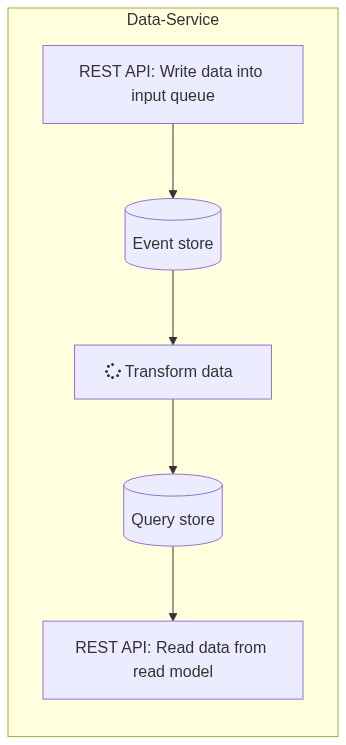
Mapping Directives
The mapping directives provide settings for the data transformation process accompanying the sent data directly. They can be used in simpler cases for direct mapping of input data to data models, if the names of the input properties match the model properties.
Mapping directives can be defined at the level of the entire input-data collection or at the level of a specific input-item in the collection, with the item directive overriding the default directive for the whole collection.
| Parameter | Type | Required | Description |
|---|---|---|---|
mandantCodeIsRequired | boolean | No | The flag if data are mandant-specific or not (default: false) |
modelId | string (uuid) | Yes | The target data-model identifier |
options | array[key-value] | No | The additional options as key-value pairs |
preserveEntityMapping | boolean | No | The flag if preserve/extend entity mapping instead of replace (default: false) |
priority | integer | No | The mapping-directive priority (default: 0, preceding = < 0 and following = higher >) |
replaceCommonFields | boolean | No | The flag if replace or update existing common fields (default: false = update) |
replaceCustomFields | boolean | No | The flag if replace or update existing custom fields (default: false = update) |
transformationType | string | No | The model-mapping transformation type used to build externalId: Default, Custom |
Sample of input-data contract including mapping-directives (shortened):
{
  ...
  "mappingDirectives": [
    {
      "preserveEntityMapping": <bool>,
      "modelId": "<uuid>",
      "priority": <int>,
      "transformationType": "Default|Custom",
      "options": [
         ...key-value pairs...
      ],
      "replaceCommonFields": <bool>,
      "replaceCustomFields": <bool>,
      "mandantCodeIsRequired": <bool>
    }
  ],
  "items": [
    {
      "mappingDirectives": [
        {
          "preserveEntityMapping": <bool>,
          "modelId": "<uuid>",
          "priority": <int>,
          "transformationType": "Default|Custom",
          "options": [
             ...key-value pairs...
          ],
          "replaceCommonFields": <bool>,
          "replaceCustomFields": <bool>,
          "mandantCodeIsRequired": <bool>
        }
      ],
      "entityMappingId": "<string>",
      ...
      "data": { ...json object or null... },
      "customData": { ...json object or null... },
      ...
    }
  ],
  ...
}
Model Mapping
Model Mapping is responsible for assignment of input data (resp. each input datarow) to target data-model row.
The appropriate model mappings are assigned by EntityId property on the EdgeDataRecord contract of given input data-row (it must match with entityId property in model mapping of input data-transformation).
The target data-models are assigned by modelId property in model mapping of input data-transformation.
Each input row fits to single target data-model record and it is transformed separately in sequential order of input data-rows.
The ExternalId identifier is used to match these two records to execute upsert (i.e. insert/update) or delete command.
Built-in input fields
Built-in input fields are added into input-data row automatically.
system_EntityId- external entity identifier in input-data rowsystem_RecordId- external record identifier in input-data rowsystem_MandantCode- mandant identifier in input-data row
ExternalId builder
ExternalId rules
ExternalId represents the unique identifier of the source record (i.e. an original record stored in publisher data-source). ExternalId consists of record identifier, entity identifier and data-source identifier. ExternalId must be unique per target data-model, because existing records in data-model are paired with input data via ExternalId to provide repetitive updates and prevent duplicities. So the single source record can be transformed multiple times to a multiple data-models, but only once to the single target data-model. ExternalId can be also used for a back-tracking to original record (if supported by publisher).
- behavior: the identifier is CASE INSENSITIVE
- pattern:
«recordId».«entityId».«sourceId».is used as segment separator«sourceId»represents data-source identifier«entityId»represents source entity identifier (e.g. table name, class id or class name)«recordId»represents source record identifier (e.g. PK)
- allowed characters for identifiers:
- alphanumeric characters:
0-9,a-z,A-Z - these special characters:
_,-,|
- alphanumeric characters:
Note: When any invalid character is found in «recordId» and «entityId» then it is replaced with - character to preserve length of original value and to avoid unwanted string degradation.
Default behavior
By default the ExternalId is built from input data-row combining RecordId, EntityId and SourceId properties on the EdgeDataRecord contract.
Example: a model mapping using default behavior
{
  // ... model mappings ...
  "mappings": [
    {
      "entityId": "code-list-input-entity-id", //this value must match with EntityId property on the EdgeDataRecord contract
      "modelId": "11111111-1111-1111-1111-111111111111", //identifier of target data-model
      "transformationType": "Default",
      // ...
    }
  ]
}
Custom behavior
The custom behavior allows to built the ExternalId from input data-row using options.
These options are available:
RecordIdColumnNameprovides the column-name which contains a custom value of RecordId identifier (it overrides theRecordIdproperty on theEdgeDataRecordcontract)EntityIdColumnNameprovides the column-name which contains a custom value of EntityId identifier (it overrides theEntityIdproperty on theEdgeDataRecordcontract)SourceIdColumnNameprovides the column-name which contains a custom value of SourceId identifier (it overrides theSourceIdidentifier)CustomEntityIdprovides a constant value which overrides theEntityIdproperty on theEdgeDataRecordcontractCustomSourceIdprovides a constant value which overrides theSourceIdidentifier
Note: The ExternalId is built from a value obtained from column representing recordId, entityId and sourceId.
Example: a model mapping using custom behavior (custom keys code-list-record-id and code-list-entity-id for record identification)
{
  // ... model mappings ...
  "mappings": [
    {
      "entityId": "code-list-input-entity-id", //this value must match with EntityId property on the EdgeDataRecord contract
      "modelId": "11111111-1111-1111-1111-111111111111", //identifier of target data-model
      "transformationType": "Custom",
      "options": [
        {
            "key": "RecordIdColumnName",
            "value": "code-list-record-id" //this column will be used to obtain value for recordId in ExternalId
        },
        {
            "key": "EntityIdColumnName",
            "value": "code-list-entity-id" //this column will be used to obtain value for entityId in ExternalId
        }
      ],
      // ...
    }
  ]
}
Entity Ownership feature
The EntityOwnership feature validates if TenantId and MandantCode are valid. By default input data record has TenantId determined by security token and such record can have also MandantCode identifier filled by data-source.
It is possible to customize this settings:
tenantIdColumnName- custom column representing TenantId to ensure that input data are valid for current tenant (useful e.g. for forwarded security tokens to prevent from unwanted data modifications)tenantIdIsRequired- determines if value is mandantory or not, note: each value is checked (except null/empty string) regardless if required or notmandantCodeColumnNamecustom column representing MandantCode to ensure that input data are valid for available mandants of current tenant (useful e.g. for forwarded security tokens to prevent from unwanted data modifications)mandantCodeIsRequired- determines if value is mandantory or not, note: each value is checked (except null/empty string) regardless if required or not
Example: a simple entity ownership mandant check (by default system_MandantCode field is used)
{
  // ... model mappings ...
  "mappings": [
    {
      "entityId": "code-list-input-entity-id",
      "entityOwnership": {
        "mandantCodeColumnName": "column-representing-mandant-code", //this column will be used to obtain value for mandantCode check
        "mandantCodeIsRequired": true
      },
      "modelId": "11111111-1111-1111-1111-111111111111",
      // ...
    }
  ]
}
Model-Mapping Expressions
The model mapping can define computed expressions with predicate and decorate input-data rows.
The expression results are upserted into input data-row with prefix expr_.
See more details in Computed Expressions and Predicates section.
Example: compute fullname value from first name and last name using expression when predicate is fulfilled
{
  // ... model mappings ...
  "mappings": [
    {
      // ...
      "expressions": [
        {
          "fieldName": "FullName", //the `expr_FullName` column is upserted with computed value
          "value": "FIRST_NAME + \" \" + LAST_NAME", //the computed expression with any result
          "predicate" : "AGE > 18", //(optional) the predicate (i.e. computed expression with bool result)
          "post" : false //false = pre (i.e. the first pass (default)), true = post (i.e. the second pass)
        }
      ],
      // ... field mappings ...
      "mappings": [
        {
          "sourceFieldName": "expr_FullName",
          "targetFieldName": "FullName"
        },
        // ...
      ]
    }
  ]
}
Model-Mapping Predicate
The model mapping can define predicate as standalone condition using computed expressions to control given entity transformation. The predicate is evaluated just before entity record lookup, when predicate isn't accomplished then model-mapping transformation is skipped. See more details in Computed Expressions and Predicates section.
Example: apply model mapping when predicate is fulfilled (e.g. CODE field contains non-empty value)
{
  // ... model mappings ...
  "mappings": [
    {
      // ...
      "predicate": {
        "value": "!string.IsNullOrEmpty(CODE)"
      },
      // ... field mappings ...
      "mappings": [
        // ...
      ]
    }
  ]
}
Field Mapping
Field Mapping is responsible for assignment of input data-row (resp. each input key/value pair) to target properties of data-model row.
The input fields in input data-row are assigned by sourceFieldName property in field mapping.
The target properties in data-model are assigned by targetFieldName property in field mapping.
Default behavior
Example: assign multiple values from input datarow to fields of nested entity using implicit index field mapping
{
  // ... model mappings ...
  "mappings": [
    {
      // ...
      // ... field mappings ...
      "mappings": [
        {
            "sourceFieldName": "CODE", //get value from `CODE` column in input data-row
            "targetFieldName": "Code", //set value into `Code` property of target data-model
            "transformationType": "Default" //note: use implicit conversion (default)
        },
        {
            "sourceFieldName": "NAME", //get value from `NAME` column in input data-row
            "targetFieldName": "Name", //set value into `Name` property of target data-model
            "transformationType": "Default" //note: use implicit conversion (default)
        }
      ]
    }
  ]
}
Example: assign denormalized values from input datarow to fields of nested entity using implicit index field mapping, the result is the single row in Addresses collection
{
  // ... model mappings ...
  "mappings": [
    {
      // ...
      // ... field mappings ...
      "mappings": [
        {
            "sourceFieldName": "ADDRESS_STREET_NAME", //get value from `ADDRESS_STREET_NAME` column in input data-row
            "targetFieldName": "Addresses.StreetName", //set value into nested `StreetName` property of data-model assigned via `Addresses` property
            "transformationType": "Default" //note: use implicit conversion (default)
        },
        {
            "sourceFieldName": "ADDRESS_HOUSE_NUMBER", //get value from `ADDRESS_HOUSE_NUMBER` column in input data-row
            "targetFieldName": "Addresses.HouseNumber", //set value into nested `HouseNumber` property of data-model assigned via `Addresses` property
            "transformationType": "Default" //note: use implicit conversion (default)
        }
      ]
    }
  ]
}
Example: assign denormalized values from input datarow to fields of nested entity using explicit index field mapping, the result are the two rows in Addresses collection
{
  // ... model mappings ...
  "mappings": [
    {
      // ...
      // ... field mappings ...
      "mappings": [
        {
            "sourceFieldName": "PERMANENT_ADDRESS_STREET_NAME", //get value from `PERMANENT_ADDRESS_STREET_NAME` column in input data-row
            "targetFieldName": "Addresses[0].StreetName", //set value into nested `StreetName` property of data-model assigned via `Addresses` property
            "transformationType": "Default" //note: use implicit conversion (default)
        },
        {
            "sourceFieldName": "TEMPORARY_ADDRESS_STREET_NAME", //get value from `TEMPORARY_ADDRESS_STREET_NAME` column in input data-row
            "targetFieldName": "Addresses[1].StreetName", //set value into nested `StreetName` property of data-model assigned via `Addresses` property
            "transformationType": "Default" //note: use implicit conversion (default)
        }
      ]
    }
  ]
}
Custom behavior
The custom behavior allows to built the Lookup Entity and Nested Entity relationships from input data-row using options.
These options are available:
RecordIdColumnNameprovides the column-name(s) which contains a custom value ofRecordIdidentifier of the record being associatedTargetEntityIdprovides a constant value which specifies theEntityIdidentifier of the record being associatedTargetEntityIdColumnNameprovides the column-name which contains a custom value ofEntityIdidentifier of the record being associatedTargetExternalIdprovides a constant value which specifies theExternalIdidentifier of the record being associatedTargetOrphanSeverityprovides a constant value which specifies the severity for createorphantarget record (default: Error)TargetOrphanSeverityColumnNameprovides the column-name which contains the severity for createorphantarget record
Example: Lookup Entity or Nested Entity - assign constant record to lookup entity (identified by TargetExternalId), the target record must exist
{
  // ... model mappings ...
  "mappings": [
    {
      // ...
      // ... field mappings ...
      "mappings": [
	    {
	      "sourceFieldName": "", //note: empty string to build a source value during transformation
	      "targetFieldName": "Relations.Type", //set value using navigation property to the target data-model
	      "options": [
		    {
		      "key": "TargetExternalId",
		      "value": "Employee.PersonRelationType.00000000-0000-0000-0000-000000000000"
		    }
	      ],
	      "transformationType": "Default" //note: use implicit conversion (default)
	    }
      ]
    }
  ]
}
Example: Lookup Entity - assign any record to lookup entity (identified by composite key defined by RecordIdColumnName and TargetEntityId or TargetEntityIdColumnName)
{
  // ... model mappings ...
  "mappings": [
    {
      // ...
      // ... field mappings ...
      "mappings": [
	    {
	      "sourceFieldName": "", //note: empty string to build a source value during transformation
	      "targetFieldName": "Person", //set value using navigation property to the target data-model
	      "options": [
		    {
		      "key": "RecordIdColumnName",
		      "value": "ORG_CODE,EMPLOYEE_CODE" //the list of column-names representing composite key of the custom RecordId
		    },
		    {
		      "key": "TargetEntityId",
		      "value": "Employee" //the constant value representing the custom EntityId
		    }
	      ],
	      "transformationType": "Default" //note: use implicit conversion (default)
	    }
      ]
    }
  ]
}
Example: Lookup Entity - assign any record to lookup entity (identified by value in ORG_CODE column and TargetEntityId or TargetEntityIdColumnName)
{
  // ... model mappings ...
  "mappings": [
    {
      // ...
      // ... field mappings ...
      "mappings": [
	    {
   	      "sourceFieldName": "ORG_CODE", //get value from `ORG_CODE` column in input data-row, representing simple key of the custom RecordId
	      "targetFieldName": "Relations.Organization", //set value using navigation property to the target data-model
	      "options": [
		    {
		      "key": "TargetEntityId",
		      "value": "Company" //the constant value representing the custom EntityId
		    }
	      ],
	      "transformationType": "Default" //note: use implicit conversion (default)
	    }
      ]
    }
  ]
}
Example: Lookup Entity - optionally assign non-existing record to lookup entity, i.e. create orphan target record and assign to lookup property,
by default SourceSeverityLevel is set to Error, but it is possible to specify custom level (defined by TargetOrphanSeverity or TargetOrphanSeverityColumnName with possible values: None, Info, Warning, Error)
{
  // ... model mappings ...
  "mappings": [
    {
      // ...
      // ... field mappings ...
      "mappings": [
	    {
   	      "sourceFieldName": "ORG_CODE", //get value from `ORG_CODE` column in input data-row, representing simple key of the custom RecordId
	      "targetFieldName": "Organization", //set value using navigation property to the target data-model
	      "options": [
		    {
		      "key": "TargetEntityId",
		      "value": "Company" //the constant value representing the custom EntityId
		    },
		    {
		      "key": "TargetOrphanSeverity",
		      "value": "Info"
		    }
	      ],
	      "transformationType": "Default" //note: use implicit conversion (default)
	    }
      ]
    }
  ]
}
Aggregate functions
The aggregate functions can be used to convert collection of values to scalar value.
Count- number of input values, input datatype: [any], output datatype: [long]Min/Max- minimum/maximum value of input values, input datatype: [long, decimal, datetime], output datatype: [long, decimal, datetime]Sum- sum value of input values, input datatype: [long, decimal], output datatype: [long, decimal]Avg- average value of input values, input datatype: [long, decimal], output datatype: [decimal]First/Last- first/last value of input values, input datatype: [any], output datatype: [any]
Example: apply aggregation function to input data collection, compute a scalar result value and set to target property
{
  // ... model mappings ...
  "mappings": [
    {
      // ...
      // ... field mappings ...
      "mappings": [
        {
            "sourceFieldName": "ITEM_ARRAY", //get value from `ITEM_ARRAY` column in input data-row
            "targetFieldName": "NumberOfItems", //set value into `NumberOfItems` property of target data-model
            "transformationType": "Default", //note: use implicit conversion (default)
            "aggregateFunction": "Count"
        },
        {
            "sourceFieldName": "ITEM_ARRAY", //get value from `ITEM_ARRAY` column in input data-row
            "targetFieldName": "LastItem", //set value into `LastItem` property of target data-model
            "transformationType": "Default", //note: use implicit conversion (default)
            "aggregateFunction": "Last"
        }
      ]
    }
  ]
}
Nested Model Mapping
Nested Model Mapping is technique how to join normalized input data to existing data using lookup.
- Note: Nested Model Mapping can be defined recursively
- Note: Nested Model Mapping supports single mapping only
- Note: Nested Model Mapping supports computed expressions on root level only
Example: Lookup Entity or Nested Entity - use navigation property with NestedMapping transformation type to transform denormalized data in Cartesian Join format
{
  // ... model mappings ...
  "mappings": [
    {
      // ...
      // ... field mappings ...
      "mappings": [
        {
	      "sourceFieldName": "", //note: empty string to build a source value during transformation
	      "targetFieldName": "Positions", //target property representing the collection of assigned records (nested model)
	      "transformationType": "NestedMapping", //switch to nested model mapping mode (i.e. recursion)
	      "mappings": [
		    {
		      "entityId": "Position",
		      "modelId": "9ab0a283-eaf3-46d1-85d7-dd2bd0452cce",
		      "transformationType": "Custom",
		      "options": [
			    {
			      "key": "RecordIdColumnName",
			      "value": "ORG_CODE,POSITION_CODE"
			    }
		      ],
		      "mappings": [
		        // ... field mapping of nested model
		      ]
		    }
	      ]
        }
      ]
    }
  ]
}
Field-Mapping Expressions
The field mapping can define adhoc computed expressions with predicate. The expression result is used directly for target property value (implicit conversion is applied). See more details in Computed Expressions and Predicates section.
Example: a field mapping can define computed expressions with predicate and provide field transformation based on expression result
{
  // ... model mappings ...
  "mappings": [
    {
      // ...
      // ... field mappings ...
      "mappings": [
        {
	      "sourceFieldName": "", //note: empty string to build a source value during transformation
	      "targetFieldName": "FullName", //set value using navigation property to the target data-model
          "transformationType": "Expression", //use computed expression
          "expression": { //get values from `FIRST_NAME` and `LAST_NAME` columns in input data-row
            "value": "FIRST_NAME + \" \" + LAST_NAME"
          }
        },
        {
	      "sourceFieldName": "", //note: empty string to build a source value during transformation
	      "targetFieldName": "FullNameWithPredicate", //set value using navigation property to the target data-model
          "transformationType": "Expression", //use computed expression
          "expression": { //get values from `FIRST_NAME` and `LAST_NAME` columns in input data-row
            "value": "FIRST_NAME + \" \" + LAST_NAME"
          },
          "predicate": {  //apply predicate, get value from `AGE` column in input data-row
            "value": "AGE < 18"
          }
        }
      ]
    }
  ]
}
Field-Mapping Predicate
The field mapping can define predicate as standalone condition using computed expressions to control given field transformation. The predicate is evaluated just before field mapping is applied, when predicate isn't accomplished then field-mapping transformation is skipped. See more details in Computed Expressions and Predicates section.
Example: a field mapping can define predicate as standalone condition to control field transformations of any type
{
  // ... model mappings ...
  "mappings": [
    {
      // ...
      // ... field mappings ...
      "mappings": [
        {
	      "sourceFieldName": "FIRST_NAME", //get value from `FIRST_NAME` column in input data-row
	      "targetFieldName": "FullName", //set value using navigation property to the target data-model
          "transformationType": "Default",
          "predicate": {  //apply predicate, get value from `AGE` column in input data-row
            "value": "AGE < 18"
          }
        }
      ]
    }
  ]
}
Computed Expressions and Predicates
Computed expressions can be defined as simple C# statements written in .NET Standard 2.0 and evaluated by an C# interpreter. Several helper classes and delegates are available to simplify manipulation with data during data transformation. All fields in input data-row are registered as global variables and can be used inside expressions.
Note: When any invalid character is found in field name then it is prepended or replaced with _ character (e.g. '1.A' => '_1_A').
Computed expressions can be defined on multiple places:
- Expressions defined on model-mapping level (root level only!)
- Expression can use fields of input-data row as variables
- Expressions are evaluated in order defined by order of items in collection, but with respect to pre/post-processing flag
- Expression result is added to cached input-data row
- There are two stages of processing (pre and post), before and after row-multiplier feature
- Conditional processing of expression can be handled by expression predicate (optional)
- when predicate isn't satisfied then expression isn't evaluated and field isn't created (it stops field-mapping transformation(s) based on this source field, if any)
- Conditional processing of entity-mapping can be handled by entity-mapping predicate (optional)
- when predicate isn't satisfied then entity-mapping transformation is skipped
- See more details: Model-Mapping Expressions
- Expressions defined on field-mapping level
- Expression can use fields of input-data row as variables
- Expression result is used as source value and transformed into target model property value
- Conditional processing of expression can be handled by expression predicate (optional)
- when predicate isn't satisfied then expression isn't evaluated and field-mapping transformation is skipped
- See more details: Field-Mapping Expressions
- Expressions defined as computed property on target model level
- Expression can use fields of target model instance as variables
- Expression result is set into target model property value (result value must fit the property
FieldTypewith respect toIsCollectionflag) - Expressions are evaluated in ascending order defined by
Ordersetting (optional, default: 0) - Expressions are evaluated after transformation of input-data row is completed but before denormalized fields are updated
- note: computed property can be flagged as published (i.e. denormalized) fields, but expression is evaluated on primary model only (when such entity was affected (created or updated) by transformation process)
- See more details: Data-Model - Computed Properties
Built-in functionality
- Identifiers (variables, functions, ...) are CASE INSENSITIVE
- Variable name is converted to symbolic name (letters, digits and underscores are allowed only, other characters are replaced with underscore, identifier must start with letter or underscore)
Built-in input fields
system_EntityId- external entity identifier in input-data rowsystem_RecordId- external record identifier in input-data rowsystem_MandantCode- mandant identifier in input-data row
IsNull, IsNotNull functions
Check if value is null/empty string or not:
bool IsNull(object)andbool IsNotNull(object)functions- e.g.
IsNull(variable),IsNotNull(variable)
- e.g.
GetNestedObjectFieldValue function
Get value of NestedObject datatype:
object GetNestedObjectFieldValue(object, string)function- e.g.
GetNestedObjectFieldValue(nestedObject, fieldName)
- e.g.
Helper class
Get value of invariant culture:
CultureInfo InvariantCulture- e.g.
variable?.ToString(Helper.InvariantCulture)
- e.g.
Build symbolic name from string value:
string BuildSymbolicName(string value),string BuildSymbolicName(string value, bool allowNullOrEmpty)- e.g.
Helper.BuildSymbolicName(variable),Helper.BuildSymbolicName(variable, true)
- e.g.
Build code identifier from string value:
string BuildCode(string value),string BuildCode(string value, bool allowNullOrEmpty)- e.g.
Helper.BuildCode(variable),Helper.BuildCode(variable, true)
- e.g.
Converter class
Convert any value to string or string collection:
string ToString(object),ICollection<string> ToStringCollection(params object)- e.g.
Converter.ToString(variable),Converter.ToStringCollection(variable),Converter.ToStringCollection(variable1, variable2)
- e.g.
Convert any value to long or long collection:
long? ToInteger(object),ICollection<long> ToIntegerCollection(params object)- e.g.
Converter.ToInteger(variable),Converter.ToIntegerCollection(variable),Converter.ToIntegerCollection(variable1, variable2)
- e.g.
Convert any value to decimal or decimal collection:
decimal? ToDecimal(object),ICollection<decimal> ToDecimalCollection(params object)- e.g.
Converter.ToDecimal(variable),Converter.ToDecimalCollection(variable),Converter.ToDecimalCollection(variable1, variable2)
- e.g.
Convert any value to datetime or datetime collection:
DateTime? ToDateTime(object),ICollection<DateTime> ToDateTimeCollection(params object)- e.g.
Converter.ToDateTime(variable),Converter.ToDateTimeCollection(variable),Converter.ToDateTimeCollection(variable1, variable2)
- e.g.
Convert any value to boolean or boolean collection:
bool? ToBoolean(object),ICollection<bool> ToBooleanCollection(params object)- e.g.
Converter.ToBoolean(variable),Converter.ToBooleanCollection(variable),Converter.ToBooleanCollection(variable1, variable2)
- e.g.
Convert collection value to enumerable:
IEnumerable<object> ToEnumerable(object)- e.g.
Converter.ToEnumerable(variable)
- e.g.
Convert scalar value(s) to collection:
object[] MakeArray(object),object[] MakeArray(object, object),object[] MakeArray(object, object, object), ...- e.g.
Converter.MakeArray(variable),Converter.MakeArray(variable1, variable2),Converter.MakeArray(variable1, variable2, variable3), ...
- e.g.
Convert string value to datetime:
DateTime? ParseDateTime(string value, string format)- e.g.
Converter.ParseDateTime(variable, \"M/d/yyyy\")
- e.g.
Selector class
Select single value from list:
object SingleByIndex(int, IList)- e.g.
Selector.SingleByIndex(codeValue.Length / 3, listOfValues)
- e.g.
Examples
Example 1 - Contact persons
Example to publish organizations, persons and their relationship from the same data-source in three steps. Addresses and contacts are send in normalized form and identified using explicit keys based on ExternalId.
- Input data - organizations
{
  "items": [
    {
      "entityId": "org", //data-source specific identifier of table/entity providing organization records
      "recordId": "1", //data-source specific identifier of primary key representing organization record
      "referenceId": "0b96052e-d876-469e-934b-847eaf94670d", //data-source specific GUID identifier of record (guid is obtained when data are inserted by user or when data are consumed from another application)
      "mandantCode": "64949541|CZ", //mandant code providing isolation level per owner organization
      "fields": [
        {
          "key": "name",
          "value": "Specimen s.r.o"
        },
        {
          "key": "id_number",
          "value": "12345678"
        },
        {
          "key": "id_number_countrycode",
          "value": "CZ"
        },
        {
          "key": "sic_code",
          "value": "CZ12345678"
        },
        {
          "key": "addresses",
          "value": [
            {
              "billing_address_id": "6", //data-source specific identifier of primary key representing address record
              "billing_address_refId": "c650dc26-59d8-4a86-9d1d-b7f59991959e", //data-source specific GUID identifier of address record
              "billing_address_line1": "Main 1645/15",
              "billing_address_street": "Main",
              "billing_address_regnumber": "1645",
              "billing_address_housenumber": "15",
              "billing_address_city": "Prague 1",
              "billing_address_postalcode": "11000",
              "billing_address_country_code": "CZ"
            }
          ]
        },
        {
          "key": "contacts",
          "value": [
            {
              "id": "11",
              "refId": "3472b55b-9478-44f6-9d25-3b307b1bfe4f",
              "value": "test@specimen.cz",
              "type": "PrimaryEmail.ContactType.00000000-0000-0000-0000-000000000000"
            },
            {
              "id": "12",
              "refId": "8a86c368-21aa-4ef8-81c4-c5bae0992466",
              "value": "+420728465678",
              "type": "MobilePhone.ContactType.00000000-0000-0000-0000-000000000000"
            },
            {
              "id": "13",
              "refId": "4d968dfa-862d-4f22-ad9d-eade819fd8f9",
              "value": "www.specimen.cz",
              "type": "AddressWWW.ContactType.00000000-0000-0000-0000-000000000000"
            }
         ]
        }
      ]
    }
  ]
}
- Input data - persons
{
  "items": [
    {
      "entityId": "person", //data-source specific identifier of table/entity providing person records
      "recordId": "2", //data-source specific identifier of primary key representing person record
      "referenceId": "76764648-64e3-4287-90b5-cdc9a275c370", //data-source specific GUID identifier of record
      "mandantCode": "64949541|CZ",
      "fields": [
        {
          "key": "first_name",
          "value": "Thomas"
        },
        {
          "key": "surname",
          "value": "Edison"
        }
        {
          "key": "id_number",
          "value": "601015/0123"
        },
        {
          "key": "id_number_countrycode",
          "value": "CZ"
        },
        {
          "key": "addresses",
          "value": [
            {
              "address_id": "33", //data-source specific identifier of primary key representing address record
              "address_refId": "2fa4013b-ed1a-4388-8497-a963b08f5978", //data-source specific GUID identifier of address record
              "address_line1": "Garden 1356/7",
              "address_street": "Garden",
              "address_regnumber": "1356",
              "address_housenumber": "7",
              "address_city": "Prague 2",
              "address_postalcode": "12000",
              "address_country_code": "CZ",
              "address_type": "Permanent.AddressType.00000000-0000-0000-0000-000000000000"
            },
            {
              "address_id": "34", //data-source specific identifier of primary key representing address record
              "address_refId": "9b7c7281-4be4-4aad-96ae-824ce9115b92", //data-source specific GUID identifier of address record
              "address_line1": "Circle 1112/2",
              "address_street": "Circle",
              "address_regnumber": "1112",
              "address_housenumber": "2",
              "address_city": "Prague 3",
              "address_postalcode": "13000",
              "address_country_code": "CZ",
              "address_type": "Temporary.AddressType.00000000-0000-0000-0000-000000000000"
            }
          ]
        },
        {
          "key": "contacts",
          "value": [
            {
              "id": "41",
              "refId": "984459eb-c4cc-4b80-8e54-0171cb455dd0",
              "value": "edison@gmail.com",
              "type": "PrimaryEmail.ContactType.00000000-0000-0000-0000-000000000000"
            },
            {
              "id": "42",
              "refId": "591f6316-859b-465a-9167-acab02b8b125",
              "value": "+420601465678",
              "type": "MobilePhone.ContactType.00000000-0000-0000-0000-000000000000"
            },
            {
              "id": "43",
              "refId": "314a29b0-322f-4744-b4e2-612800031577",
              "value": "+420123465678",
              "type": "CellPhone.ContactType.00000000-0000-0000-0000-000000000000"
            }
         ]
        }
      ]
    }
  ]
}
- Input data - person relations
{
  "items": [
    {
      "entityId": "org-person",
      "entityMappingId": "org-person-rel",
      "recordId": "r12",
      "referenceId": "a3560d48-af5e-482f-8264-e2ae16b7109c",
      "mandantCode": "64949541|CZ",
      "fields": [
        {
          "key": "org_id",
          "value": "1"
        },
        {
          "key": "person_id",
          "value": "2"
        }
      ]
    }
  ]
}
- Input transformation
{
"sourceId": "<identifier of your data-source>", //guid obtained in data publisher registration process
"customCode": "ContactPersons", //custom identification of data-transformation of data-source
"notes": "Example of mappings for organizations, persons and person relations",
"mappings": [
{
"entityId": "org", //data-source specific identifier of table/entity providing organization records
"entityOwnership": {
"mandantCodeIsRequired": true
},
"modelId": "b6530960-bb27-4980-b1bf-80ba28e78e0e", //Organization modelId
"transformationType": "Default",
"mappings": [
{
"sourceFieldName": "name",
"targetFieldName": "Name"
},
{
"sourceFieldName": "id_number",
"targetFieldName": "IdentificationNumber"
},
{
"sourceFieldName": "id_number_countrycode",
"targetFieldName": "CountryCode"
},
{
"sourceFieldName": "sic_code",
"targetFieldName": "TaxId"
},
{
"sourceFieldName": "addresses",
"targetFieldName": "Addresses",
"transformationType": "NestedObjectMapping", //transformation of structured data array into nested entity collection
"mappings": [
{
"entityId": "org-address", //data-source specific identifier of table/entity providing address records
"modelId": "4b3e7a23-f83e-432c-8b03-2b8054169106", //Address modelId
"transformationType": "Custom",
"options": [
{
"key": "RecordIdColumnName",
"value": "billing_address_id"
},
{
"key": "ReferenceIdColumnName",
"value": "billing_address_refId"
}
],
"mappings": [
{
"sourceFieldName": "billing_address_line1",
"targetFieldName": "Line1"
},
{
"sourceFieldName": "billing_address_street",
"targetFieldName": "StreetName"
},
{
"sourceFieldName": "billing_address_regnumber",
"targetFieldName": "RegistryNumber"
},
{
"sourceFieldName": "billing_address_housenumber",
"targetFieldName": "HouseNumber"
},
{
"sourceFieldName": "billing_address_city",
"targetFieldName": "City"
},
{
"sourceFieldName": "billing_address_postalcode",
"targetFieldName": "PostalCode"
},
{
"sourceFieldName": "billing_address_country_code",
"targetFieldName": "CountryCode"
},
{
"sourceFieldName": "", //attach unified data using constant value of target ExternalId
"targetFieldName": "Type",
"options": [
{
"key": "TargetExternalId",
"value": "Main.AddressType.00000000-0000-0000-0000-000000000000"
}
]
}
]
}
]
},
{
"sourceFieldName": "contacts",
"targetFieldName": "Contacts",
"transformationType": "NestedObjectMapping", //transformation of structured data array into nested entity collection
"mappings": [
{
"entityId": "org-contact", //data-source specific identifier of table/entity providing contact records
"modelId": "ef0acd96-3e88-4fc6-a331-4f0f2c571395", //Contact modelId
"transformationType": "Custom",
"options": [
{
"key": "RecordIdColumnName",
"value": "id"
},
{
"key": "ReferenceIdColumnName",
"value": "refId"
}
],
"mappings": [
{
"sourceFieldName": "value",
"targetFieldName": "Value"
},
{
"sourceFieldName": "type", //attach unified data using ExternalId value
"targetFieldName": "Type"
}
]
}
]
}
]
},
{
"entityId": "person", //data-source specific identifier of table/entity providing person records
"entityOwnership": {
"mandantCodeIsRequired": true
},
"modelId": "298d4779-93a0-4903-ac63-29cb15f9e8ce", //Person modelId
"transformationType": "Default",
"mappings": [
{
"sourceFieldName": "first_name",
"targetFieldName": "FirstName"
},
{
"sourceFieldName": "last_name",
"targetFieldName": "Surname"
},
{
"sourceFieldName": "title_before",
"targetFieldName": "TitlePre"
},
{
"sourceFieldName": "title_after",
"targetFieldName": "TitlePost"
},
{
"sourceFieldName": "addresses",
"targetFieldName": "Addresses",
"transformationType": "NestedObjectMapping", //transformation of structured data array into nested entity collection
"mappings": [
{
"entityId": "person-address", //data-source specific identifier of table/entity providing address records
"modelId": "4b3e7a23-f83e-432c-8b03-2b8054169106", //Address modelId
"transformationType": "Custom",
"options": [
{
"key": "RecordIdColumnName",
"value": "address_id"
},
{
"key": "ReferenceIdColumnName",
"value": "address_refId"
}
],
"mappings": [
{
"sourceFieldName": "address_line1",
"targetFieldName": "Line1"
},
{
"sourceFieldName": "address_street",
"targetFieldName": "StreetName"
},
{
"sourceFieldName": "address_regnumber",
"targetFieldName": "RegistryNumber"
},
{
"sourceFieldName": "address_housenumber",
"targetFieldName": "HouseNumber"
},
{
"sourceFieldName": "address_city",
"targetFieldName": "City"
},
{
"sourceFieldName": "address_postalcode",
"targetFieldName": "PostalCode"
},
{
"sourceFieldName": "address_country_code",
"targetFieldName": "CountryCode"
},
{
"sourceFieldName": "address_type",
"targetFieldName": "Type"
}
]
}
]
},
{
"sourceFieldName": "contacts",
"targetFieldName": "Contacts",
"transformationType": "NestedObjectMapping", //transformation of structured data array into nested entity collection
"mappings": [
{
"entityId": "person-contact", //data-source specific identifier of table/entity providing contact records
"modelId": "ef0acd96-3e88-4fc6-a331-4f0f2c571395", //Contact modelId
"transformationType": "Custom",
"options": [
{
"key": "RecordIdColumnName",
"value": "id"
},
{
"key": "ReferenceIdColumnName",
"value": "refId"
}
],
"mappings": [
{
"sourceFieldName": "value",
"targetFieldName": "Value"
},
{
"sourceFieldName": "type",
"targetFieldName": "Type"
}
]
}
]
}
]
},
{
"entityMappingId": "org-person-rel",
"entityId": "org-person",
"entityOwnership": {
"mandantCodeIsRequired": true
},
"modelId": "39fdf397-6344-4474-8887-82909c8043d5", //PersonRelation modelId
"transformationType": "Default",
"mappings": [
{
"sourceFieldName": "person_id",
"targetFieldName": "Person", //attach unified data published from the same data-source using RecordId value and EntityId constant
"options": [
{
"key": "TargetEntityId",
"value": "person"
}
]
},
{
"sourceFieldName": "org_id",
"targetFieldName": "Organization",
"options": [
{
"key": "TargetEntityId",
"value": "org"
}
]
},
{
"sourceFieldName": "",
"targetFieldName": "Type",
"options": [
{
"key": "TargetExternalId",
"value": "ContactPerson.PersonRelationType.00000000-0000-0000-0000-000000000000"
}
]
}
]
}
]
}
Example 2 - Contact persons
Example to publish persons and attach them to existing organizations published by another data-source in single step. Addresses and contacts are send in normalized form and identified using explicit keys based on ExternalId.
- Input data - persons with relationship to organizations
{
  "items": [
    {
      "entityId": "person", //data-source specific identifier of table/entity providing person records
      "recordId": "2", //data-source specific identifier of primary key representing person record
      "mandantCode": "64949541|CZ",
      "fields": [
        {
          "key": "org_external_id", //ExternalId of existing organization consumed from another data-source
          "value": "1.1519f11b-339a-4262-ac4f-77c33aba10a8.0eb2bab7-fe8c-4a13-be1f-2db877c4b455"
        },
        {
          "key": "first_name",
          "value": "Thomas"
        },
        {
          "key": "surname",
          "value": "Edison"
        }
        {
          "key": "id_number",
          "value": "601015/0123"
        },
        {
          "key": "id_number_countrycode",
          "value": "CZ"
        },
        {
          "key": "addresses",
          "value": [
            {
              "address_id": "33", //data-source specific identifier of primary key representing address record
              "address_line1": "Garden 1356/7",
              "address_street": "Garden",
              "address_regnumber": "1356",
              "address_housenumber": "7",
              "address_city": "Prague 2",
              "address_postalcode": "12000",
              "address_country_code": "CZ",
              "address_type": "Permanent.AddressType.00000000-0000-0000-0000-000000000000"
            },
            {
              "address_id": "34", //data-source specific identifier of primary key representing address record
              "address_line1": "Circle 1112/2",
              "address_street": "Circle",
              "address_regnumber": "1112",
              "address_housenumber": "2",
              "address_city": "Prague 3",
              "address_postalcode": "13000",
              "address_country_code": "CZ",
              "address_type": "Temporary.AddressType.00000000-0000-0000-0000-000000000000"
            }
          ]
        },
        {
          "key": "contacts",
          "value": [
            {
              "id": "41",
              "value": "edison@gmail.com",
              "type": "PrimaryEmail.ContactType.00000000-0000-0000-0000-000000000000"
            },
            {
              "id": "42",
              "value": "+420601465678",
              "type": "MobilePhone.ContactType.00000000-0000-0000-0000-000000000000"
            },
            {
              "id": "43",
              "value": "+420123465678",
              "type": "CellPhone.ContactType.00000000-0000-0000-0000-000000000000"
            }
         ]
        }
      ]
    }
  ]
}
- Input transformation
{
    "sourceId": "<identifier of your data-source>", //guid obtained in data publisher registration process
    "customCode": "ContactPersons", //custom identification of data-transformation of data-source
    "notes": "Example of mappings for organizations, persons and person relations",
    "mappings": [
        {
            "entityId": "person", //data-source specific identifier of table/entity providing person records
            "priority": 0,
            "entityOwnership": {
                "mandantCodeIsRequired": true
            },
            "modelId": "298d4779-93a0-4903-ac63-29cb15f9e8ce", //Person modelId
            "transformationType": "Default",
            "mappings": [
                {
                    "sourceFieldName": "first_name",
                    "targetFieldName": "FirstName"
                },
                {
                    "sourceFieldName": "last_name",
                    "targetFieldName": "Surname"
                },
                {
                    "sourceFieldName": "title_before",
                    "targetFieldName": "TitlePre"
                },
                {
                    "sourceFieldName": "title_after",
                    "targetFieldName": "TitlePost"
                },
                {
                    "sourceFieldName": "addresses",
                    "targetFieldName": "Addresses",
                    "transformationType": "NestedObjectMapping", //transformation of structured data array into nested entity collection
                    "mappings": [
                        {
                            "entityId": "person-address", //data-source specific identifier of table/entity providing address records
                            "modelId": "4b3e7a23-f83e-432c-8b03-2b8054169106", //Address modelId
                            "transformationType": "Custom",
                            "options": [
                               {
                                   "key": "RecordIdColumnName",
                                   "value": "address_id"
                               }
                            ],
                            "mappings": [
                                {
                                    "sourceFieldName": "address_line1",
                                    "targetFieldName": "Line1"
                                },
                                {
                                    "sourceFieldName": "address_street",
                                    "targetFieldName": "StreetName"
                                },
                                {
                                    "sourceFieldName": "address_regnumber",
                                    "targetFieldName": "RegistryNumber"
                                },
                                {
                                    "sourceFieldName": "address_housenumber",
                                    "targetFieldName": "HouseNumber"
                                },
                                {
                                    "sourceFieldName": "address_city",
                                    "targetFieldName": "City"
                                },
                                {
                                    "sourceFieldName": "address_postalcode",
                                    "targetFieldName": "PostalCode"
                                },
                                {
                                    "sourceFieldName": "address_country_code",
                                    "targetFieldName": "CountryCode"
                                },
                                {
                                    "sourceFieldName": "address_type",
                                    "targetFieldName": "Type"
                                }
                            ]
                        }
                    ]
                },
                {
                    "sourceFieldName": "contacts",
                    "targetFieldName": "Contacts",
                    "transformationType": "NestedObjectMapping", //transformation of structured data array into nested entity collection
                    "mappings": [
                        {
                            "entityId": "person-contact", //data-source specific identifier of table/entity providing contact records
                            "modelId": "ef0acd96-3e88-4fc6-a331-4f0f2c571395", //Contact modelId
                            "transformationType": "Custom",
                            "options": [
                               {
                                   "key": "RecordIdColumnName",
                                   "value": "id"
                               }
                            ],
                            "mappings": [
                                {
                                    "sourceFieldName": "value",
                                    "targetFieldName": "Value"
                                },
                                {
                                    "sourceFieldName": "type",
                                    "targetFieldName": "Type"
                                }
                            ]
                        }
                    ]
                }
            ]
        },
        {
            "entityId": "person", //data-source specific identifier of table/entity providing person records
            "priority": 10,
            "entityOwnership": {
                "mandantCodeIsRequired": true
            },
            "modelId": "39fdf397-6344-4474-8887-82909c8043d5", //PersonRelation modelId
            "transformationType": "Default",
            "mappings": [
                {
                    "sourceFieldName": "system_RecordId",
                    "targetFieldName": "Person", //attach record published from the same data-source using RecordId value and EntityId constant
                    "options": [
                        {
                            "key": "TargetEntityId",
                            "value": "person"
                        }
                    ]
                },
                {
                    "sourceFieldName": "org_external_id",
                    "targetFieldName": "Organization" //attach record published from another data-source using ExternalId value
                },
                {
                    "sourceFieldName": "",
                    "targetFieldName": "Type",
                    "options": [
                        {
                            "key": "TargetExternalId",
                            "value": "ContactPerson.PersonRelationType.00000000-0000-0000-0000-000000000000"
                        }
                    ]
                }
            ]
        }
    ]
}