Business integration
Business integration purpose is automation of order approval and deployment of external cloud applications by the partner (i.e. vendor of the application) after they are purchased by the customer at AVAplace store.
You can easily imagine it like this: When a customer buys something from one of our partners at AVAplace store, it's our job to make sure that the partner knows exactly what the customer is buying (such as which edition for how many users they bought, or which payment frequencies they preferred). Afterwards the partner is obliged to send us information about order status.
Order status flow
Order status flow represents scenario(s) to confirm and deploy application ordered by customer at AVAplace store.
When the customer creates a new order then the OrderReleased notification is sent.
Partner receives notification, gets and validates order details and as soon as possible sends status to acknowledge that order was received.
Then partner can decide if they accept or reject customer's order and in a positive case will start to deploy and initialize application for customer.
Customer is still waiting until done. Finally partner confirms that application is ready to use and customer can start to work in application.
State machine - Click to expand
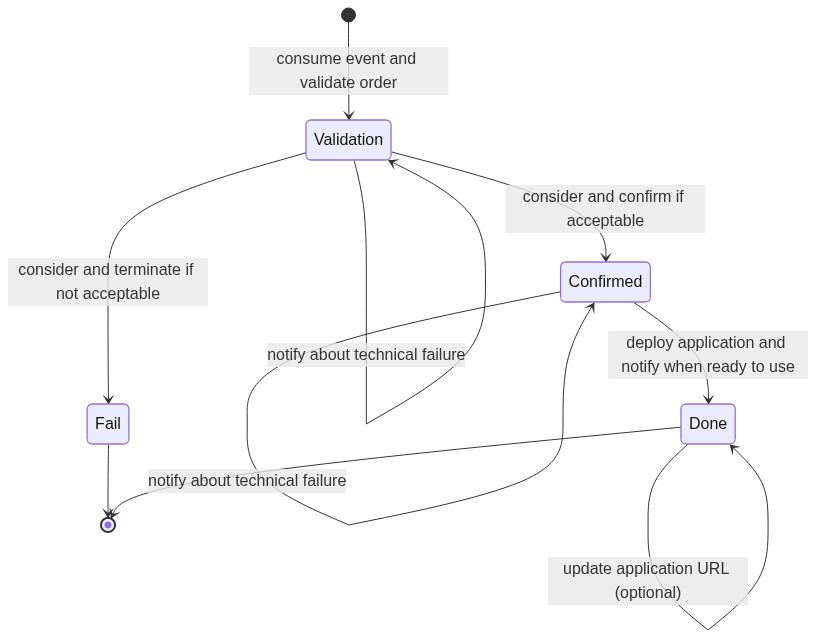
Statuses:
- `` - customer order was released ('no state' = initial state).
Validation- initial status acknowledging that order was received and negotiation with customer has been started.Confirmed- status confirming that order evaluation was successful and deployment of customer application has been started.Done- terminal status acknowledging that deployment was successful and customer application is ready to use by customer.Fail- terminal status when order evaluation was terminated because negotiation with customer was unsuccessful.
See currentStatusInfo in the Order model response:
"currentStatusInfo": {
    "systemStatus": "Validation",
    "modifiedOn": "2024-12-13T13:20:01.804Z",
    "modifiedBy": "tester@assecosol.com",
    "customProperties": []
},
Types of Billing
AVAplace platform currently operates using two main billing models: billing forward and Pay-as-you-go (billing backwards) and the partner has to choose, which one is the best fit for the application in question. Usage notes: Each subscription is assigned exclusively to one of these models; combinations are not permitted at this time.
Billing forward model
This model entails invoicing a fixed EUR amount at the outset of a specified time period, which may be either monthly or annually.
Diagram - Click to expand
Pay-as-you-go billing model
In this model, customers are billed periodically based on the units or resources they've consumed by the end of each billing period, typically monthly. For instance, customers are charged based on metrics like the number of transactions, active users, or data usage at the end of every month.
To ensure accurate invoicing for each customer, AVAplace's billing service requires usage data from partners utilizing this billing model.
This aspect of business integration is obligatory for all partners utilizing applications with a Pay-as-you-go billing model. You can read more about AVA order usages in PlatformStore Order - User Usage article.
Diagram - Click to expand
Implementation step by step
- PlatformStore.Order base URL:
https://{avaplace-hostname}/api/asol/ord/
Create or reset credentials of your external application
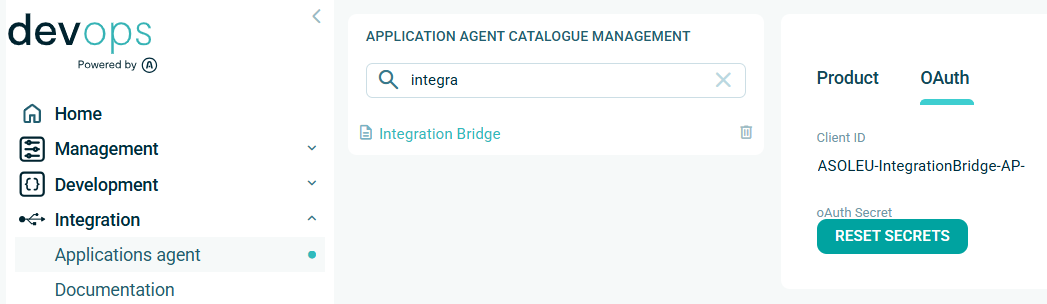
Use DevOps application to obtain service account secrets for your external application. Link:
This process uses the tenant context of the application vendor, so you can use a service account from one of your applications for the ordering process of all your applications. Therefore, please find a suitable application/agent in product catalog of your applications, and on the OAuth tab you will find the ClientId where you can generate new secrets. If the service account does not yet exist, it will be created automatically as part of the secret generation process.
Important: Please note that generating new secrets will invalidate the existing ones. You must then replace the old secrets everywhere they have been used so far with the newly generated ones.
Register consumer of business integration agent
Choose gRPC or Webhook channel to use for receiving business integration notifications using Message Gateway.
Register consumer using PlatformStore.Order API.
Note: The tenantId of your application vendor is used as a unique identifier of your consumer,
and the registered consumer is tightly bound to the clientId of the service account used.
This means that the consumer can only be used together with the service account that registered it.
If you need to switch to a different service account, you must perform a new consumer registration.
Register and configure message-gateway consumer API call example - Click to expand

/api/v1/Integration/Settings
clientId- (optional) the service account identifier of business integration agent (when user account instead of service account is used)- request body properties:
orderReleased- (optional) the flag to enable/disable 'ASOL.PlatformStore.OrderReleased' message typeconsumerCode- the unique code of MessageGateway consumer used by business integration agent, use tenantId of vendor for business integrationconsumerChannel- the type of consumer ("gRPC", "Webhook")webhookUrl- the consumer webhook URL used by business integration agent (when webhook channel is used)rateLimit- (optional) the rate limit value representing how many messages will be delivered to consumer during given intervalrateLimitInterval- (optional) the rate limit interval (Second,Minute,HourandDay) to control speed of message delivery.
- sample request body:
{
  "orderReleased": true,
  "consumerCode": "PartnerABC-a53e7bb5-ff4b-432a-a046-6708c1c5ec35",
  "consumerChannel": "Webhook",
  "webhookUrl": "https://partnerABC.com/webhooks/ava/businessintegration/demo",
  "rateLimit": 120,
  "rateLimitInterval": "Minute"
}
Note: you can setup flags together or independently (i.e. PATCH method), null means no change, empty string means clear value.
Get configuration of message-gateway consumer API call example - Click to expand

/api/v1/Integration/Settings
clientId- (optional) the service account identifier of business integration agent (when user account instead of service account is used)consumerCode- (optional) the unique code of MessageGateway consumer, by default the tenantId of vendor is used for business integration agentconsumerChannel- (optional) the type of consumer ("gRPC", "Webhook"), you can use explicitly to check if currently used value matches the expectations- sample response (shortened):
{
  "tenantId": "PartnerABC-a53e7bb5-ff4b-432a-a046-6708c1c5ec35",
  "vendorCode": "12345678|CZ",
  "consumerIsConnected": true,
  "consumerStatus": "Healthy",
  "webhookUrl": "https://partnerABC.com/webhooks/ava/businessintegration/demo",
  "rateLimit": 120,
  "rateLimitInterval": "Minute",
  "orderReleased": true,
  "consumerCode": "PartnerABC-a53e7bb5-ff4b-432a-a046-6708c1c5ec35",
  "consumerChannel": "Webhook"
}
Important: ASOL.PlatformStore.OrderReleased messages are filtered by X-VendorCode custom code.
The custom filter is configured by platform, not by integration agent.
When message is obtained, call Order API to get order details
Retrieve order details using PlatformStore.Order API.
See also: Order model - general principles for maintaining compatibility
Get the order detail using the order identifier API call example - Click to expand
/api/v1/Order/{id}
id- (mandatory) the order identifierorderAccessType- the type of perspective applied to filter orders for current tenant (mandatory)Vendor=> the released orders of applications provided by partner
- sample response (shortened):
{
  "id": "b8240b7c-3040-500f-82f8-052e6fde6e8c",
  "orderNumber": "202305090001",
  "licenceId": "b8240b7c-3040-500f-82f8-052e6fde6e8c",
  "licenceCode": "B8240B7C-3040-500F-82F8-052E6FDE6E8C",
  "vendor": {
    "code": "64949541|CZ"
  },
  ...
}
When order details were obtained, set VALIDATION status
Set VALIDATION status using PlatformStore.Order API to acknowledge that order was received and negotiation with customer has been started.
Then continue with validation of delivered order details and provide VALIDATION status again with severity Error when Technical failure occurred. Optionally you can provide FAIL terminal status when order evaluation was terminated because negotiation with customer was unsuccessful.
Set the new status of order using the order identifier API call example - Click to expand

/api/v1/Order/{id}/SetStatus
id- (mandatory) the order identifierorderAccessType- the type of perspective applied to filter orders for current tenant (mandatory)Vendor=> the released orders of applications provided by partner
- request body properties:
systemStatus- (optional) the new system status value (mandatory when requested to change system status in the state machine)severity- the severity of status information (info, warning, error = technical failure)statusCode- the informative code of external operation (e.g. rest api call result)source- the informative code of source application (e.g. agent code) calling set statusmessage- (mandatory) the user messagedetails- (optional) the array of technical details (e.g. details about technical failure)customProperties- (optional) the collection of key/value pairs
- sample request body:
{
  "systemStatus": "Validation",
  "severity": "Info",
  "statusCode": 0,
  "source": "My.OrderExternalAgent",
  "message": "OK",
  "details": [
    "received", "acknowledged"
  ]
}
- sample response: returns identifier of created order status record
{
  "id": "b3d6cd2d-4a49-44d7-b721-ad69063d0818"
}
When order details were validated, set CONFIRMED status
Set CONFIRMED status using PlatformStore.Order API to confirm that order evaluation was successful and deployment of customer application has been started.
Then continue with deployment and initialization of application for customer.
Optionally provide CONFIRMED status again with severity Error when Technical failure occurred.
You can use ApplicationUrl key in customProperties section to specify the customer specific URL of deployed application, see Update ApplicationUrl for additional usage.
Set the new status of order using the order identifier API call example - Click to expand
/api/v1/Order/{id}/SetStatus
id- (mandatory) the order identifierorderAccessType- the type of perspective applied to filter orders for current tenant (mandatory)Vendor=> the released orders of applications provided by partner
- request body properties:
systemStatus- (optional) the new system status value (mandatory when requested to change system status in the state machine)severity- the severity of status information (info, warning, error = technical failure)statusCode- the informative code of external operation (e.g. rest api call result)source- the informative code of source application (e.g. agent code) calling set statusmessage- (mandatory) the user messagedetails- (optional) the array of technical details (e.g. details about technical failure)customProperties- (optional) the collection of key/value pairs
- sample request body:
{
  "systemStatus": "Confirmed",
  "severity": "Info",
  "statusCode": 0,
  "source": "My.OrderExternalAgent",
  "message": "OK",
  "details": [
    "accepted", "deployment", "started"
  ],
  "customProperties": [
    {
      "key": "ApplicationUrl",
      "value": "https://myuser.myapp.com"
    }
  ]
}
- sample response: returns identifier of created order status record
{
  "id": "b3d6cd2d-4a49-44d7-b721-ad69063d0818"
}
When application was deployed, set DONE status
Set DONE status using PlatformStore.Order API to acknowledge that deployment was successful and customer application is ready to use by customer.
Optionally provide DONE status again with severity Error when Technical failure occurred.
If not provided in CONFIRMED, you have to use ApplicationUrl key in customProperties section to specify the customer specific URL of deployed application, see Update ApplicationUrl for additional usage.
Set the new status of order using the order identifier API call example - Click to expand
/api/v1/Order/{id}/SetStatus
id- (mandatory) the order identifierorderAccessType- the type of perspective applied to filter orders for current tenant (mandatory)Vendor=> the released orders of applications provided by partner
- request body properties:
systemStatus- (optional) the new system status value (mandatory when requested to change system status in the state machine)severity- the severity of status information (info, warning, error = technical failure)statusCode- the informative code of external operation (e.g. rest api call result)source- the informative code of source application (e.g. agent code) calling set statusmessage- (mandatory) the user messagedetails- (optional) the array of technical details (e.g. details about technical failure)customProperties- (optional) the collection of key/value pairs
- sample request body:
{
  "systemStatus": "Done",
  "severity": "Info",
  "statusCode": 0,
  "source": "My.OrderExternalAgent",
  "message": "OK",
  "details": [
    "deployment", "was", "finished"
  ],
  "customProperties": [
    {
      "key": "ApplicationUrl",
      "value": "https://myuser.myapp.com"
    }
  ]
}
- sample response: returns identifier of created order status record
{
  "id": "b3d6cd2d-4a49-44d7-b721-ad69063d0818"
}
Optionally set FAIL status when negotiation with customer was unsuccessful
Please distinguish between business failure (e.g. customer in insolvency) and technical failure (e.g. temporary error during automatic processing).
Set FAIL status using PlatformStore.Order API when order evaluation was terminated because negotiation with customer was unsuccessful.
Optionally provide FAIL status again with severity Error when Technical failure occurred.
Set the new status of order using the order identifier API call example - Click to expand
/api/v1/Order/{id}/SetStatus
id- (mandatory) the order identifierorderAccessType- the type of perspective applied to filter orders for current tenant (mandatory)Vendor=> the released orders of applications provided by partner
- request body properties:
systemStatus- (optional) the new system status value (mandatory when requested to change system status in the state machine)severity- the severity of status information (info, warning, error = technical failure)statusCode- the informative code of external operation (e.g. rest api call result)source- the informative code of source application (e.g. agent code) calling set statusmessage- (mandatory) the user messagedetails- (optional) the array of technical details (e.g. details about technical failure)customProperties- (optional) the collection of key/value pairs
- sample request body:
{
  "systemStatus": "Fail",
  "severity": "Info",
  "statusCode": 0,
  "source": "My.OrderExternalAgent",
  "message": "OK",
  "details": [
    "terminated", "due", "insolvency"
  ]
}
- sample response: returns identifier of created order status record
{
  "id": "b3d6cd2d-4a49-44d7-b721-ad69063d0818"
}
How to test the business integration functionality
Use Partners center application on AVAplace to test the integration after purchasing the application on AVAplace store. Link:
We recommend developing and deploying the business integration process on DEMO stage and then deploying and checking on PROD stage.
Important: The bypass process is used that ignores business constraints (if the application’s VendorCode matches the customer’s TenantId) and allows developers to repeatedly order the application and tune the integration; this applies to all stages including PROD.
Example of business integration agent
You can use example of business integration agent (.NET) - Click to expand
NuGet feed to get packages for backend development packages: https://pkgs.dev.azure.com/avaspace/feed/_packaging/feed/nuget/v3/index.json
Integration agent example for business integration of external application:
PlatformStore.OrderAgent represents example how to implement bridge providing tightly-coupled integration between partner's infrastructure and AVAPLACE PlatformStore services.
Download example here:
Important: Unpack README.md file for more instructions.
How to start with example:
- Setup missing values in
appsetting.jsonor override them inusersecrets.json(see<place your ... here>) - Find the
MyOrderProcessorclass (it contains the DEMO functionality), duplicate it and register your class in dependency injection container - Let’s start reimplementing it to fit your requirements
Specific cases
Technical failure
Technical failure is any status message with severity Error.
Technical failure can't change the custom properties either current system status of order, so systemStatus value is optional and just informative.
Note: Therefore it is recommended to send Validation system status with severity Info to acknowledge that order was received at first and then validate order and send information about technical failure with severity Error in the second status message call.
API call example - Click to expand
/api/v1/Order/{id}/SetStatus- sample request body of technical failure:
{
  "systemStatus": "Validation",
  "severity": "Error",
  "statusCode": 400,
  "source": "My.OrderExternalAgent",
  "message": "Company identifier is already used.",
  "details": [
    "more", "details", "about", "failure"
  ]
}
Update ApplicationUrl
Update custom properties (e.g. ApplicationUrl) can be called as standalone status message without system status.
Update custom properties can be called repetitively (the last wins) for any status value. Severity of status message must be Info or Warning.
Note: Typically are custom properties set when Done status message is set.
API call example - Click to expand
/api/v1/Order/{id}/SetStatus- sample request body of custom properties update:
{
  "severity": "Info",
  "source": "My.OrderExternalAgent",
  "message": "Update URL",
  "customProperties": [
    {
      "key": "ApplicationUrl",
      "value": "https://myuser.myapp.com"
    }
  ]
}
FAQ
How to solve - Precondition Failed (412) response - Click to expand
Q: How to solve Precondition Failed (412) response when calling SetStatus API?
e.g.: Current system status of order '4220f6d9-6507-42a4-9731-71db67f8079b' disallows to set 'Validation' status.
A: It means that the Order status flow doesn't allow to set requested system status for the current system status of order.
Check the current system status of order in currentStatusInfo section of Order model response and follow the Order status flow to set the next allowed system status.
How to get collection of pending released orders for vendor - Click to expand
A: Use PlatformStore.Order API endpoints and events to get collection of released orders for vendor. It isn't possible to filter for pending orders only, so you must retrieve all of them and filter locally by their status or other requirements. The list of orders is sorted by descending date, so you can use paging to get the older order details if necessary.
Is it possible to check new orders without using Message Gateway notification? - Click to expand
A: Yes, it is possible, although the way using message consumer to consume notifications is preferred.
You can use the get order collection requests with limit=1 periodically to check if new orders are available for processing
and then use paging to get the order details using the order collection sorted by descending date.
References
See also: