CompositeTreeview component
#Introduction Composite treeview is a component for management of tree-like data. Its main goal is to provide the developer means to navigate the tree, add/delete nodes and provide detailed view of data related to particular node. The tree view also allows the user to mark multiple nodes via checkboxes.
Basic functionality:
- Display tree data
- lazy loaded (tree nodes are loaded as the tree is expanded)
- fully loaded in-memory
- Filter tree data
- server-side filtering for lazy loaded data
- client filtering for in-memory data (via utility functions)
- tree is automatically expanded to show the nodes satisfying the filter criteria
- only needed paths are expanded, the nodes satisfying the criteria can be expanded further down (without applying filter criteria)
- proper add/remove behavior
- Add new node/delete node
- each node can specify if can be deleted or new child node can be added to it
- when node is deleted, detail is properly notified that no node is selected
- special button for adding root nodes
- Allow the user to mark multiple nodes in the tree
- two way databinding
- initially the tree is expanded so all the checked nodes are visible
- when node is removed from tree, it is also marked as uncheck
- Optionally provides controls for switching languages for localization of the data
- Detail component for detailed data management
- implemented by the developer
- gets notification about selected node, language change, changes in checked nodes list
- possibility to prevent user to change the selected node when the detail data are dirty
Visualisation of the component:
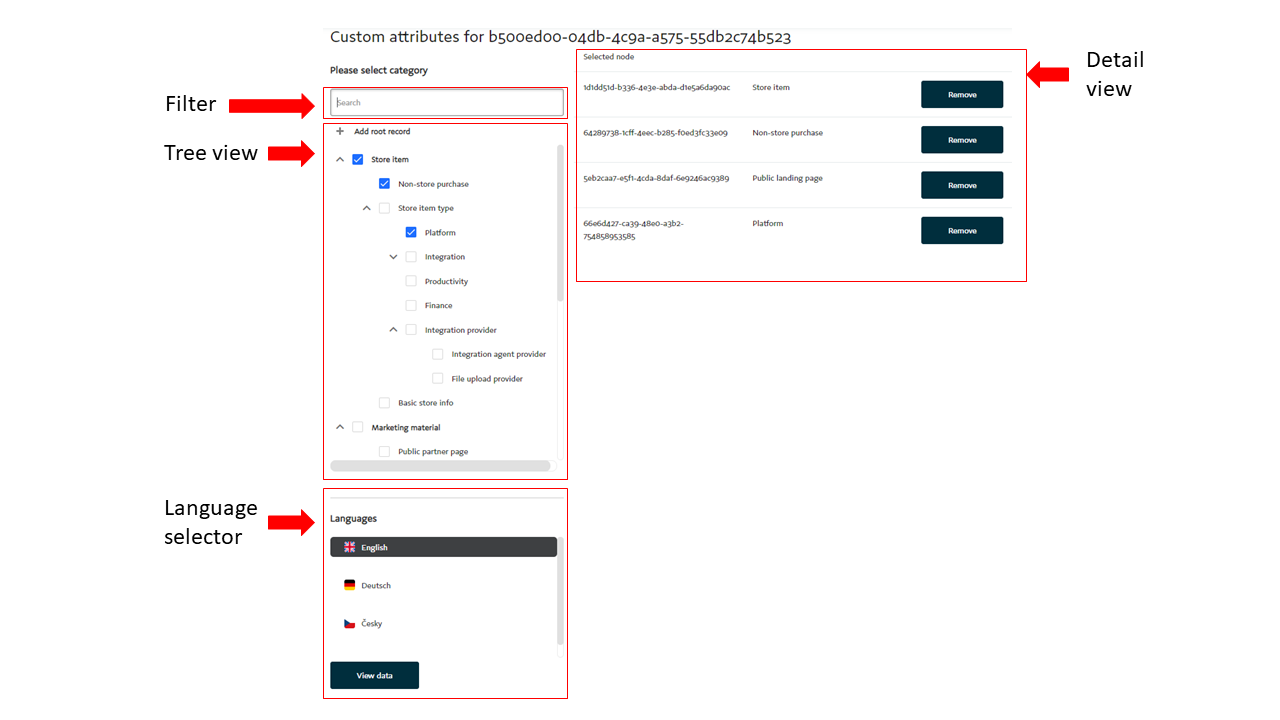
#Usage of the component
Composite tree view
Template
The component must be place into the html template by selector asol-platform-composite-tree-view:
<asol-platform-composite-tree-view
      [dataProvider]="cuAttDataProvider"
      [showLanguageSelector]="true"
      [showNodeCheckboxes]="true"
      [canAddRoot]="true"
      treeHeader="Please select category"
      [(checkedNodes)]="checkedCategories"
    >
      <app-composite-detail-test #detail> </app-composite-detail-test>
    </asol-platform-composite-tree-view>
Available component properties:
| Property | Description |
|---|---|
| dataProvider | Data provider for the tree. The developer must provide his/hers own implementation of interface TreeDataProvider |
| showLanguageSelector | Specifies if language selector is visible |
| showNodeCheckboxes | Specifies if the checkboxes for node selection are visible in the tree |
| canAddRoot | Specifies if new root item can be added to the tree (controls visibility of "Add root record" button) |
| treeHeader | Header text for the tree ("Please select category" in the example picture) |
| checkedNodes | List of checked nodes. Provides two-way databinding |
| isBusy$ | Observable reporting the busy status (tree data loading, detail data processing) |
| keepDetailScrollPosition | Keep CompositeDetail content scroll position after select another node (default is false) |
The composite tree view requires specification of component for the detail view - in the example above it is the app-composite-detail-test. This component must implement interface CompositeDetail.
The composite tree view currently supports only one detail control. However in the future it should be able to choose between multiple components and possibly use different detail control for node creation. Some if these intents are already visible in the CompositeDetail interface.
The tree is able to change its height so it fits the available space and does not out grow it. This feature requires the parent element to have the height set to specific value, for example view port height. Responive variant is under construction.
By default the control tries to expand the nodes so all the nodes specified in checkedNodes are visible after component initialization.
Component code
The composite tree view must be initialized in the ngAfterViewInit by calling int init() method.
Tree data provider TreeDataProvider
In order to load tree-like data into the composite tree view the developer must provide class implementing interface TreeDataProvider. This interface allows the component to built its own internal representation of the tree data in the form of TreeNode objects and arrays. This internal representation should not be manipulated manually in case of expansion/collapse/add/remove, the tree view component does this automatically.
The interface has following methods:
| Method | Description |
|---|---|
loadChildren(node?: TreeNode): Observable<TreeNode[]> | If node parameter is specified, should return children of that node. If no node is given, should return the list of root nodes. It is possible to return whole tree structue in one call to loadChildren and properly setup the TreeNode structures to completely avoid lazy loading of the tree. |
loadFiltered(filter: unknown): Observable<TreeNode[]> | Retrieves the tree nodes that satisfy given filtering criteria. Unlike loadChildren, this method should always return the full subtree that contains the paths to nodes that satisfy criteria so it can be expanded after search. It is possible for filtered leaf nodes to be expanded further down (their children should not be filtered). The library provides utility functions for filterTreeByStringLabel and filterTree for filtering the in-memory data. For in-memory filtered data it is important to set expand property to true. The tree is pruned so it contains only paths to filtered nodes. For add/delete operation on filtered in-memory trees the TreeDataProvider has to properly modify not only the base data but also the filtered data. |
removeNode(node: TreeNode) | Called to notify the data provider to remove the node from its structures (possibly by calling backend API). The TreeNode structure is modified autotacally by the component. Please note that this method is not called for the child nodes recursively in order to delete them. This has to be done manually. The addition of new node is handled via detail component |
TreeNode interface
The interface for representation of single node in the tree data. The interface has following properties:
| Property | Description |
|---|---|
id:string | Id of the node. Every node in the tree must have id that is unique across the whole tree. If the data do not have natural unique id, artificial id has to be provided by the developer. |
label: string | Label to be displayed in the control. |
hasChildren: boolean | Flag indicating if the node has children. Properly setting up this property is essential for lazy loading - the backing data source (eg. backend API) has to provide this value so the tree can decide in the node can be expanded and issue loading of child nodes. |
children?: TreeNode[] | The collection of child nodes. For lazy loaded trees should be left undefined so the control requests the child nodes when the node should be expanded (user click on expand button in the tree or the tree is automatically expanded due to checkedNodes). In this case the control will fill the value after the call to loadChildren. In case of fully loaded in-memory trees this property should contain the child nodes themselves. |
data?: unknown | Additional data of the node. May containg eg. the original data retrieved from the backend service. By using this property the developer is able to pass arbitrary data into the detail component. |
expand?: boolean | Used for filtered in-memory trees. Set to true for those nodes that should be expanded after search. |
canAddChildren?: boolean | Flag indicating if child nodes can be added to the node. |
deletable?: boolean | Flag indicating if node can be deleted. |
CheckedNode interface
This interface represents information about node that should be marked as checked in the treeview. The interface has following properties:
| Property | Description |
|---|---|
checkedNodePath: TreePath | Path from the root to the checked node. See the TreePath interface |
checkedNode?: TreeNode | The checked node. |
TreePath interface
This interface represents path in the tree.
The interface has following properties:
| Property | Description |
|---|---|
path: string[] | List of ids of the nodes that form path in the tree from root to the specific node. |
Detail control CompositeDetail
The composite detail control must implements the interface CompositeDetail. When defining detail component for the tree, the control must have selector '#detail':
<asol-platform-composite-tree-view ...>
      <app-composite-detail-test #detail> </app-composite-detail-test>
</asol-platform-composite-tree-view>
The interface has following properties/methods:
| Method/Property | Description |
|---|---|
accepts(node: TreeNode): boolean | For future use. Will be used to determine if the control wants to process specific node. For now always return true. |
processNode(node: TreeNode, checkedNodes: CheckedNode[], language: LanguageData): void | Used by the composite tree view control to notify that another node was selected in the tree view. Along with the node information also current language setting and list of checked nodes is passed to the detail. |
changeLanguage(language: LanguageData): void | Used byt the composite control to notify the detail about language change. |
nodesChecked(checkedNodes: CheckedNode[]) | Used byt the composite control to notify the detail about checked nodes change. During the tree initialization this method might be callend multiple times (first with empty checked nodes, then with only paths filled in and finally with both paths and loaded TreeNodes) |
getValues(): unknown | Used to retrieve values specified for given node. |
isBusy: Observable<boolean> | Observable for notifying the composite tree view component that detail is doing some time-consumig work. Can be used for example to display busy indicator during saving new data. |
checkedNodesChanged: Observable<CheckedNode[]> | Observable for notifying the composite tree view component that detail changed the list of checked nodes. |
acceptsAdd(parentNode: TreeNode): boolean | For future use. Will be used to determine if the control wants to process creation of child for specific node. For now always return true. |
addNode(parentNode: TreeNode): void | Used byt the composite control to notify the detail that new node should be added to the given parent node. If parent node is empty, new root node should be created. |
addCompleted: Observable<AddedNode> | Observable for notifying the composite tree view component that detail completed the creation of new node. For in-memory tree the composite detail has to update the underlying structures. |
addCanceled: Observable<void> | Observable for notifying the composite tree view component that detail cancelled the creation of new node. |
canChangeSelectedNode(nextNode?: TreeNode): Observable<boolean> | Observable for notifying the tree control that the currently selected node cannot be changed. Can be used to prevent the user from navigating away from the detail control in dirty state. |