Application routing
With new top menu design changes we have implemented new way of handling in-app navigation through side menu. The requirement is to highlight application name when navigating using side menu (see picture below).
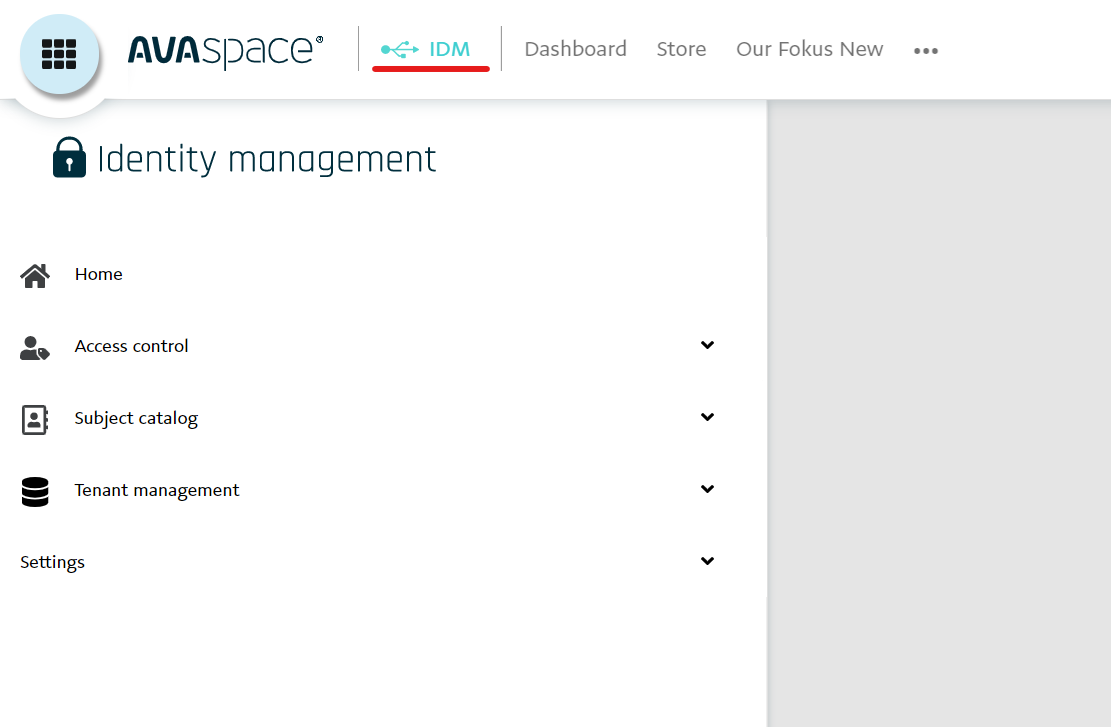
We created application wrapper that is acting as placeholder for in-app navigation and AsolPlatformAppRoutingModule for route definition. Basic routes and components are defined in Common library and AsolPlatformAppRoutingModule is merging routes from apps.
Usage of AsolPlatformAppRoutingModule
Firstly and most important, main app routing module needs to be altered like this:
const routes: Routes = [
  {
    path: 'rights/catalogue',
    component: RightsCatalogueComponent,
    canActivate: [AsolAuthGuard],
  },
  {
    path: 'tenants',
    canActivate: [AsolAuthGuard],
    loadChildren: () =>
      import('./modules/tenants/tenants.module').then(
        (module) => module.TenantsModule
      ),
  },
];

@NgModule({
  imports: [
    AsolPlatformAppRoutingModule.forRoot(routes),
    RouterModule.forRoot([], {
      relativeLinkResolution: 'legacy',
    }),
  ],
  exports: [RouterModule],
})
export class AppRoutingModule {}
Please note that RouterModule.forRoot has empty routes! By this change main app routes will be merged with app routes in Common library.
Feature modules
By using feature module without lazy loading, the module routing needs to be also changed similarly as main routing.
const routes: Routes = [
  {
    path: 'roles',
    component: RolesComponent,
    canActivate: [AsolAuthGuard],
    children: [
      {
        path: 'role-list',
        component: RoleListComponent,
      },
      {
        path: 'role-add',
        component: RoleDetailComponent,
      },
      {
        path: 'role-edit/:id',
        component: RoleDetailComponent,
      },
    ],
  },
];

@NgModule({
  imports: [
    AsolPlatformAppRoutingModule.forRoot(routes),
    RouterModule.forChild([]),
  ],
  exports: [RouterModule],
})
export class RolesRoutingModule {}
Lazy loaded modules
Lazy loaded feature modules does not require any change in routes, but be aware for proper definition of lazy loading routes in side menu definition. Challenge is that lazy loaded modules routes are not visible using router or ActivatedRoutes, so debugging is hard.
const routes: Routes = [
  {
    path: 'tenant-list',
    component: TenantListComponent,
  },
  {
    path: 'tenant-add',
    component: TenantAddComponent,
  },
  {
    path: 'current-tenant',
    component: TenantDetailComponent,
  },
  {
    path: 'tenant-detail/:id',
    component: TenantDetailComponent,
  },
];

@NgModule({
  imports: [RouterModule.forChild(routes)],
  exports: [RouterModule],
})
export class TenantsRoutingModule {}
NOTE: Proper path for navigation for current-tenant will be: /app/tenants/current-detail
Side menu definition changes
Next thing is to change side menu definition. Every path definition needs to start with /app prefix, it does not matter if the route definition is for lazy loaded modules or not.
{
      "path": "app/subject-catalog", // <= Feature module without lazy loading
      "name": "Subject catalog",
      "description": "",
      "iconUrl": "https://mafstory.blob.core.windows.net/plaza/IDM/menu/subject-catalogue.svg",
      "hasSeparator": false,
      "children": [
        {
          "path": "app/organizations/organization-list", // <= child
          "name": "Organizations",
          "description": "",
          "iconUrl": "",
          "hasSeparator": false,
          "children": []
        }
      ]
    },
    {
      "path": "app/tenant-management", // <= Lazy loaded feature module
      "name": "Tenant management",
      "description": "",
      "iconUrl": "https://mafstory.blob.core.windows.net/plaza/IDM/menu/tenant-management.svg",
      "hasSeparator": false,
      },
      "children": [
        {
          "path": "app/tenants/current-tenant", // <= child
          "name": "My tenant",
          "description": "",
          "iconUrl": "",
          "hasSeparator": false,
          "children": []
        },
        {
          "path": "app/tenants/tenant-list", // <= child
          "name": "Partners tenants",
          "description": "",
          "iconUrl": "",
          "hasSeparator": false,
          "children": []
        }
      ]
    },
Navigation, deep linking and more
Lastly, with this change you need to test all routerLinks, router.navigate, deep link sharing etc. Navigation is depending on lazy loading of modules or feature module routing. You need to add the app prefix if you need to navigate to certain link like:
public goToInvitePage(): void {
    this.router.navigate(['/app/candidate/list/sendinvite']); // <- app prefix needed
  }

// or

<button
   class="btn btn-primary"
   [routerLink]="['/app/candidate/list/sendinvite']"
>
   {{ trans.get(TRANS.CANDIDATE, 'SendInvite') }}
 </button>
If you are navigating using relative paths and in same module you dont need to add the prefix:
<button
  class="btn btn-primary float-right"
  [routerLink]="['../account-add']" // <- no need for app prefix
>
  {{ trans.get(TRANS.ACCOUNT_LIST, 'AddPerson') }}
</button>