Versioning
Versioning
Information about @asol-platform packages versioning connected with usage in module federation.
NPM version explanation

NPM version consist of three parts - major, minor and patch. Each part is signalizes with number. We will use this information later in this documentation.
@asol-platform versions
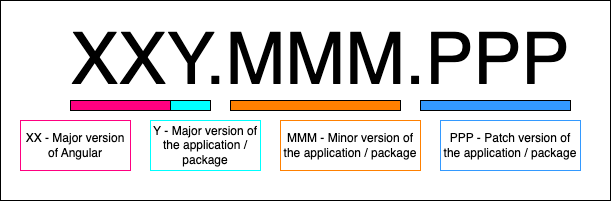
The definition of the version of @asol-platform packages are kinda different. Let me divide it into each part of versioning:
- Major version consists of 2 number. The version of the Angular, which is source for the package, and major version of the package. It may contain breaking changes.
- Minor version contains new features.
- Patch version contains bug fixes and can contain preview of new features.
This information is needed when working with the module federations, so developer can avoid breaking changes in the app. Combining different major versions may cause some unpredictable situations.
Some version may have version 15.0.0-dev.0. Those versions with tag (in this case dev tag) are just for development purpose. Use another smaller/bigger version (stable v15 version - 15.0.1 or for example latest v14 version - 14.20.5 in this case).
Do not install versions with dev tags! They are not stable released versions!
Module federation versions
Webpack Module Federation makes it easy to load separately compiled code like micro frontends. It even allows us to share libraries among them. This prevents that the same library has to be loaded several times.
However, there might be situations where several micro frontends and the shell need different versions of a shared library. Also, these versions might not be compatible with each other.
Libraries
List of @asol-platform libraries can find on Azure Devops Public Feed.
Configuration example
Application configuration in file webpack.config.js. More information can be found on page Module federation.
REMOTE APPLICATION
shared: share({
    ...
    '@asol-platform/controls': {
        singleton: true,
        requiredVersion: '>=14.3.5'
    },
    ...
}),
HOST APPLICATION
shared: share({
    ...
    '@asol-platform/controls': {
        singleton: true,
        requiredVersion: '>=14.1.20'
    },
    ...
}),
In this case remote application does not have desired version, as host application has singleton defined and required version are not compatible. Removing singleton will make remote application to use wanted version of the library. However, in this case the loading time would increase, another library will need to be loaded.
Singleton should always be used for libraries of UI kit 1.0 (so Angular 14) as there were different dependencies between ava platform libraries.