UI authorization
UI Authorization
1. Introduction
Authorization library provides mechanisms for adjusting the user interface based on user's permissions set in the IDM. It is possible to define the structure of FE application and upload it's definition into IDM where it will be available to set up permission in separate node. The frontend authorization serves only as a mean to adjsut the UI and does not replace the proper authorization of the respective API!
2. Usage of UI authorization
2.1 Definition of application structure
The developer of the frontend application has to properly design and describe the structure of the application authorization requirements in JSON. This JSON will be uploaded into IDM via endpoint
api/v1/Process/ImportApplicationFrontendVisualTreeDefinition/Upload (or possibly automatically during the app deployment). In the IDM this will be represented as special type of RightObjects.
Make sure you have defined
FeatureCode. This may cause problems with other definition in application (sidemenu definition, sidemenu authorization, ...). When you don't define it, you gonna rewrite all definition with this file.
The structure of the JSON allows to specify the tree-like structure of application. It is important to properly group the right objects so the authentication library is able to preload the permissions for entire page and not check all the permission in separate backed calls. Typically one page in application will have one node in JSON and it's children will represent various elements on the page that need to be authorized (shown/hidden). Code is used as code for right object and later will be used in frontend code to check for permission.
Upload all definition files by following patterns:
assets/menu/side-menu-*.json- built-in frontend side menu definition (right's objects)assets/menu/top-menu-*.json- built-in frontend top menu definition (right's objects)assets/menu/side-menu-*.authorization.json- built-in frontend side menu role authorization definition (role - roleauthorization - rights object)assets/menu/top-menu-*.authorization.json- built-in frontend top menu role authorization definition (role - roleauthorization - rights object)assets/auth/roles-*.json- built-in frontend virtual app roles (usefull for virtual app only)assets/auth/ui-authorization*.json- visual tree definition (right's objects)assets/auth/ui-roleauthorization*.json- visual tree role authorization definition (role - roleauthorization - rights object)
File name should start exactly as written above. When the file doesn't start with for example
ui-roleauthorization..., it's not going to be processed with backend, and the authorization not going to appear in application.
In this example JSON add-employee right object is defined for the page employee-list for the application ASOLEU-HCM-AP-:
{
    "applicationCode": "ASOLEU-HCM-AP-",
    "FeatureCode": "HCM-AP-ui-auth", // should be unique in application
    "nodes": [
      {
        "code": "employee-list",
        "name": {
          "values": [
            {
              "locale": "en-US",
              "value": "Employees"
            }
          ]
        },
        "description": {
            "values": [
                {
                  "locale": "en-US",
                  "value": "Employees"
                }
            ]
        },
        "nodes": [
          {
            "code": "employee-create",
            "name": {
              "values": [
                {
                  "locale": "en-US",
                  "value": "Create"
                }
              ]
            },
            "description": {
                "values": [
                    {
                      "locale": "en-US",
                      "value": "Create"
                    }
                  ]
            },
            "nodes": []
          }
        ]
      }
    ]
  }
This will look like this in IDM app (note the new node "Visual Tree" under which the entries were added):
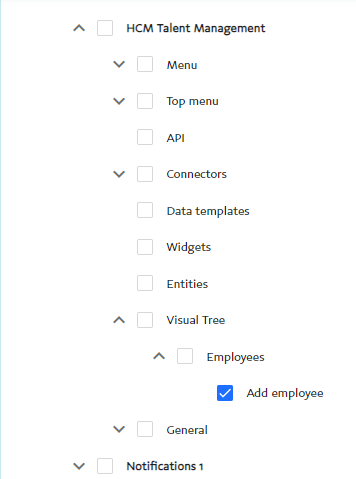
There is no default permission for the created right object, so it needs to be set up in the IDM.
2.3 Pipe hasPermission
In the html template the permission can check using the hasPermission pipe:
<div *ngIf="
    PERMISSION_CODE
     | hasPermission: AsolPermission.Update: APP_CODE: PARENT_CODE: impersonation
     | async">
    <!-- ... -->
</div>
PERMISSION_CODE is string constant, however arbitrary string can be used as a right object code. This value should correspond to the right object code defined in JSON structure described in chapter 2.1.
Second argument of the pipe is optional value from AsolPermission enum (available in authentication library). By default, AsolPermission.Read is used
Third argument APP_CODE is code of the application in which permission is checked. If not specified, value injected by ASOL_APP_ID is used.
The fourth argument is PARENT_CODE, which represents the string constant. This value should also be defined in the JSON structure described in Chapter 2.1. Has permission pipe by default loads permission for each unique PERMISSION_CODE. If PARENT_CODE is defined, it loads that permission, with all its child permission. It is better as it does fewer BE requests.
The PERMISSION_CODE specified in hasPermission pipes have to be (indirect) descendants of the PARENT_CODE!
The last argument is impersonation. It is used to use secondary token. (More information should be provided in the services library.) impersonation should implement interface AsolImpersonationOptions, where tenant id and organization code is provided.
This is minimal setup of the hasPermission pipe. It checks permission RIGHT_OBJECT.EMPLOYEE_CREATE. Other parameters which are used: AsolPermission.Read, injected ASOL_APP_ID, undefined for the parent code and for impersonation.
<div *ngIf="RIGHT_OBJECT.EMPLOYEE_CREATE | hasPermission | async">
   <!-- ... -->
</div>
Combination of the multiple permission can be checked following way:
<div *ngIf="(RIGHT_OBJECT.EMPLOYEE_CREATE | hasPermission | async) || (RIGHT_OBJECT.EMPLOYEE_UPDATE | hasPermission | async)">
    <!-- ... -->
</div>
New version of using hasPermission pipe is:
2.4 Checking permissions manually
When needed, particular permission can by checked in typescript code by using the AsolPermissionService. The service provides following method:
  public hasPermission(
    rightObjectCode: string,
    parentRightObjectCode?: string,
    permission = AsolPermission.Read,
    applicationId?: string,
    impersonation?: AsolImpersonationOptions
  ): Observable<boolean>
parentRightObjectCode is optional parameter used for preloading all the related right objects for the given parent right object (page).
permission is optional parameter. Return value of the methods is Observable which needs to be properly unsubscribed. This observable is not updated after initial permission check, so it currently cannot be kept alive to receive notifications about permission state change. In order to check permission repetitively new call to hasPermission needs to be issued.
applicationId is an optional parameter. If not provided, the default ID provided by the ASOL_APP_ID is used. It can be skipped in modules, which are not going to be provided via module federation. Otherwise, it is needed to define proper application ID, where permission is defined.
impersonation is a new parameter added from version @14.4.0. It checks the permission of the secondary token. As a secondary token directs the user to the other tenant and organization, their id/code has to be provided.
The AsolPermissionService caches the permissions for 5 minutes so the change of permission in IDM app might not be immediately propagated into the authorized application.
2.5 pagePermissionsLoaded pipe
Sometimes the page needs for the permissions to be loaded. The main scenario is usage of control that requires input based on permissions but is not able to properly react to async pipe change reporting.
For example setting values allowEditing, allowDeleting, multiSelect, allowExport in following grid requires proper boolean values. In the example this is ensured via *ngIf check if permissions are loaded.
<asol-platform-grid [allowEditing]="isAddEditDeleteAllowed" [allowDeleting]="isAddEditDeleteAllowed"
    [multiSelect]="isAddEditDeleteAllowed" [allowExport]="isAddEditDeleteAllowed" *ngIf="isPermissionLoaded">
</asol-platform-grid>
We can change the *ngIf to call the pagePermissionsLoaded pipe to wait for the page permissions to be resolved:
 <asol-platform-grid
    [allowEditing]="RIGHT_OBJECT.EMPLOYEE_UPDATE | hasPermission| async" [allowDeleting]="RIGHT_OBJECT.EMPLOYEE_DELETE | hasPermission| async"
    [multiSelect]="RIGHT_OBJECT.EMPLOYEE_MULTISELECT | hasPermission| async" [allowExport]="RIGHT_OBJECT.EMPLOYEE_EXPORT | hasPermission| async" *ngIf="RIGHT_OBJECT.EMPLOYEE_LIST| pagePermissionsLoaded ">
</asol-platform-grid>
3. Implementation
The implementation of the UI authorization consists of AsolPermissionService, IdentityManagerService, AsolDataCache and hasPermission pipe.
3.1 AsolPermissionService
AsolPermissionService is the core part of the UI authorization. It provides method hasPermission which is used internally by hasPermission pipe and can also be used directly by the application.
hasPermission method returns Observable<string>. Subsequent calls to hasPermission with identical rightObjectCode and Persmission receive shared Observable which is internally cached by the service for 5 minutes.
The service contains periodic process which purges the expired entries from the cache every 5 minutes. The purged entries - observables - are completed.
Service allows preloading related right objects and their permission by specifying parentRightObjectCode. These requests are also cached so multiple calls with same parentRightObjectCode issue only one call to the backend.
3.2 IdentityManagerService
IdentityManagerService is used to acces the IDM backend. The permission check in IDM is divided into two methods:
/api/v1/Authorization/IsPermissionValid - for single permission check
/api/v1/UIAuthorization/Page/${this.appId}/${parentRightObjectCode} - for retrieval of all the related right objects and definition
This service requires application part code, therefore APP_ID injection token was moved to authentication library from common library.
3.3 AsolDataCache
AsolDataCache is implementation of simple caching mechanism. It allows to specifity the retention periond (in miliseconds) for which the entries will be kept in the cache. It also provides means to specify "destructor" function which will be called on the item when it is removed from the cache. This is currently used to complete the store permission observables.
The cache in current state is fairly general and could possibly be moved to core or services library. It's not there since during implementation it seemed that it would be too specific for permissions and it is still possible that future development of UI authorization will require some specific changes.
3.4 hasPermission pipe
hasPermission is pure pipe which basically just calls AsolPermissionService.hasPermission. It has optional parameter PARENT_RIGHT_OBJECT which is used to retrieve the right object code of the page. This way only "first" pipe issues the server call, the rest just waits for the first call to complete.
It would be possible to use the hasPermission pipe without specifying PARENT_RIGHT_OBJECT for the page however that would result in separate backend call for each pipe usage.
4. Guards
Authentication provider guards for secure routing.
- AsolHomeGuard - When auth service is authenticated then redirect to '/app-home'
- AsolLoginGuard - Useful for special case on Login page. When auth service is authenticated then redirect to '/app-home', otherwise redirect to '/'
- AsolAuthGuard - However, when the authentication service is not authenticated, it redirects to '/' by default, but its behavior can be changed via optional data.
- "data.login" -true/false [default is false] - if true, it redirects to the login page
- "data.backToOrigin" - true/false [default is false]. If true, it redirects back to the original page after a successful login.
Example with AsolAuthGuard with different behavior is not authenticated.
{
    path: 'permission-test1',
    component: PermissionTest1Component,
    canActivate: [AsolAuthGuard],
  },
  {
    path: 'permission-test2',
    component: PermissionTest2Component,
    canActivate: [AsolAuthGuard],
    data: { login: true, backToOrigin: true },
  },
5. Virtual application built-in roles definition
Frontend developer can define "virtual" applications with their own roles and their own side menu definition.
Built-in roles for virtual application definition file located on /assets/auth/roles-[virtualAppCode].json
example of built-in roles for ASOL-HCM-AP- virtual application "Swot" (/assets/auth/roles-Swot.json):
{
  "applicationCode": "ASOLEU-HCM-AP-Swot", // application code
  "roles": [
    {
      "code": "ASOLEU-HCM-AP-Swot.AppUser", // built-in Role code
      "name": {
        "values": [
          {
            "locale": "en-US",
            "value": "SWOT analysis user"
          }
        ]
      }
    },
  ]
}
6. Page access
Authentication library from version v14.0.21 controls access on page based on user's role. Those users who don't have sufficient role rights are going to be redirected on 403 Page with access information.
Page access right are defined in side-menu.authorization.json, where are block divided by role code with collection of pages that the role has access to.
{
    "roleCode":"ASOLEU-IDM-AP-.Admin",
    "rights":[
        {
            "code": "licensing",
            "permissions": [ "Read" ]
        },
        {
            "code": "licensing-overview",
            "permissions": [ "Read" ]
        }
    ]
}
AsolAuthGuard defined in the page configuration in the routing module is responsible for access and control of the user's role.
{
    path: 'admin-dashboard',
    component: AdminDashboardComponent,
    canActivate: [AsolAuthGuard]
}
If you want to disable page role control and enable user access independently on his role, you can configure the path object with skipPermission property in data object.
{
    path: 'public-dashboard',
    component: PublicDashboardComponent,
    canActivate: [AsolAuthGuard],
    data: {
      skipPermission: true
    }
}
Otherwise you can assign rights from another source. For this, use property permissionPageCode which accepts side menu path or code, or right object group code.
You can also use code from another application with property permissionAppCode.
{
    path: 'public-dashboard',
    component: PublicDashboardComponent,
    canActivate: [AsolAuthGuard],
    data: {
        permissionPageCode: 'page-right-objects-code',
        permissionAppCode: 'ASOLEU-ExampleApp-AP-'
    }
}
Besides that you can optimize permission checks by preloading permissions for the child routes. For this, use the property loadChildrenPermission in the parent route object. Child routes will then pass parent's permissionPageCode or path to hasPermission method. If a child route does not fall
under the same permission hierarchy, you can override its parent code with parentPermissionPageCode property.
{
  path: 'admin-dashboard',
  canActivate: [AsolAuthGuard],
  data: {
    loadChildrenPermission: true
  },
  children: [
    {
      path: 'device-management',
      component: DeviceManagementComponent,
      canActivate: [AsolAuthGuard],
    },
    {
      path: 'user-management',
      component: UserManagementComponent,
      canActivate: [AsolAuthGuard],
      data: {
        parentPermissionPageCode: 'some-parent-code',
      }
    },
  ],
}