Application layout
Application Layout
Fully available from the version @190.2.1 of the @asol-platform/common.
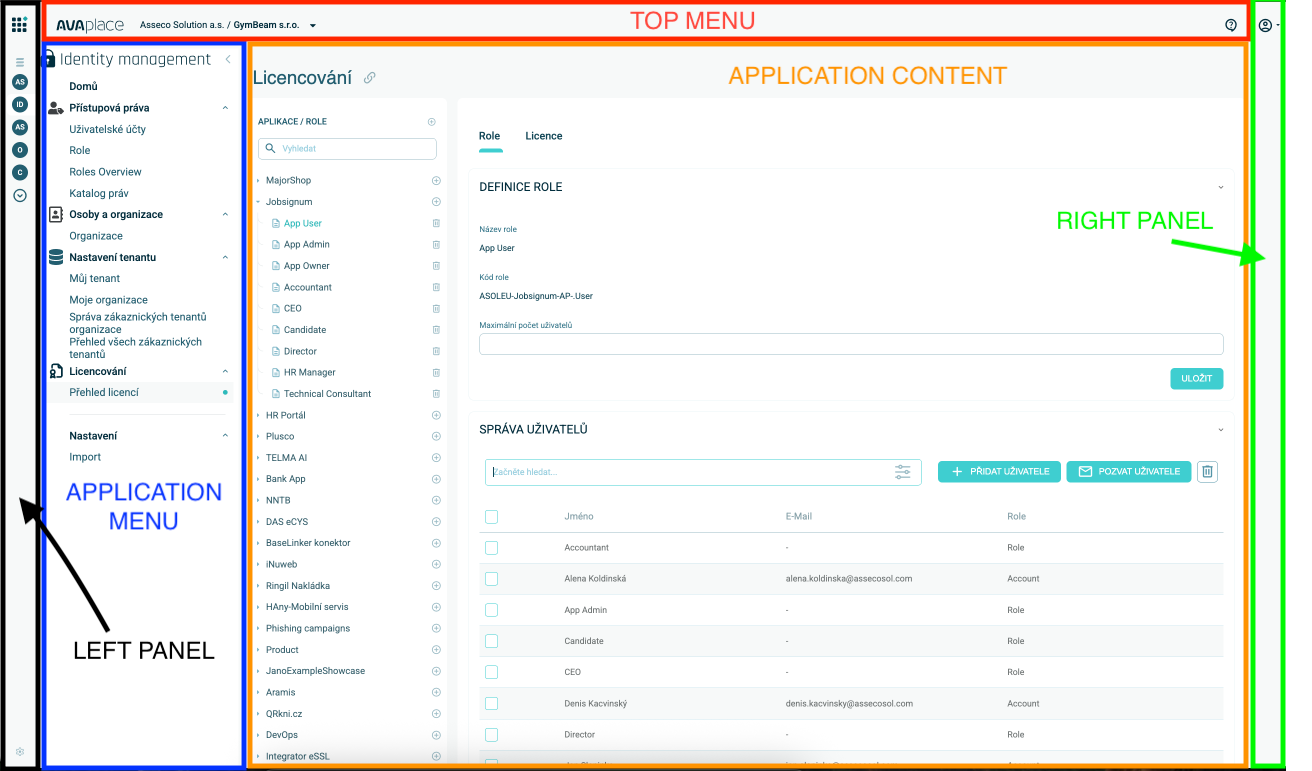
Each application layout consists of five main parts: Left Panel, Right Panel, Top Menu, Application Menu, and Application Content. This page provides an overview of each part.
Left Panel
The left panel serves as a shortcut for the user's applications. It contains a list of all applications the user has access to. Users can customize this list by changing the order, renaming items, or adding new links to frequently used applications. This list remains consistent for the user across the entire platform.
At the top of the left panel, there is a Quick Access Panel, which includes:
- All applications the user can access.
- Applications the user has purchased but cannot access yet.
- A list of store items the user can still purchase.
Top Menu
The top menu provides access to the Tenant Switcher component, which manages the current user context. It displays the active tenant and organization.
Additional elements in the top menu include:
- An icon for accessing the Helpdesk Form.
- The AVAPLACE Logo, which navigates the user to the Portal Application (the default landing page after login).
Right Panel
The right panel allows users to access their Profile Menu and platform settings. It also includes quick settings and additional functions, which may vary depending on the platform's configuration.
Application Menu
The application menu is the primary navigation menu for the current application. It is displayed as a tree structure of modules and submodules that the user has access to.
For more details about its configuration, refer to the Menu Configuration page.
Application Content
This is the main area where the content of the application is displayed. Each application is responsible for managing and rendering the content shown in this section.