Menu configuration
Application contains several menu controls:
-
side menu – main application navigation (support static and dynamic items)
-
top menu – common (cross) application navigation - defined by Avaspace Core team
-
community menu – navigation in community section Menu items are loaded from APIs based on user rights and permissions.
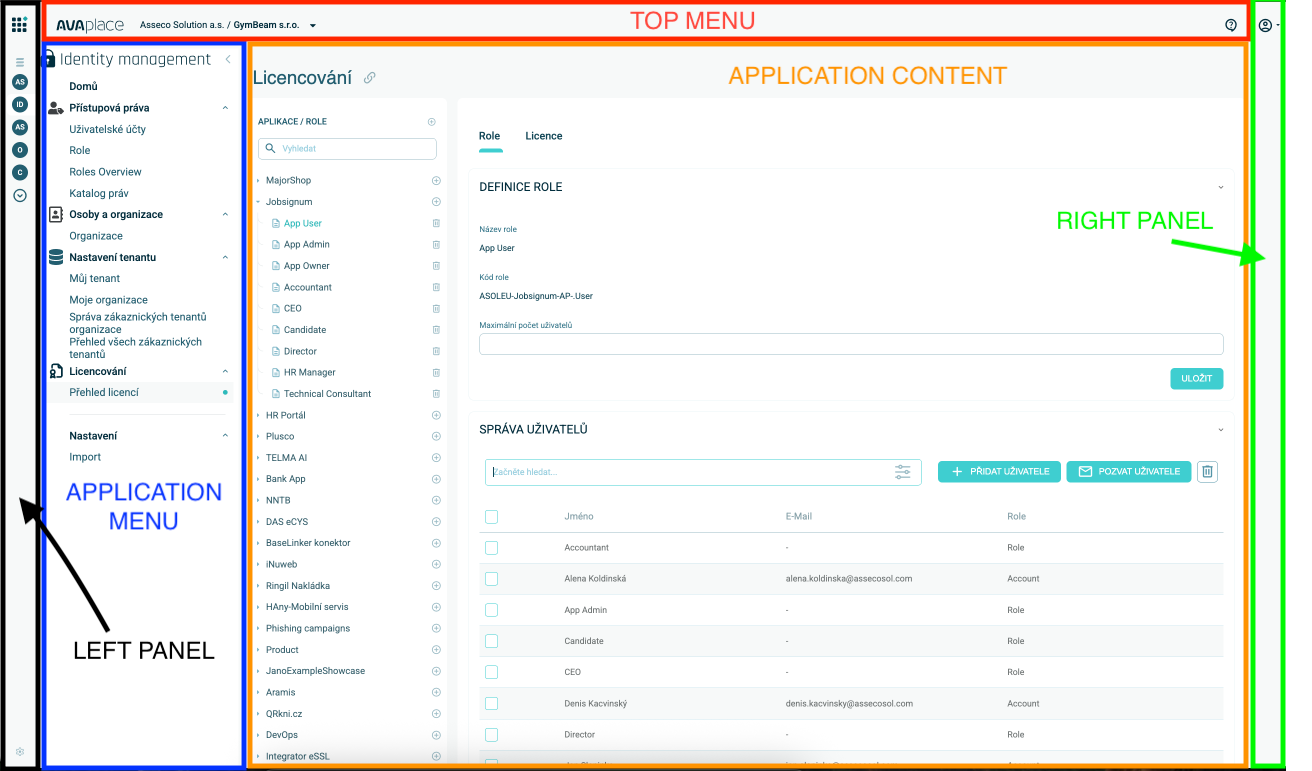
Side menu definition - Application menu
Note: Application menu is newer naming for the component, as we now have more side menus (left panel, application menu, right panel). However only one of them is configurable via JSON files,
so naming convention for those files remains the same. So for now Application menu and the Side menu refers to the same component of the application.
Every application needs navigation, in Avaplace apps it is side menu. In production version of application the side menu is loaded from API and permissions are applied to the side menu items. In development the side menu can be loaded from side menu definition json file which is located in assets folder of the application (when Avaplace app template was used). This configuration is then used to upload the definition into IDM API, so every change in this file will be propageted to IDM. To switch between local side menu definition and API call you can use sideMenuDebug flag located in environment file
File naming convention:
- side-menu.definition.json
- side-menu-[virtualappcode].definition.json:
Menu structure example (/assets/menu/side-menu-swot.definition.json):
  "id": "ASOLEU-HCM-AP-SWOT", // app identifier
  "applicationCode": "ASOLEU-HCM-AP-SWOT", // app code (same as id)
  "href": "https://#{Dns_AsolAppWebSite}#:50019/x-SWOT", // app href
  "menu": [    // menu items definition
    {
      "path": "/swot", // path in router
      "name": "SWOT", // menu item name
      "description": "SWOT analysis", // menu item description
      "hasSeparator": false, // flag if separator should be used
      "iconUrl": "assets/images/swot.svg", // menu item icon
      "children": [// multi-level menu
        {
          "code": "swot-overview", // rights object code for this item. Code must be unique on whole application. When is missing then automatically determine from last path segment of Path
          "path": "/swot/overview", // full path, parent needs to be there!!!
          "name": "Overview",
          "description": "SWOT overview",
          "hasSeparator": false,
          "children": null,
          "iconUrl": null,
          "nameLocalization": { // localization },
          "descriptionLocalization": { // localization }
        },
        {
          "code": "swot-list",
          "path": "/swot/list",
          "name": "List of SWOTs",
          "description": "SWOT list",
          "hasSeparator": false,
          "children": null,
          "iconUrl": null,
          "nameLocalization": { // localization },
          "descriptionLocalization": { // localization }
        }
      ]
    }
Side menu built-in authorization
Side menu authorization definition file to define relation between built-in roles and side menu item definitions. Authorization and definition files are located in same directory.
File naming convention:
- side-menu.authorization.json
- side-menu-[virtualappcode].authorization.json:
Example for Swot virtual application of ASOLEU-HCM-AP- application. (/assets/menu/side-menu-swot.authorization.json):
When you define menu items, and you have PARENT item which has CHILD item, you have to authorize route both routes to have access on the final CHILD item page. Imagine, you have page structure in side-menu: Settings > Profile > Privacy, and url for privacy page is /settings/profile/privacy. Then you need to set authorization for all pages: settings, profile and privacy for specific role in side-menu.authorization.json file.
{
  "applicationCode": "ASOLEU-COMMUNITY-AP-", // application code
  "featureCode": "SideMenuAuth", // internal constant to identify authorization kind. SideMenuAuth is for Side menu items authorization
  "authorizations": [
    {
      "roleCode": "ASOLEU-COMMUNITY-AP-.User", // built-in Role code from backend or from virtual frontend application
      "rights": [
        {
          "code": "swot-overview", // application rights object code for menu item
          "permissions": [
            "Read" // allowed Read (visible to see) this menu item
          ]
        },
        {
          "code": "swot-list", // application rights object code for menu item
          "permissions": [
            "Read" // allowed Read (visible to see) this menu item
          ]
        },
      ]
    }
  ]
}
Application Menu - Additional Functionality
The application menu supports a tree structure with a maximum visible depth of 3 levels. However, the configuration can define more than 3 levels. Items beyond the third level are managed by the AsolApplicationMenuService. These items are accessible via its tabData signal, which holds all removed nodes. As the name suggests, these items should be displayed as a TabsComponent and should provide routing functionality.
Notifications
The AsolApplicationMenuService also provides the updateNotifications method, which developers can use to display notifications on menu items. Notifications are shown as numbers and are only displayed if their value is greater than zero. To remove a notification from an item, call updateNotifications again and provide a value of 0.
export class AsolApplicationMenuService {
  public updateNotifications(
    notifications: ApplicationMenuNotification[]
  ): void;

  public readonly tabData: Signal<NavigationItemTreeNode[]>;
}

export interface NavigationItemTreeNode {
  expandable: boolean;
  name: AsolLocalizedValue<string> | string;
  iconUrl?: string;
  path: string;
  hasSeparator: boolean;

  sideMenuCode?: string;
  applicationPartCode?: string;
  applicationPath?: string;
  shouldNavigate?: boolean;

  // calculated property / transformed properties
  iconCode?: string;
  children?: NavigationItemTreeNode[];
}

export interface ApplicationMenuNotification {
  path: string;
  notification: number;
}
Visual Representation
The following images illustrate how notifications and the current route are displayed in the menu:
- Current Route: The first image shows the item currently being navigated to.
- Child Route: The second image shows an item whose child is currently being navigated to.
- Parent with Notifications: The third image shows a parent item with collapsed children, where one of the children has notifications.
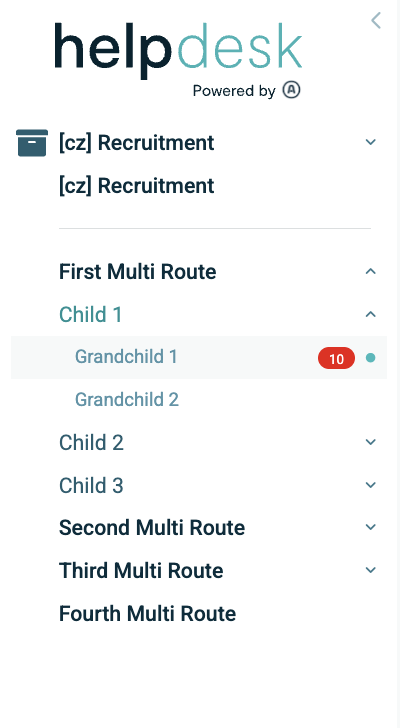
Figure 1: Item currently navigated to.
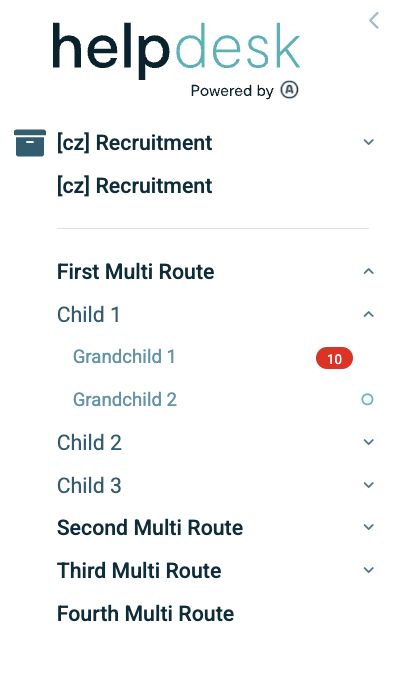
Figure 2: Item with a child currently navigated to.
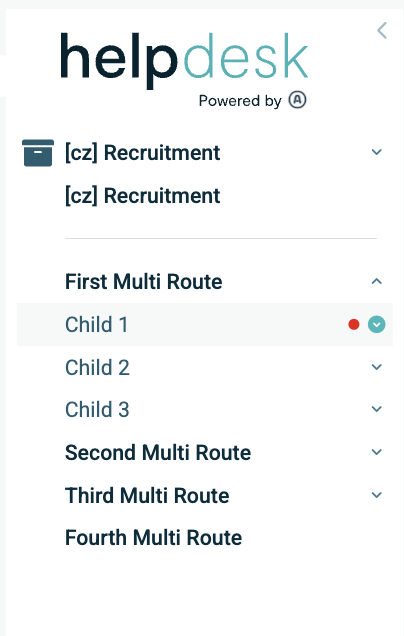
Figure 3: Parent item with collapsed children, one of which has notifications.
This functionality ensures a clean and organized menu structure while providing flexibility for deeper hierarchies and dynamic notifications.
Top menu definition
Top menu is located on top of the screen. In most cases it contains common menu items which is available to all applications, but it can also contain in app navigation. Definition is in assets folder next to side menu definition.
Application inner wrapper
With UI kit 2.0 (@asol-platform/common@170.0.7 and @asol-platform/controls@170.0.50) it is possible to create custom inner wrapper
of the application. This should be mainly used to add and control the state of asol-platform-application-top-menu. For this to work, user
has to wrap the asol-platform-app in the own AppBootstrapComponent and then insert wanted components to its content. When <router-outlet></router-outlet>
tag is present, platform will use it for main routing. Otherwise, it will be placed under user's content in the asol-platform-app.
Example of the AppBootstrapComponent:
<asol-platform-app>
  <asol-platform-application-top-menu [formGroup]="form">
    <asol-platform-chip-button [variant]="'white'">
      Some button
    </asol-platform-chip-button>
    <asol-platform-select
      formControlName="select"
      [options]="options"
      valueProperty="value"
      displayProperty="label"
      chipVersion
    ></asol-platform-select>
    <asol-platform-date-time-picker
      formControlName="dateTime"
      chipVersion
    ></asol-platform-date-time-picker>
    <asol-platform-time-picker
      formControlName="time"
      chipVersion
    ></asol-platform-time-picker>
  </asol-platform-application-top-menu>
</asol-platform-app>
import { Component, inject } from "@angular/core";
import { FormBuilder, ReactiveFormsModule } from "@angular/forms";
import {
  AsolApplicationTopMenuComponent,
  AsolPlatformCommonModule,
} from "@asol-platform/common";
import {
  AsolChipButtonComponent,
  AsolFormControlsModule,
  AsolPlatformDateTimePickerComponent,
  AsolPlatformTimePickerComponent,
} from "@asol-platform/controls";

@Component({
  selector: "app-bootstrap",
  templateUrl: "./app-bootstrap.component.html",
  standalone: true,
  imports: [
    AsolPlatformCommonModule,
    AsolApplicationTopMenuComponent,
    AsolChipButtonComponent,
    AsolFormControlsModule,
    AsolPlatformDateTimePickerComponent,
    AsolPlatformTimePickerComponent,
    ReactiveFormsModule,
  ],
})
export class AppBootstrapComponent {
  private formBuilder = inject(FormBuilder);
  protected form = this.formBuilder.group({
    dateTime: new Date(),
    time: new Date(),
    select: "1",
  });

  protected options = [
    { value: "1", label: "Option 1" },
    { value: "2", label: "Option 2" },
    { value: "3", label: "Option 3" },
  ];
}
FOR migration:
If you are still using AsolPlatformAppComponent as bootstrap component, you can replace it with locally created AppBootstrapComponent. In the app.module.ts you have to change:
@NgModule({
  ...
  bootstrap: [AppBootstrapComponent],
})
export class AppModule {}
and then in the index.html you have to update the tag of the root component:
<!DOCTYPE html>
<html lang="en">
  <head>
    ...
  </head>

  <body>
    <!-- This tag needs to be same as the selector of the AppBootstrapComponent  -->
    <app-bootstrap></app-bootstrap>
  </body>
</html>
Community menu definition
Community menu component is located on the left side of the screen at the same place as side menu. When community menu is displayed side menu is hidden and vice versa. Community menu has dynamic component at the top which can be replaced by any component defined in community menu definition. Community menu definition is in ASOL Platform Common library in community module.
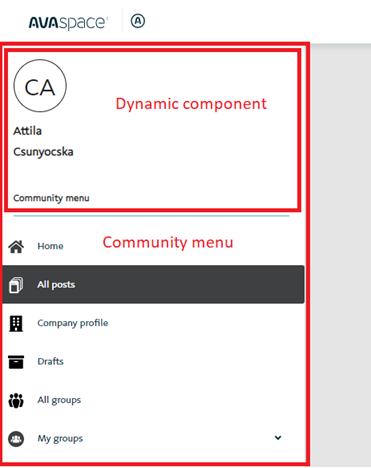
Structure of the community menu is same as for side menu except few new parameters:
  "id": "ASOLEU-COMMUNITY-AP-",
  "applicationCode": "ASOLEU-COMMUNITY-AP-",
  "name": "Community",
  "shortName": "Community",
  "logo": "https://avaplace.com/api/asol/cnt/api/v1/PublicFiles/Path/ASOLEU-HCM-AP-/logo.svg",
  "icon": "https://avaplace.com/api/asol/cnt/api/v1/PublicFiles/Path/ASOLEU-HCM-AP-/icon.svg",
  "href": "https://#{Dns_AsolAppWebSite}#:50061",
  "menuInjectedContentType": "AngularComponent", // dynamic content type
  "menuInjectedContentKey": "app-community-menu", // dynamic content key
  "menu": []
Dynamic menu definition
Steps to support dynamic menu items:
- Create or update an API endpoint in your domain service. Example below. The endpoint name and routing URL are in your hand.
- Replace the "children" element in the fronend .json file with "dynamicChildren" or create "dynamicChildren" and set the relative URL to the endpoint of your domain for the navigation response.
Important:
- Menu and DynamicMenu cannot be defined both on same application definition.
- Children and DynamicChildren cannot be defined both on same menu item.
Example side-menu.json menu item under "menu", or "children"
{
      "path": "/myteam",
      "name": "My Team",
      "description": "Overview of user's respective team",
      "hasSeparator": false,
      "iconUrl": "assets/images/myteam.svg",
      "dynamicChildren": {
        // Url for backend side dynamic resolve items at runtime. Url is typicaly relative to backend service in format /api/v1/something/something
        "url": "api/v1/navigation/sidemenu/myteam"
      },
      "nameLocalization":{
        "values": [
          { "locale": "en-US", "value": "My Team" }
        ]
     },
     "descriptionLocalization":{
      "values": [
        { "locale": "en-US", "value": "Overview of user's respective team" }
    ]
  }
}
Backend implementation endpoint (mock) to get dynamic menu items
Important:
Real code must be separated logic from this example to Query, QueryHandler on domain level instead of directly coded logic in controller endpoint
The name of Controller and route to endpoint on your choose. This is only example.
[ApiVersion("1.0")]
[Route("api/v{version:apiVersion}/[controller]")]
[Consumes("application/json")]
[Produces("application/json")]
[ApiConventionType(typeof(DefaultApiConventions))]
public class NavigationController : AuthorizeControllerBase
{
  public NavigationController(
    ILogger<NavigationController> logger,
    IPlatformAuthorizationService authService)
   : base(logger)
  {
    AuthService = authService;
  }

  protected IPlatformAuthorizationService AuthService { get; }

  /// <summary>
  /// Get side menu dynamic /myteams children
  /// </summary>
  /// <returns>Returns employee details</returns>
  [Route("sidemenu/myteam")]
  [HttpGet]
  [ProducesResponseType(StatusCodes.Status200OK, Type = typeof(IList<NavigationItemModel>))]
  [ProducesResponseType(StatusCodes.Status204NoContent)]
  [ApiAuthorize(false)] // Disable check IDM role/rights access
  public async Task<ActionResult<IList<NavigationItemModel>>> GetMyTeamSideMenu(
    [FromHeader(Name = "X-Navigation-Item-Path")] string navigationPath)
  {
    var isSuperUserRole = await AuthService.IsInRoleAsync(Constants.SuperUserRole);
    Logger.LogInformation($"Request dynamic menu children for path '{navigationPath}'");

    // Resolve required rights, roles, tenant, organization etc. and return items based on your own path.
    // Recommended check rights via
    await AuthService.
    // Frontend application must be contains routing definition for "Path"

    var mockResponse = new[]
      {
        new NavigationItemModel
          {
            Path = "/Pdp/F5EA4825-CC44-41F4-A12E-2B163068A1AB",
            Name = "John Liberty",
            Description = "My Manager",
            HasSeparator = false,
            IconUrl = "assets/images/employees.svg",
          },
        new NavigationItemModel
          {
            Path = "/Employee/1BA5C942-E7CE-4A94-8CDD-EBE0730FF29A",
            Name = "Eva Liberty",
            Description = "My Colleague - Eva",
            HasSeparator = false,
            Children = new List<NavigationItemModel>(new [] {
              new NavigationItemModel{
                Path = "/Pdp/1BA5C942-E7CE-4A94-8CDD-EBE0730FF29A",
                Name = "Eva Liberty PDP",
                Description = "My Colleague - Eva",
                HasSeparator = false,
                }
              }
            )
          },
        new NavigationItemModel
          {
            Path = "/aaaa/EAA2DA66-000C-4B3B-A33C-AD99ED6D78B0",
            Name = "Adam Liberty",
            Description = "My Colleague - Adam",
            HasSeparator = false,
          }
      };
    return Ok(mockResponse);
  }
}
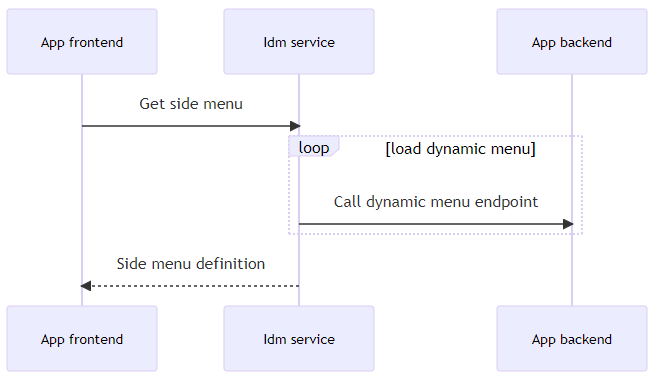
Dynamic menu items flow
Dynamic menu items troubleshooting
Dynamic items can be a source of problems loading menus because external target application API calls are made from IDM, and if that call fails, the menu may not be provided from IDM and the frontend will fail.
The most common cause of the problem is an incorrect URL to the RightsObjectGroup (BackEndHref property) representing the requested application. The code of the problem application will be found from the console frontend, where it will see a problem loading "api/asol/idm/api/v1/UIAuthorization". Note that RightsObjectGroup is in the master definition, but can be overridden by a definition with the same code in the tenant database. The first thing is to look at the definition in the master using the IDM.RightObjectGroup collection and find a matching record with the "Code" property. The second view is into the used tenant where the same collection is "IDM.RightObjectGroup". A valid URL must be entered on both sides otherwise the dynamic menu system will not work properly.