Operating log
Overview
Operating log provides proprietary end-to-end logging mechanism and keeps information about data operations which have been applied during processing of data.
Logs are grouped by operationId identifier and qualified with operationType enumeration.
Data flow
A data processing usually starts by enqueing of data, continues with data transformations and ends with published events. Consumers notified by event then appends additional info to log when processing incoming data changes.
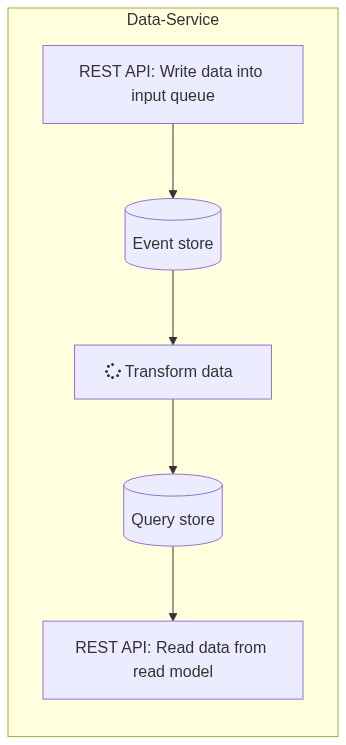
Each operation-pipeline can be extended by other cooperating services reusing the same operationId, e.g.:
- any Consumer service - can send info about processing of incoming data-changes
- any Publisher service - can send info about preparing of outgoing data-changes before their enqueuing to dataservice
- Agent/Application - can send an additional status and append to operating log as
AgentStatusoperation-type - Agent/Application - can send an additional coordination actions to operating log as
Coordinationoperation-type
Terms
OperationType - represents the type of data processing phase:
InputData- phase of sending input data to dataservice and storing into input queue / event storeTransform- phase of processing input data (including data transformation), storing them into query store and sending notifications about processed-dataConsumeData- phase of querying processed data/data-changes published in query store (including validation and processing of retrieved data by consumer)AgentStatus- optional information for emergency or periodic agent statusCoordination- optional information about cross-service coordination actions
ActivityType - describes the specific activity within an operation type:
Application|Start,Application|Ack,Application|Begin,Application|EndandApplication|Finishfor milestones and scoped duration pairs (operationType:InputData,ConsumeData), see: publisher logging, consumer logging sectionsValidation- validation feedback for retrieved data during querying phase (operationType:ConsumeData)ProcessingResult- processing result for retrieved data during querying phase (operationType:ConsumeData)ActionRequest- cross-service action request within the coordination phase (operationType:Coordination)ActionResponse- cross-service action response within the coordination phase (operationType:Coordination)
OperationScope - is a query filter that groups logs by end-to-end context, scopes make diagnostics easier without assembling complex filters:
PublishData- to see publisher-side steps, useincludeSystemLevelflag to see also system-level informationPublishDataWithConsumerFeedback- for full end-to-end visibility from publisher-side including consumer feedbackConsumerFeedbackOnly- for feedback alone (includes all consumers) from publisher-sideConsumeData- to see consumer-side steps, useincludeSystemLevelflag to see also system-level informationAgentStatus- to filter for agent status logs onlyCoordination- to filter for cross-service coordination actions.
Categories - provide finer classification of logged information
System level - the built-in categories help to filter for specific data or mapping issues:
LookupEntityReference- information or issues with entity lookup referencesInputDataConversion- information or issues with input-data conversionsInputDataLocalization- information or issues with input-data localizationInputDataProjection- information or issues with input-data projectionsMappingTransformation- information or issues with data-mapping transformations
User/Application level - the custom categories can be used to satisfy specific needs of integrated applications.
Use customCategory property to set the category of logged information.
Any category set from outside (i.e. by application/agent) is prefixed by Custom prefix as Custom|<category>,
e.g. "customCategory": "ABC" category is classified as Custom|ABC category.
Usage
Publisher logging when sending data to platform
Application end-to-end logging encapsulating the whole publishing process when sending data.
- operationType:
InputData - minimal logging:
Application|Start+Application|Finishmilestones - typical logging:
Application|Start+ [Application|Begin+Application|Endscope +]Application|Finishmilestones

Consumer logging when querying data from platform
Application end-to-end logging encapsulating the whole consuming process when retrieving data.
- operationType:
ConsumeData - minimal logging:
Application|Start+Application|Finishmilestones - typical logging:
Application|Start+ [Application|Begin+Application|Endscope +]Application|Finishmilestones

Consumer logging when consuming data via notification
Application end-to-end logging encapsulating the whole consuming process when responding to data notification.
- operationType:
ConsumeData - minimal logging:
Application|Ack+Application|Finishmilestones - typical logging:
Application|Ack+ [Application|Begin+Application|Endscope +]Application|Finishmilestones

Examples
Example: a consumer service writes result info about processed event when data was processed
{
  "operationId": "<operationId guid obtained from received event>",
  "operationType": "ConsumeData",
  "activityType": "Application|Finish",
  "scopeId": null,
  "severity": "Info",
  "systemLevel": false,
  "customCategory": null,
  "message": "Explain to user what happened, if event was consumed or not.",
  "details": [
    "Optionally you can write more details here."
  ],
  "customFields": [
    { "key": "MyKey", "value": "MyValue" }
  ],
  "source": "MyService",
  "sourceId": "<datasourceId guid of owned data-agent>",
  "publisherSourceId": "<datasourceId guid of publisher data-agent>"
}
GET examples (OperationScope variants)
Filter the collection by operation scope. Each scope targets a different part of the end-to-end pipeline,
so you can answer specific questions (publisher vs. consumer vs. status vs. coordination) without over-filtering by OperationType or ActivityType.

/api/v1/OperatingLogs - get filtered, paged operating log items
Query parameters
| Name | Type | Required | Default | Description |
|---|---|---|---|---|
| operationId | string (uuid) | No | — | The operation identifier. |
| includeSystemLevel | boolean | No | false | Include system-level items in addition to application-level items. |
| severityLevel | string (enum: StatusSeverity) | No | — | Minimal severity to return (e.g. Info, Warning, Error). |
| agentCode | string | No | — | Data-agent code of the log-item owner. |
| agentId | string (uuid) | No | — | Data-agent identifier of the log-item owner. |
| sourceId | string (uuid) | No | — | Data-source identifier of the log-item owner. |
| operationScope | string (enum: OperationScope) | No | — | Operation scope filter (e.g. PublishData, PublishDataWithConsumerFeedback, ConsumerFeedbackOnly, ConsumeData). |
| createdFrom | string (date-time) | No | — | CreatedOn >= this UTC datetime. |
| createdTo | string (date-time) | No | — | CreatedOn <= this UTC datetime. |
| offset | integer (int32) | No | 0 | Paging offset. |
| limit | integer (int32) | No | 100 | Paging limit. |
OperationScope variants:
PublishData - Use when you want to see only the publisher side of the operation, i.e. upload, enqueue, transform, and publishing from the publisher’s perspective. This is most suitable for troubleshooting on the source side and validating the publishing process without consumer feedback.
curl -X GET "https://demo.avaplace.com/api/asol/ds/api/v1/OperatingLogs?operationScope=PublishData&sourceId=<publisherSourceId>&offset=0&limit=50" ^
  -H "Authorization: Bearer <access_token>"
PublishDataWithConsumerFeedback - Use when you need the full picture of the integration operation, i.e. both the publisher process and consumer feedback.
This is the ideal option for end-to-end tracing of a single operation filtered by operationId.
curl -X GET "https://demo.avaplace.com/api/asol/ds/api/v1/OperatingLogs?operationScope=PublishDataWithConsumerFeedback&operationId=<operationId>&includeSystemLevel=true" ^
  -H "Authorization: Bearer <access_token>"
ConsumerFeedbackOnly - Use when you are interested only in consumer feedback (e.g. validation or processing on the consumer side) without publisher-side logs. Very useful for analyzing issues like “data arrived but was not accepted”.
curl -X GET "https://demo.avaplace.com/api/asol/ds/api/v1/OperatingLogs?operationScope=ConsumerFeedbackOnly&operationId=<operationId>&severityLevel=Warning" ^
  -H "Authorization: Bearer <access_token>"
ConsumeData - Use when you want to see only the consumer side of the process. Typically filtered by the consumer’s sourceId and a required time window.
Helps track data processing on the receiving side.
curl -X GET "https://demo.avaplace.com/api/asol/ds/api/v1/OperatingLogs?operationScope=ConsumeData&sourceId=<consumerSourceId>&createdFrom=2026-01-01T00:00:00Z" ^
  -H "Authorization: Bearer <access_token>"
AgentStatus - (legacy) Can be used when dealing with agent state (e.g. the agent cannot fulfill a request, is paused, etc.).
Typically filtered by agentId or agentCode.
curl -X GET "https://demo.avaplace.com/api/asol/ds/api/v1/OperatingLogs?operationScope=AgentStatus&agentId=<agentId>" ^
  -H "Authorization: Bearer <access_token>"
Coordination - (experimental) Can be used for coordination operations (i.e. action requests/responses). Suitable for tracking coordination handshakes between services and observing the flow and chaining of individual requests.
curl -X GET "https://demo.avaplace.com/api/asol/ds/api/v1/OperatingLogs?operationScope=Coordination&operationId=<operationId>" ^
  -H "Authorization: Bearer <access_token>"
POST examples (Validation, ProcessingResult)

/api/v1/OperatingLogs
Request body properties:
operationId- the unique identifier for the operation (usually obtained from notification message)operationType- the type of operation (ConsumeData)activityType- the type of activity representing a performance milestone (Validation,ProcessingResult)severity- the severity of status information (Info,Warning,Error)source- the human readable identifier of integration agent creating this log itemsourceId- the unique identifier for the data-source of integration agent reporting validation or processing resultpublisherSourceId- the data-source identifier of integration agent representing publisher (usually obtained from notification message)
Url example:
- POST
https://demo.avaplace.com/api/asol/ds/api/v1/OperatingLogs
Validation activity (consumer feedback) - validation result of retrieved data during querying phase (severity: warning or error). This information can be used by consumer services to provide feedback to users about the processing of received data, e.g. to explain why specific records were rejected before processing.
{
  "operationId": "<operationId guid from event>",
  "operationType": "ConsumeData",
  "activityType": "Validation",
  "severity": "Warning",
  "message": "Record 456 rejected: field 'Email' is invalid.",
  "source": "MyConsumer",
  "sourceId": "<consumerSourceId guid>",
  "publisherSourceId": "<publisherSourceId guid>"
}
Successful ProcessingResult activity - the processing result for retrieved data during querying phase (severity: info or warning). This information can be used by consumer services to provide feedback to users about the processing of received data, e.g. to confirm that specific records were successfully processed.
{
  "operationId": "<operationId guid>",
  "operationType": "Transform",
  "activityType": "ProcessingResult",
  "severity": "Info",
  "message": "Processing completed successfully.",
  "source": "MyService",
  "sourceId": "<datasourceId guid>"
}
Failed ProcessingResult activity - the processing result for retrieved data during querying phase (severity: error). This information can be used by consumer services to provide feedback to users about the processing of received data, e.g. to explain why specific records were not processed.
{
  "operationId": "<operationId guid>",
  "operationType": "Transform",
  "activityType": "ProcessingResult",
  "severity": "Error",
  "message": "Processing failed.",
  "details": [
    "Primary key missing in record 123.",
    "Import aborted."
  ],
  "source": "MyService",
  "sourceId": "<datasourceId guid>"
}
Performance statistics & visualization
Platform provides performance-oriented logging to track and measure data flow between Publishers, the Platform, and Consumers. There are two use-cases supported:
- investigation of specific virtual operation defined by
OperationIdand helps to identify bottlenecks and delays - aggregated statistics values (mean, median, min, max, ...) for period of time
From,To
The visualization of data flow by generated Mermaid-based Gantt chart diagram.
Publisher logging
To track publisher behavior in OperationType.InputData phase:
| Activity | Required ActivityType | Milestone | Description |
|---|---|---|---|
| APP: Start of publishing data process | `Application | Start` (const: OperationActivityType.ApplicationStart) | ✔ |
| APP: Begin of publishing data step | `Application | Begin` (const: OperationActivityType.ApplicationBegin) | |
| APP: End of publishing data step | `Application | End` (const: OperationActivityType.ApplicationEnd) | |
| APP: Finish of publishing data process | `Application | Finish` (const: OperationActivityType.ApplicationFinish) | ✔ |
Note: Each pair (begin/end) must use the same ScopeId to enable duration tracking. Application can provide multiple pairs (begin/end) with different ScopeIds for more complex scenarios.
Consumer logging
To track consumer processing in OperationType.ConsumeData phase:
| Activity | Required ActivityType | Milestone | Description |
|---|---|---|---|
| APP: Start of consuming data process | `Application | Start` (const: OperationActivityType.ApplicationStart) | ✔ |
| APP: Acknowledge of consuming data notification | `Application | Ack` (const: OperationActivityType.ApplicationAck) | ✔ |
| APP: Begin of consuming data processing | `Application | Begin` (const: OperationActivityType.ApplicationBegin) | |
| APP: End of consuming data processing | `Application | End` (const: OperationActivityType.ApplicationEnd) | |
| APP: Finish of consuming data process | `Application | Finish` (const: OperationActivityType.ApplicationFinish) | ✔ |
Note: Each pair (begin/end) must use the same ScopeId to enable duration tracking. Application can provide multiple pairs (begin/end) with different ScopeIds for more complex scenarios.
Logging requirements
To include a component (Publisher or Consumer) in performance statistics,
it must log specific activity types and provide paired start/end logs with consistent ScopeId
or specific milestone.
⛔ Warning when not used
If the application does not follow the above rules, the system cannot calculate performance statistics nor visualize its execution in the diagram. Thus it would not be able to specify the time spent in a specific component (i.e. publisher or consumer), leading to a loss of valuable insights into the data flow performance.
Time Pairing (Scope ID)
Every scoped operation must have:
- a
BeginTimelog (e.g.,Application|Begin) - a
EndTimelog (e.g.,Application|End) - and both logs must share the same
ScopeId
Multiple such pairs can exist per consumer or publisher, and they will be aggregated.
Note: The milestone operation isn't paired and represents a moment when milestone occcured.
Examples
How to write the start, ack or finish application milestone into operating log in consuming phase - Click to expand
/api/v1/OperatingLogs
Request body properties:
operationId- the unique identifier for the operationoperationType- the type of operation (InputData,ConsumeData)activityType- the type of activity representing a performance milestone (Application|Start,Application|Ack,Application|Finish)severity- the severity of status information (Info,Warning,Error)source- the human readable identifier of integration agent creating this log itemsourceId- the unique identifier for the data-source of integration agent
Note: operationId guid has been obtained (e.g. from received notification) or created as a new guid
Url example:
https://demo.avaplace.com/api/asol/ds/api/v1/OperatingLogs
Sample request body:
{
  "operationId": "<operationId guid>",
  "operationType": "ConsumeData",
  "activityType": "Application|Start",
  "severity": "Info",
  "source": "<human readable identifier of data-agent>",
  "sourceId": "<datasourceId guid of data-agent>"
}
Sample response:
{
    "id": "07919f59-1cd3-400d-89bf-a9955891fc26",
    "operationId": "f670127a-ef1b-4926-ab64-387fba251523",
    "operationType": "ConsumeData",
    "activityType": "Application|Start",
    "createdOn": "2026-03-04T15:59:03.64Z",
    "severity": "Info",
    "systemLevel": false,
    "category": "Custom",
    "source": "ASOLEU-DataIntegrationExample2-AP-",
    "agentId": "65d9f221-01ce-433f-bc63-e81a4201516a",
    "sourceId": "65d9f221-01ce-433f-bc63-e81a4201516a"
}
How to write the begin/end of the application scoped operation into operating log in consuming phase - Click to expand
/api/v1/OperatingLogs
Request body properties:
operationId- the unique identifier for the operationoperationType- the type of operation (InputData,ConsumeData)activityType- the type of activity representing a performance scope (Application|Begin,Application|End)scopeId- the unique identifier representing the scope of begin-end pair, useful when you need to distinguish multiple activities in the same operationseverity- the severity of status information (Info,Warning,Error)source- the human readable identifier of integration agent creating this log itemsourceId- the unique identifier for the data-source of integration agent
Note: operationId guid has been obtained (e.g. from received notification) or created as a new guid Note: the begin-end pair encapsulates the duration of specific activity (e.g. complex processing of consumed data)
Url examples:
https://demo.avaplace.com/api/asol/ds/api/v1/OperatingLogs
Sample request body:
{
  "operationId": "<operationId guid>",
  "operationType": "ConsumeData",
  "activityType": "Application|Begin",
  "scopeId": "<unique identifier representing scope>",
  "severity": "Info",
  "source": "<human readable identifier of data-agent>",
  "sourceId": "<datasourceId guid of data-agent>",
  "scopeId": "<scopeId uuid>"
}
Sample response:
{
    "id": "07919f59-1cd3-400d-89bf-a9955891fc28",
    "operationId": "f670127a-ef1b-4926-ab64-387fba251523",
    "operationType": "ConsumeData",
    "activityType": "Application|Begin",
    "createdOn": "2026-03-04T15:59:03.64Z",
    "severity": "Info",
    "systemLevel": false,
    "category": "Custom",
    "source": "ASOLEU-DataIntegrationExample2-AP-",
    "agentId": "65d9f221-01ce-433f-bc63-e81a4201516a",
    "sourceId": "65d9f221-01ce-433f-bc63-e81a4201516a",
    "scopeId": "EKqjYYBKTEeuGcBM5Miazw"
}
Endpoints
Endpoint Summary
| Method | Path | Short description |
|---|---|---|
| /api/v1/OperatingLogs | Get filtered, paged operating log items |
| /api/v1/OperatingLogs | Create a new operating log item |
GET /api/v1/OperatingLogs
Summary: Get a filtered collection of operating log items. Description: Returns a paged list of operating logs that match the provided filters. Auth: Bearer token Roles/Scopes: —
Request
Query parameters
| Name | Type | Required | Default | Description |
|---|---|---|---|---|
| operationId | string (uuid) | No | — | The operation identifier. |
| includeSystemLevel | boolean | No | false | Include system-level items in addition to application-level items. |
| severityLevel | string (enum: StatusSeverity) | No | — | Minimal severity to return (e.g. Info, Warning, Error). |
| agentCode | string | No | — | Data-agent code of the log-item owner. |
| agentId | string (uuid) | No | — | Data-agent identifier of the log-item owner. |
| sourceId | string (uuid) | No | — | Data-source identifier of the log-item owner. |
| operationScope | string (enum: OperationScope) | No | — | Operation scope filter (e.g. PublishData, PublishDataWithConsumerFeedback, ConsumerFeedbackOnly, ConsumeData). |
| createdFrom | string (date-time) | No | — | CreatedOn >= this UTC datetime. |
| createdTo | string (date-time) | No | — | CreatedOn <= this UTC datetime. |
| offset | integer (int32) | No | 0 | Paging offset. |
| limit | integer (int32) | No | 100 | Paging limit. |
Headers
| Name | Required | Example | Description |
|---|---|---|---|
| Authorization | Yes | Bearer <access_token> | OAuth2 bearer token. |
Body
- Content-Type: —
- Schema: —
Response
-
Response statuses
200 OK:{ totalCount, items[] }400 Bad Request: invalid filter (e.g. malformed GUID)
-
Example response (json)
{
  "totalCount": 1,
  "items": [
    {
      "id": "11111111-1111-1111-1111-111111111111",
      "operationId": "00000000-0000-0000-0000-000000000000",
      "operationType": "ConsumeData",
      "activityType": "Application|Finish",
      "createdOn": "2026-01-06T10:11:12Z",
      "severity": "Warning",
      "systemLevel": false,
      "category": "MyCategory",
      "message": "Explain to user what happened.",
      "details": ["Optional technical details."],
      "customFields": [{ "key": "MyKey", "value": "MyValue" }],
      "source": "MyService",
      "agentId": "22222222-2222-2222-2222-222222222222",
      "sourceId": "33333333-3333-3333-3333-333333333333",
      "publisherSourceId": "44444444-4444-4444-4444-444444444444",
      "utcTimestamp": "2026-01-06T10:10:00Z",
      "scopeId": "EKqjYYBKTEeuGcBM5Miazw"
    }
  ]
}
Examples
curl
curl -X GET "https://demo.avaplace.com/api/asol/ds/api/v1/OperatingLogs?OperationId=<guid>&IncludeSystemLevel=true&SeverityLevel=Warning&Offset=0&Limit=50" ^
  -H "Authorization: Bearer <access_token>"
powershell
$headers = @{ Authorization = "Bearer <access_token>" }
$url = "https://demo.avaplace.com/api/asol/ds/api/v1/OperatingLogs?OperationId=<guid>&IncludeSystemLevel=false&SeverityLevel=Warning&Offset=0&Limit=50"
Invoke-RestMethod -Method Get -Uri $url -Headers $headers
POST /api/v1/OperatingLogs
- Summary: Create a new operating log item.
- Description: Creates a new operating log entry.
- Auth: Bearer token
Request
Headers
| Name | Required | Example | Description |
|---|---|---|---|
| Authorization | Yes | Bearer <access_token> | OAuth2 bearer token. |
| Content-Type | Yes | application/json | Request body media type. |
Body
- Content-Type: application/json
- Schema: OperatingLogModelCreate
Request body parameters
| Property | Type | Description |
|---|---|---|
operationId | uuid | The operation identifier (optional). |
operationType | string (enum: OperationType) | The operation type of item (e.g. InputData, Transform, ConsumeData). |
activityType | string | The activity type of item (optional, e.g. Validation, ProcessingResult, `Application |
severity | string (enum: StatusSeverity) | The item severity (e.g. Info, Warning, Error). |
systemLevel | bool | The flag to distinguish system-level (true) ando user-level (false) of item. Default: false. |
customCategory | string | The identifier of the Custom-<customId> subcategory (optional). |
message | string | The log message. |
details | array | The technical details (optional). |
customFields | array | The custom fields (optional). |
source | string | The human-readable identifier of the log-item owner (optional). |
agentId | uuid | Data-agent identifier of the log-item owner (optional). |
sourceId | uuid | Data-source identifier of the log-item owner (optional). |
publisherSourceId | uuid | Data-source identifier of the publisher (optional). Used in operationType ConsumeData context |
utcTimestamp | date-time | The datetime timestamp of item occurence (optional). |
scopeId | string | The begin-end scope identifier (optional). |
Response
-
Response statuses
201 Created:uuidThe identifier of created item.
-
Example response (json)
{
  "operationId": "11111111-1111-1111-1111-111111111111",
  "operationType": "Transform",
  "activityType": "ProcessingResult",
  "severity": "Info",
  "systemLevel": false,
  "message": "Processing completed successfully.",
  "source": "MyService",
  "sourceId": "22222222-2222-2222-2222-222222222222"
}
Examples
curl
curl -X POST "https://demo.avaplace.com/api/asol/ds/api/v1/OperatingLogs" ^
  -H "Authorization: Bearer <access_token>" ^
  -H "Content-Type: application/json" ^
  -d "{\"operationId\":\"<uuid>\",\"operationType\":\"ConsumeData\",\"activityType\":\"Application|Finish\",\"severity\":\"Info\",\"systemLevel\":false,\"message\":\"Explain to user what happened.\"}"
powershell
$headers = @{
  Authorization = "Bearer <access_token>"
  "Content-Type" = "application/json"
}

$body = @{
  operationId   = "<uuid>"
  operationType = "ConsumeData"
  activityType  = "Application|Finish"
  severity      = "Info"
  systemLevel   = $false
  message       = "Explain to user what happened."
} | ConvertTo-Json -Depth 10

Invoke-RestMethod -Method Post `
  -Uri "https://demo.avaplace.com/api/asol/ds/api/v1/OperatingLogs" `
  -Headers $headers `
  -Body $body