Data integration - How to start
Overview
Data integration purpose is automation of data exchange using VDM among native and external applications (including on-premise ERPs). Data integration represents the ecosystem of business processes realized by cooperation of applications purchased by the customer at AVAplace store.
The AVAplace platform provides the integration orchestrator, so called DataService, to implement the publisher/subscriber scenarios using declarative meta-models via REST API calls and messaging notifications.
This article descibes how to start with an implementation of the integration bridge between your application and AVAplace platform. So called the data-integration agent.
About VDM
VDM (Virtual Data Model) is a key concept in the AVAplace platform that provides declarative meta-models to fulfill requirements of various business processes in different business domains.
See also:
Terms
- Integration provider - provider available in Connector Catalogue to register connector and agent for on-premise solution installed on the customer's site. Provider is not used for cloud-based integrations.
- Integration connector - connector registered in Connector Catalogue representing the business configuration for on-premise solution installed on the customer's site. Connector is not used for cloud-based integrations.
- Integration agent - agent is a bridge component between external application and AVAPLACE platform responsible for data exchange, for on-premise solution also represents the installed instance on the customer's site.
- data agent and data source - V1 original entities representing integration bridge and its data source in DataService, V2 encapsulates them (with 1:1 relationship) into one component called integration agent
Guidelines to integration etiquette
- Publisher is any application that sends data to virtual data models and must follow the guidelines for publishing data via the VDM.
- Consumer is any application that retrieves data from virtual data models and must follow the guidelines for consuming data via the VDM.
See also: Publisher - Consumer Guidelines
How to test the data integration functionality
For testing the functionality of data integration, you can use the VDM models in the Examples domain.
The DEMO stage is used for testing data integrations; the partner's application has automatically granted access to the tenant that created it. We recommend to develop and test the basic integration processes (registration, consumption, publishing, handling notifications) directly in your own tenant, to which your developers also have user access.
Then call AVAplace support to request access to the ASOLEU-DEV tenant (id: "ASOLEU-DEV-fd9ad6b9-2f29-4c7a-9a3a-c7469e19b1ff") for your application / service account,
when you are ready to integrate with other applications and test integration processes of your application again.
The ASOLEU-DEV tenant on DEMO stage acts as a kind of sandbox, where you can find test data of the other applications including on-premise ERP systems, to fine-tune the integration processes in the context of a “customer's” tenant (such as tenant configuration and data integration with others). The available data-sets of various application modules from ERP systems are separated typically by mandant isolation.
We recommend to develop and deploy the data integration process on the DEMO stage and then deploy and verify it on the PROD stage.
Implementation step by step
Create or reset credentials of your application/installation
EXTERNAL APPLICATION: Create or reset credentials using DevOps application - Click to expand
Use DevOps application to obtain service account secrets for your external application. Link:
This process uses the tenant context of the customer, so you have to use a service account assigned exactly to application participating in the integration. Therefore, please find a appropriate application/agent in product catalog of your applications, and on the OAuth tab you will find the ClientId where you can generate new secrets. If the service account does not yet exist, it will be created automatically as part of the secret generation process. Later, when a customer buys your application on AVAplace store, the service account of your application will obtain automatically granted access to the customer's tenant.
Important: Please note that generating new secrets will invalidate the existing ones. You must then replace the old secrets everywhere they have been used so far with the newly generated ones.
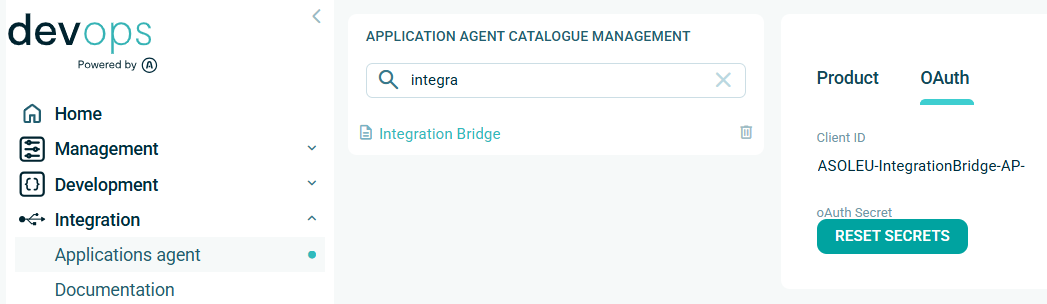
NATIVE APPLICATION: Create or reset credentials using DevOps application - Click to expand
Use DevOps application to obtain service account secrets for your external application. Link:
This process uses the tenant context of the customer, so you have to use a service account assigned exactly to application participating in the integration. Therefore, please find a appropriate application/agent in product catalog of your applications, and on the OAuth tab you will find the ClientId where you can generate new secrets. If the service account does not yet exist, it will be created automatically as part of the secret generation process. Later, when a customer buys your application on AVAplace store, the service account of your application will obtain automatically granted access to the customer's tenant.
Important: Please note that generating new secrets will invalidate the existing ones. You must then replace the old secrets everywhere they have been used so far with the newly generated ones.
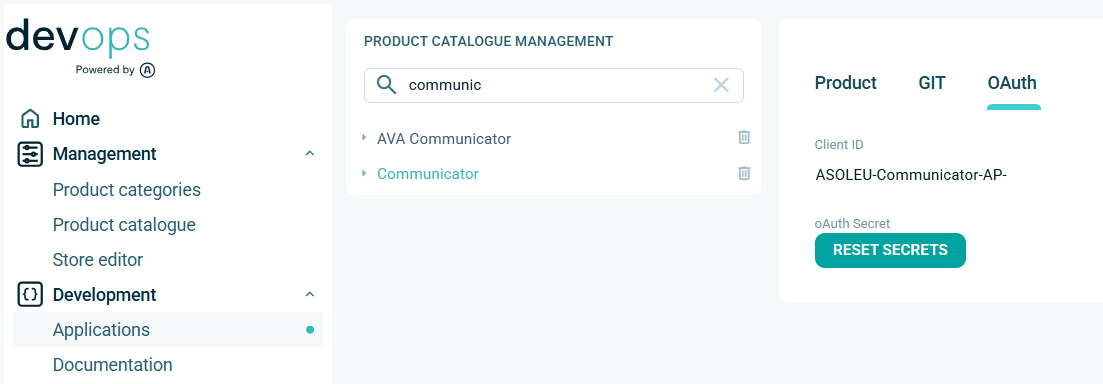
ONPREMISE INSTALLATION: Create or reset credentials using Connector application - Click to expand
Use ConnectorCatalogue application to obtain service account secrets for the on-premise installation of your external application. Link:
The business connector is registered for each ERP system per tenant only once, but integration agent for the specific ERP system can be installed multiple times. Each on-premise installation of the integration agent has own registration with unique agent code.
This process uses the tenant context of the customer, so you have to use a service account assigned exactly to application participating in the integration. Therefore, please find a appropriate application/agent in product catalog of your applications, and on the OAuth tab you will find the ClientId where you can generate new secrets. If the service account does not yet exist, it will be created automatically as part of the secret generation process. Later, when a customer buys your application on AVAplace store, the service account of your application will obtain automatically granted access to the customer's tenant.
Important: Please note that generating new secrets will invalidate the existing ones. You must then replace the old secrets everywhere they have been used so far with the newly generated ones.

Register data integration agent including consumer and tenant configuration
EXTERNAL APPLICATION: Register data integration agent using REST API - Click to expand
Global registration of your integration agent using DataService API.
When your integration agent isn't registered yet, it is created, otherwise it is updated with provided settings.
The registration also includes registration/configuration of message-gateway consumer.
Important: You must call this api with tenant context to provide also tenant-specific registration of integration agent and repeat atleast once for each accessible tenant.
Note: The global application code of your application is used as a unique identifier of your consumer,
and the registered consumer is tightly bound to the clientId of the service account used.
This means that the consumer can only be used together with the service account that registered it and cannot be changed.
See also:
- V2 REST API - Query parameters for agent identification
- Safe migration of integration agent definition from V1 to V2
- Check tenant-specific configuration of data-source using V1
Methods:
/api/v2/IntegrationAgents/Settings— Patch settings

request body:
| Property | Type | Description |
|---|---|---|
agentDefinition | The data-agent definition | |
agentDefinition.customProperties | array[key-value] | The custom properties (optional) |
agentDefinition.description | string | The description of data-agent (optional) |
sourceDefinition | The data-source definition | |
sourceDefinition.consumerType | string | The consumer type: None, Grpc, Webhook |
sourceDefinition.consumerWebhookUrl | string | Web-hook URL assigned to data-source |
sourceDefinition.customProperties | array[key-value] | The custom properties (optional) |
sourceDefinition.description | string | The description of data-source (optional) |
Important: Choose consumer type for your data integration external agent: Grpc or Webhook.
/api/v2/IntegrationAgents/ConfigureConsumer— Configure consumer (returns 204)
request body parameters:
| Property | Type | Required | Description |
|---|---|---|---|
settings.rateLimit | int? | No | the rate limit value representing how many messages will be delivered to consumer during given interval (null = no change). |
settings.rateLimitInterval | string | No | the rate limit interval (Second, Minute, Hour and Day) to control speed of message delivery (null = no change, empty string = remove limit). |
refreshSourceStatus | bool? | Yes | Enable/disable ASOL.DataService.RefreshSourceStatus message type (null = no change). |
refreshSourceConfig | bool? | No | Enable/disable ASOL.DataService.RefreshSourceConfig message type (null = no change). |
enqueueDataStatus | bool? | No | Enable/disable ASOL.DataService.EnqueueDataStatusChanged message type (null = no change). |
Note: you can setup flags together or independently (i.e. PATCH method), null means no change, empty string means clear value.
Important: Configure also common parameters and notifications like settings.*, refreshSourceStatus, refreshSourceConfig here.
Custom filters of the message consumer are configured by platform, not by integration agent.
See also:
- Handling of the RefreshStatus notification
- Handling of the RefreshConfig notification
- Data Integration API and Events
sample request body:
{
  "settings": {
    "rateLimit": 600,
    "rateLimitInterval": "Minute"
  },
  "refreshSourceConfig": true,
  "refreshSourceStatus": true,
  "enqueueDataStatus": true
}
/api/v2/IntegrationAgents/Settings— Get settings
response body parameters
| Property | Type | Description |
|---|---|---|
agent | The data-agent integration settings | |
agent.agentId | uuid | The data-agent identifier of integration agent |
agent.agentCode | string | The data-agent code of integration agent |
agent.enabled | bool | The flag if data-agent is registered in given tenant |
agent.description | string | The data-agent description (optional) |
source | The data-source integration settings | |
source.sourceId | uuid | The data-source identifier of integration agent |
source.sourceCode | string | The data-source code of integration agent |
source.isRegistered | bool | The flag if data-source is registered in given tenant |
source.enabled | bool | The flag if data-source is enabled in given tenant |
source.description | string | The source-agent description (optional) |
consumer | The message consumer settings | |
consumer.consumerCode | string | The message consumer code |
consumer.consumerChannel | string | The consumer channel: null, gRPC, Webhook |
consumer.consumerIsConnected | bool | The flag if consumer is connected or not |
consumer.consumerStatus | string | The status of the message consumer: Healthy, Degraded, Unhealthy |
consumer.consumerWebhookUrl | string | Web-hook URL assigned to integration agent |
sample response:
{
  "agent": {
    "agentId": "9d60daaa-4fb5-4d80-a78b-80c4f5a550de",
    "agentCode": "ASOLEU-DataIntegrationExample-AP-",
    "enabled": true,
    "customProperties": [
      {
        "key": "AutoRefreshStatusInterval",
        "value": "0.01:00:00"
      }
    ]
  },
  "source": {
    "sourceId": "9d60daaa-4fb5-4d80-a78b-80c4f5a550de",
    "sourceCode": "ASOLEU-DataIntegrationExample-AP-",
    "applicationCode": "ASOLEU-DataIntegrationExample-AP-",
    "enabled": true,
    "isRegistered": true,
    "consumerCode": "ASOLEU-DataIntegrationExample-AP-",
    "consumerType": "Grpc"
  },
  "consumer": {
    "consumerCode": "ASOLEU-DataIntegrationExample-AP-",
    "consumerChannel": "gRPC",
    "consumerIsConnected": true,
    "consumerStatus": "Healthy"
  }
}
NATIVE APPLICATION: Register data integration agent using REST API - Click to expand
Global registration of your integration agent using DataService API.
When your integration agent isn't registered yet, it is created, otherwise it is updated with provided settings.
Important: You must call this api with tenant context to provide also tenant-specific registration of integration agent and repeat atleast once for each accessible tenant.
Note: Native applications do not use a message consumer, because they consume notification messages natively using the message broker directly, see SDK - Core.Messaging.
See also:
- V2 REST API - Query parameters for agent identification
- Safe migration of integration agent definition from V1 to V2
- Check tenant-specific configuration of data-source using V1
Methods:
/api/v2/IntegrationAgents/Settings— Patch settings
request body:
| Property | Type | Description |
|---|---|---|
agentDefinition | The data-agent definition | |
agentDefinition.customProperties | array[key-value] | The custom properties (optional) |
agentDefinition.description | string | The description of data-agent (optional) |
sourceDefinition | The data-source definition | |
sourceDefinition.consumerType | string | The consumer type: None, Grpc, Webhook |
sourceDefinition.consumerWebhookUrl | string | Web-hook URL assigned to data-source |
sourceDefinition.customProperties | array[key-value] | The custom properties (optional) |
sourceDefinition.description | string | The description of data-source (optional) |
Important: Choose consumer type for your data integration embedded agent: None.
/api/v2/IntegrationAgents/Settings— Get settings
response body parameters
| Property | Type | Description |
|---|---|---|
agent | The data-agent integration settings | |
agent.agentId | uuid | The data-agent identifier of integration agent |
agent.agentCode | string | The data-agent code of integration agent |
agent.enabled | bool | The flag if data-agent is registered in given tenant |
agent.description | string | The data-agent description (optional) |
source | The data-source integration settings | |
source.sourceId | uuid | The data-source identifier of integration agent |
source.sourceCode | string | The data-source code of integration agent |
source.isRegistered | bool | The flag if data-source is registered in given tenant |
source.enabled | bool | The flag if data-source is enabled in given tenant |
source.description | string | The source-agent description (optional) |
{
  "agent": {
    "agentId": "70ca540d-44a8-47be-b237-54854acacc5a",
    "agentCode": "ASOLEU.BankApp",
    "enabled": true,
    "description": "ASOLEU BankApp multi-tenant service"
  },
  "source": {
    "sourceId": "aaef66df-377f-45fe-96e9-74372a17450b",
    "sourceCode": "ASOLEU.BankApp",
    "applicationCode": "ASOLEU-BankApp-AP-",
    "enabled": true,
    "isRegistered": true,
    "consumerCode": "ASOLEU-BankApp-AP-",
    "consumerType": "None",
    "description": "ASOLEU BankApp multi-tenant service"
  }
}
ONPREMISE INSTALLATION: Register data integration agent using REST API - Click to expand
Registration of your integration agent has been already done in previous step.
You can update settings or check the registration status of your on-premise agent using REST API.
The registration also includes registration/configuration of message-gateway consumer.
Important: You must call this api with tenant context and tenant-specific registration/configuration of integration agent.
Note: The agent-code obtained from the Connector application is used as a unique identifier of your consumer,
and the registered consumer is tightly bound to the clientId of the service account used.
This means that the consumer can only be used together with the service account that registered it and cannot be changed.
See also:
- V2 REST API - Query parameters for agent identification
- Safe migration of integration agent definition from V1 to V2
- Check tenant-specific configuration of data-source using V1
Methods:
/api/v2/IntegrationAgents/OnPremiseSettings— Patch on-premise settings
request body:
| Property | Type | Description |
|---|---|---|
agentDefinition | The data-agent definition | |
agentDefinition.customProperties | array[key-value] | The custom properties (optional) |
agentDefinition.description | string | The description of data-agent (optional) |
sourceDefinition | The data-source definition | |
sourceDefinition.consumerType | string | The consumer type: None, Grpc, Webhook |
sourceDefinition.consumerWebhookUrl | string | Web-hook URL assigned to data-source |
sourceDefinition.customProperties | array[key-value] | The custom properties (optional) |
sourceDefinition.description | string | The description of data-source (optional) |
Important: Choose consumer type for your data integration on-premise agent: Grpc or Webhook.
/api/v2/IntegrationAgents/ConfigureConsumer— Configure consumer (returns 204)
request body parameters:
| Property | Type | Required | Description |
|---|---|---|---|
settings.rateLimit | int? | No | the rate limit value representing how many messages will be delivered to consumer during given interval (null = no change). |
settings.rateLimitInterval | string | No | the rate limit interval (Second, Minute, Hour and Day) to control speed of message delivery (null = no change, empty string = remove limit). |
refreshSourceStatus | bool? | Yes | Enable/disable ASOL.DataService.RefreshSourceStatus message type (null = no change). |
refreshSourceConfig | bool? | No | Enable/disable ASOL.DataService.RefreshSourceConfig message type (null = no change). |
enqueueDataStatus | bool? | No | Enable/disable ASOL.DataService.EnqueueDataStatusChanged message type (null = no change). |
Note: you can setup flags together or independently (i.e. PATCH method), null means no change, empty string means clear value.
Important: Configure also common parameters and notifications like settings.*, refreshSourceStatus, refreshSourceConfig here.
Custom filters of the message consumer are configured by platform, not by integration agent.
See also:
- Handling of the RefreshStatus notification
- Handling of the RefreshConfig notification
- Data Integration API and Events
sample request body:
{
  "settings": {
    "rateLimit": 600,
    "rateLimitInterval": "Minute"
  },
  "refreshSourceConfig": true,
  "refreshSourceStatus": true,
  "enqueueDataStatus": true
}
/api/v2/IntegrationAgents/OnPremiseSettings— Get on-premise settings
response body parameters
| Property | Type | Description |
|---|---|---|
agent | The data-agent integration settings | |
agent.agentId | uuid | The data-agent identifier of integration agent |
agent.agentCode | string | The data-agent code of integration agent |
agent.enabled | bool | The flag if data-agent is registered in given tenant |
agent.description | string | The data-agent description (optional) |
source | The data-source integration settings | |
source.sourceId | uuid | The data-source identifier of integration agent |
source.sourceCode | string | The data-source code of integration agent |
source.isRegistered | bool | The flag if data-source is registered in given tenant |
source.enabled | bool | The flag if data-source is enabled in given tenant |
source.description | string | The source-agent description (optional) |
consumer | The message consumer settings | |
consumer.consumerCode | string | The message consumer code |
consumer.consumerChannel | string | The consumer channel: null, gRPC, Webhook |
consumer.consumerIsConnected | bool | The flag if consumer is connected or not |
consumer.consumerStatus | string | The status of the message consumer: Healthy, Degraded, Unhealthy |
consumer.consumerWebhookUrl | string | Web-hook URL assigned to integration agent |
sample response:
{
  "agent": {
    "agentId": "3406b5d2-298f-4035-8f50-479b75d12f2f",
    "agentCode": "ASOLEU-DEV-fd9ad6b9-2f29-4c7a-9a3a-c7469e19b1ff-MAF-YsZfSZLuH0qdQgzWckqnfw",
    "enabled": true,
    "customProperties": [
      {
        "key": "AutoRefreshStatusInterval",
        "value": "0.01:00:00"
      }
    ]
  },
  "source": {
    "sourceId": "890eab3f-4023-4c65-a37f-98700c0194a2",
    "sourceCode": "ASOLEU-DEV-fd9ad6b9-2f29-4c7a-9a3a-c7469e19b1ff-MAF-YsZfSZLuH0qdQgzWckqnfw",
    "applicationCode": "ASOLEU-DataIntegrationOnPremiseExample-AP-",
    "enabled": true,
    "isRegistered": true,
    "consumerCode": "ASOLEU-DEV-fd9ad6b9-2f29-4c7a-9a3a-c7469e19b1ff-MAF-YsZfSZLuH0qdQgzWckqnfw",
    "consumerType": "Grpc",
    "customProperties": [
      {
        "key": "ProviderType",
        "value": "Example"
      }
    ]
  },
  "consumer": {
    "consumerCode": "ASOLEU-DEV-fd9ad6b9-2f29-4c7a-9a3a-c7469e19b1ff-MAF-YsZfSZLuH0qdQgzWckqnfw",
    "consumerChannel": "gRPC",
    "consumerIsConnected": true,
    "consumerStatus": "Healthy"
  }
}
Setup parameters to publish data
When you want to start to send data from your application/agent via AVAplatform orchestrator you need to setup the input-data transformation for your integration agent first or you need to use the mapping directives instead. The sent data are stored into input-queue then processed by the orchestrator based on the defined transformations or mapping directives and at the end published for the subscribed integration agents.
See also:
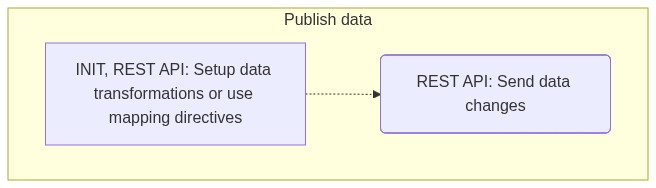
How to start setup data transformations - Click to expand
-
/api/v2/IntegrationAgents/Transformations— Patch transformations (returns 204) -
sample request body (shortened):
{
  "upsert": [
    {
      "customCode": "Example-Entities",
      "mappings": [
        {
           ...model mapping...
        },
        ...
      ]
    }
  ],
  "remove": [
    "Example-Entities"
  ],
  "removeAll": true
}
-
/api/v2/IntegrationAgents/Transformations— Get transformation settings -
sample response (shortened):
{
  "sourceId": "9d60daaa-4fb5-4d80-a78b-80c4f5a550de",
  "transformations": {
    "totalCount": 5,
    "items": [
      {
        "customCode": "Example-Entities",
        "mappings": [
          {
             ...model mappings...
          }
      },
      ...
    ]
  }
}
How to start with publishing data - Click to expand
/api/v2/SourcingData/EnqueueData/start— Start new enqueue operation/api/v2/SourcingData/EnqueueData/append— Append records to operation

Query Parameters: /api/v2/SourcingData/EnqueueData/start (POST)
| Parameter | Type | Required | Description |
|---|---|---|---|
SourceId | string (uuid) | Yes | The data-source identifier |
clientId | string | No | Client/tenant identifier |
operationId | string | No | Explicit operation context identifier |
Query Parameters: /api/v2/SourcingData/EnqueueData/append (POST)
| Parameter | Type | Required | Description |
|---|---|---|---|
SourceId | string (uuid) | Yes | The data-source identifier |
clientId | string | No | Client/tenant identifier |
operationId | string | Yes | The operation identifier to append to |
Structure for POST requests (/start and /append):
{
  "mappingDirectives": [
    {
      "preserveEntityMapping": <bool>,
      "modelId": "<uuid>",
      "priority": <int>,
      "transformationType": "Default|Custom",
      "options": [
         ...key-value pairs...
      ],
      "replaceCommonFields": <bool>,
      "replaceCustomFields": <bool>,
      "mandantCodeIsRequired": <bool>
    }
  ],
    "items": [
    {
      "mappingDirectives": [
        {
          "preserveEntityMapping": <bool>,
          "modelId": "<uuid>",
          "priority": <int>,
          "transformationType": "Default|Custom",
          "options": [
             ...key-value pairs...
          ],
          "replaceCommonFields": <bool>,
          "replaceCustomFields": <bool>,
          "mandantCodeIsRequired": <bool>
        }
      ],
      "entityMappingId": "<string>",
      "entityId": "<string>",
      "recordId": "<string>",
      "referenceId": "<uuid>",
      "mandantCode": "<string>",
      "data": { ...json object or null... },
      "customData": { ...json object or null... },
      "isDeleted": <bool>
    }
  ],
  "incompleteData": <bool>
}
- sample request body (shortened):
{
  "mappingDirectives": [
    {
      "modelId": "8f857298-0d7d-4919-b652-78690a34d094",
      "mandantCodeIsRequired": true
    }
  ],
  "items": [
    {
      "entityId": "my-books",
      "recordId": "book1",
      "referenceId": "3fa85f64-5717-4562-b3fc-2c963f66afa6",
      "mandantCode": "64949541|CZ",
      "data": {
          "code": "9788076830066",
          "name": "Do hrobu si to nevemu",
          "description": "Glosy a vzpomínky Karla Šípa, které vás zasáhnou přímo do bránice.",
          "publishingYear": 2021,
          "author": {
               "_type": "IncomingLookupObject",
               //alt: "externalId": "author1.my-authors.<data-source-id>",
               "sourceRecordId": author1,
               "sourceEntityId": "my-authors"
          }
        },
      "isDeleted": false
    }
  ],
  "incompleteData": false
}
Setup parameters to consume data
When you want to read data for your application/agent via AVAplatform orchestrator you need to call appropriate querying API endpoint.
The data are sorted in descending order by modification datetime and it is expected that you retrieve them using client paging (offset and limit) if necessary.
In this case you should keep the timestamp of already retrieved data and then use pooling method to check and retrieve any new data available.
See also:
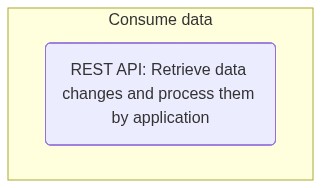
How to start with querying data - Click to expand
/api/v2/QueryingData/GetData— querying of processed data with filters/api/v2/QueryingData/GetData/ReferencedByFK— querying of processed data with foreign-key reference filters/api/v2/QueryingData/GetData/FilteredByAK— querying of processed data with alternate-key filters
query parameters:
| Parameter | Type | Required | Description |
|---|---|---|---|
externalId | string | No | Filter data by fully qualified identifier of external system data-record |
includeDeleted | boolean | No | Flag to include data marked as deleted (note: deleted data are available for limited time only after their deletion) |
includeLookupProperties | boolean | No | The comma-separated list of properties or navigation paths to include (i.e. properties of LookupEntity datatype) |
mandantCode | string | No | Filter to mandant-specific and non-mandant data or filter to non-mandant data only when null |
allMandants | boolean | No | Include all mandant-specific data and non-mandant data |
modelId | string (uuid) | Yes | Identifier of the data-model to query |
modifiedFrom + modifiedTo | string (ISO 8601) | No | datetime range to filter data records by modification datetime |
offset + limit | integer | No | The client paging parameters (default values: offset = 0 and limit = 100) |
operationId | string | No | Identifier of virtual operation context |
options | string | No | Output json formatting options (e.g., field selections, advanced filters) |
publisherSourceId | string | No | Filter data by publisher data-source identifier |
recordId | string (uuid) | No | Filter data by the internal data-record identifier |
referenceId | string | No | Filter data by the reference identifier of data-record from primary data-source |
selfSourceOnly | boolean | No | The flag to apply self-source filter, it is similar to the publisherSourceId filter when your own data-source is used |
response
- Response statuses
200 OK:{ totalCount, items[] }400 Bad Request: invalid filter (e.g. malformed GUID)412 Precondition failed: unsatisfied requirements (e.g. missing integration profile)
Data-record system properties
id- (mandatory) the internal identifier of data-recordmodelId- (mandatory) the data-model identifier (Guid)recordId- (mandatory) the data-record identifier (Guid)
externalId- the external identifier of data-record provided by publisher ('<recordId>.<entityId>.<sourceId>')sourceId- (guid) the identifier of publisher data-sourcereferenceId- (guid) the reference identifier of original record from primary data-sourcemandantCode- the mandant identifier (i.e. the code of organization representing mandant in given tenant context) or null for non-mandant datautcModifiedOn- the datetime of last modificationdeleted- (optional) flag that the data-record was recently deleted
Sample response of collection result (shortened):
{
  "totalCount": 145,
  "items": [
    {
      "Id": {
        "ModelId": "ad7b68b7-90e2-4de4-81f6-18fa325e5ee1",
        "RecordId": "0accec93-ff52-4cc4-85e7-35fa7ac50c17"
      },
      "ExternalId": "1.1519f11b-339a-4262-ac4f-77c33aba10a8.0eb2bab7-fe8c-4a13-be1f-2db877c4b455",
      "SourceId": "0eb2bab7-fe8c-4a13-be1f-2db877c4b455",
      "ReferenceId": "bb114374-816d-47f3-a2bc-3f37d9796555",
      "MandantCode": "64949541|CZ",
      "UtcCreatedOn": "2022-05-26T14:45:53.685Z",
      "UtcModifiedOn": "2023-02-13T13:55:30.942Z",
      "Code": "01",
      "Name": {
        "values": [
          {
            "locale": "cs-CZ",
            "value": "Ekonomický ředitel"
          }
        ]
      }
    },
    ...
  ]
}
Setup parameters to notifications
When you want to start to receive notifications to your application/agent via AVAplatform orchestrator you need to setup the message consumer and consumer settings for your integration agent. Then you have been notified about data-changes provided by other data-sources (i.e. data publishers) and you can decide to consume data by the processed-data results in your application.
See also:
- V2 REST API - Query parameters for agent identification
- Check tenant-specific configuration of data-source using V1
- Register data integration agent including consumer and tenant configuration
- Register integration agent for data integration using V2 or V1
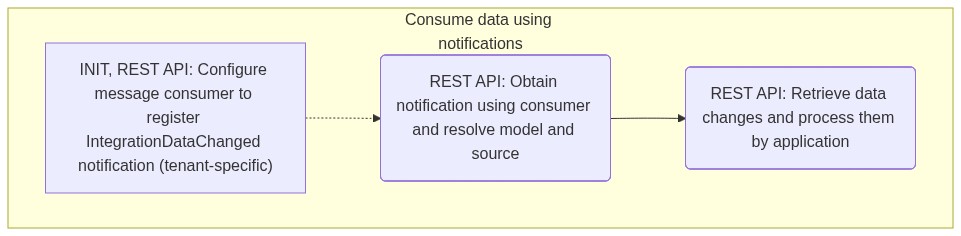
How to configure message consumer to receive notifications about data-changes - Click to expand
Note: This step assumes that the message consumer of the integration agent is already registered.
/api/v2/IntegrationAgents/ConfigureConsumer— Configure consumer (returns 204)
request body parameters:
| Property | Type | Required | Description |
|---|---|---|---|
dataRecordChanges | bool? | No | OBSOLETE: Enable/disable ASOL.DataService.RecordCreated, ASOL.DataService.RecordUpdated and ASOL.DataService.RecordDeleted message types with multi-tenant filter (null = no change). |
integrationDataChanges | bool? | No | Enable/disable ASOL.DataService.IntegrationDataChanged message type with multi-tenant filter (null = no change). |
refreshTenants | bool | No | The flag to replace(=true) all existing tenant filters or add/remove(=false) current tenant filter for message types with multi-tenant filter (default: false). Warning: Use with caution! |
Note: you can setup flags together or independently (i.e. PATCH method), null means no change, empty string means clear value.
Note: The integration agent turns on/off the appropriate notifications of the message consumer, but the syntax of custom filters is defined by the integration orchestrator, not by the integration agent itself.
See also:
sample request body:
{
  "integrationDataChanges": true,
  "refreshTenants": false
}
How to configure consumer settings (optional) - Click to expand
Consumer settings serve as one of the available client-side mechanisms for filtering data notifications;
the configuration is stored in tenant-specific metadata of the data-source.
The consumer settings can be advantageously used to store the scope of consumed data at the level of data models and data sources,
especially if the application does not implement such configuration on its own.
Technically, this means that the filter of message consumer defined in the message gateway, which is applied when inserting a notification into the queue, performs only coarse filtering (with the granularity provided by the notification message itself, e.g.: the tenant context), rather than at the level of individual data-models, data-sources, or even data-records.
Note: In the future, this client-side filtering mechanism will be replaced by filtering using integration profiles (using permanent filters when querying data).
/api/v1/DataSources/{id}/ConsumerSettings/Model- set tenant-specific consumer settings for data-source and data-model

request body:
{
  "modelId": "3fa85f64-5717-4562-b3fc-2c963f66afa6",
  "includedSourceIds": [
    "417484a7-3279-4855-9226-70478e325b73"
  ]
}
-
/api/v1/DataSources/{id}/ConsumerSettings/Model/{modelId}- delete tenant-specific consumer settings for data-source and data-model -
/api/v1/DataSources/{id}— retrieve tenant-specific consumer settings as part of data-source metadata

sample response (shortened):
{
    ...
    "consumerSettings": [
        {
            "modelId": "3614f58e-dff5-4444-a6c4-10c81d7304f2",
            "includedSourceIds": [
            "417484a7-3279-4855-9226-70478e325b73"
            ]
        },
        {
            "modelId": "46f630b1-dfdd-4aa8-a79b-92106eb38c07",
            "includedSourceIds": [
            "417484a7-3279-4855-9226-70478e325b73"
            ]
        }
    ],
    ...
}
How to start with querying data - Click to expand
/api/v2/QueryingData/GetData/{resultId}— querying of processed data by resultId/api/v2/QueryingData/GetData/{resultId}/ModelResults— querying of processed data by resultId
query parameters:
| Parameter | Type | Required | Description |
|---|---|---|---|
externalId | string | No | Filter data by fully qualified identifier of external system data-record |
includeDeleted | boolean | No | Flag to include data marked as deleted (note: deleted data are available for limited time only after their deletion) |
includeLookupProperties | boolean | No | The comma-separated list of properties or navigation paths to include (i.e. properties of LookupEntity datatype) |
mandantCode | string | No | Filter to mandant-specific and non-mandant data or filter to non-mandant data only when null |
allMandants | boolean | No | Include all mandant-specific data and non-mandant data |
modelId | string (uuid) | No | Identifier of the data-model to query, when ommitted then data from multiple data-models are returned |
modifiedFrom + modifiedTo | string (ISO 8601) | No | datetime range to filter data records by modification datetime |
offset + limit | integer | No | The client paging parameters (default values: offset = 0 and limit = 100) |
operationId | string | No | Identifier of virtual operation context |
options | string | No | Output json formatting options (e.g., field selections, advanced filters) |
publisherSourceId | string | No | Filter data by publisher data-source identifier |
recordId | string (uuid) | No | Filter data by the internal data-record identifier |
referenceId | string | No | Filter data by the reference identifier of data-record from primary data-source |
selfSourceOnly | boolean | No | The flag to apply self-source filter, it is similar to the publisherSourceId filter when your own data-source is used |
response
- Response statuses
200 OK:{ totalCount, items[] }400 Bad Request: invalid filter (e.g. malformed GUID)404 Not Found: unavailable resource (e.g. non-existing resultId)412 Precondition failed: unsatisfied requirements (e.g. missing integration profile)
Data-record system properties
id- (mandatory) the internal identifier of data-recordmodelId- (mandatory) the data-model identifier (Guid)recordId- (mandatory) the data-record identifier (Guid)
externalId- the external identifier of data-record provided by publisher ('<recordId>.<entityId>.<sourceId>')sourceId- (guid) the identifier of publisher data-sourcereferenceId- (guid) the reference identifier of original record from primary data-sourcemandantCode- the mandant identifier (i.e. the code of organization representing mandant in given tenant context) or null for non-mandant datautcModifiedOn- the datetime of last modificationdeleted- (optional) flag that the data-record was recently deleted
Sample response of collection result (shortened):
{
  "totalCount": 145,
  "items": [
    {
      "Id": {
        "ModelId": "ad7b68b7-90e2-4de4-81f6-18fa325e5ee1",
        "RecordId": "0accec93-ff52-4cc4-85e7-35fa7ac50c17"
      },
      "ExternalId": "1.1519f11b-339a-4262-ac4f-77c33aba10a8.0eb2bab7-fe8c-4a13-be1f-2db877c4b455",
      "SourceId": "0eb2bab7-fe8c-4a13-be1f-2db877c4b455",
      "ReferenceId": "bb114374-816d-47f3-a2bc-3f37d9796555",
      "MandantCode": "64949541|CZ",
      "UtcCreatedOn": "2022-05-26T14:45:53.685Z",
      "UtcModifiedOn": "2023-02-13T13:55:30.942Z",
      "Code": "01",
      "Name": {
        "values": [
          {
            "locale": "cs-CZ",
            "value": "Ekonomický ředitel"
          }
        ]
      }
    },
    ...
  ]
}
Specific use-cases
Handling of the RefreshStatus notification
The RefreshStatus notification performs a regular tenant notification (every hour) so that the platform can verify that
the integration agent is alive, ready to work, and connected to the integrated application.
For external applications this setting is mandatory, including on-premise agent installations.
Important: If the agent does not respond, or reports a problem, a warning is displayed in the tenant administration UI and it is treated as a support issue that may affect the data integration functionality and needs to be resolved (see Integration Smartchecks).
Check and send current status of integration agent - Click to expand
/api/v2/IntegrationAgents/Statuses— Get status history of integration agent/api/v2/IntegrationAgents/Statuses— Set a new status (returns 204)

//check and send current data-source status to data-service
_logger.LogDebug("Refresh status command for tenant: '{tenantId}'", tenantId);
bool isReady = true;         //alt: check if attached application is ready to work (for specified tenant context)
string[] verboseStatus = []; //alt: append verbose status with details
var status = new IntegrationAgentSetStatusModel
{
    OperationId = null, //alt: Guid.NewGuid().ToString(); //writes status also to operating log when operationId is set
    UtcTimestamp = DateTime.UtcNow,
    IsLive = true,      //flag if agent is alive
    IsReady = isReady,  //flag if agent and attached application is working / ready to work
    VerboseStatus = verboseStatus,
    Version = _versionProvider.GetCurrentVersion(),
};
await _dsConnector.SetAgentStatusAsync(status);
See also:
Handling of the RefreshConfig notification
The RefreshConfig notification informs about a change in the integration agent’s metadata configuration.
For all application types this is optional. If the application/agent uses caching of configuration metadata,
it should reload the metadata when processing this notification; otherwise it may work with outdated metadata,
which can affect the integration behavior.
Reset and reload metadata cache of integration agent - Click to expand
//reset and reload configuration
_logger.LogDebug("Refresh config command for tenant: '{tenantId}'", tenantId);
_cache.ResetConfiguration();
_ = await _cache.GetConfigurationAsync();
See also:
Query parameters for agent identification using V2
When using the V2 REST API under normal conditions with the integration agent’s service account,
the agent is automatically identified by the clientId parameter, which is derived from the authentication token of the service account used for authentication.
V2 REST API: Query parameters for agent identification - Click to expand
If it is necessary to use the V2 REST API during a support intervention with a user account instead of a service account,
the clientId parameter must be explicitly provided to ensure correct identification of the agent being serviced.
The sourceId parameter is used for unambiguous identification of the integration agent’s data source.
It is intended for edge cases where identification via the clientId parameter fails — for example, during migration from V1 to V2,
or in situations where the configuration is inconsistent and the current state needs to be diagnosed.
| Parameter | Type | Required | Description |
|---|---|---|---|
clientId | string | No | The client identifier (optional) |
sourceId | string (uuid) | No | The identifier of the data-source (optional) |
Note: The clientId parameter must be provided when a support user account is used instead of a service account.
Under standard operation, the clientId is automatically extracted from the service account’s authentication token.
Note: The sourceId parameter may be used during initial V1 → V2 migration to ensure that patch operations preserve the existing sourceId and do not create a new one.
Safe migration of integration agent definition from V1 to V2
First, verify the validity of the assignment by using GET /api/v2/IntegrationAgents/Settings to obtain the current configuration of the agent.
If you do not get the existing configuration, you need to call PATCH /api/v2/IntegrationAgents/Settings once with the sourceId identifier explicitly specified,
so that the V1 configuration is paired with the service account of your application.
After the pairing, you can use V2 without having to specify sourceId.
Important: The published data are tightly coupled with a specific data-source identifier via externalId.
Therefore, it is important to ensure that no new agent registration with a new sourceId is created during the migration.
If a duplicate registration of the integration agent with a different sourceId has already been created unintentionally,
you must contact AVAplace support to fix it.
Check tenant-specific configuration of data-source using V1
You can use the V1 REST API to obtain the more detailed tenant-specific configuration of the integration agent. You have to call it with the tenant-specific context and it works for all types of applications/agents.
You can check the key properties to verify that the agent is properly registered and configured in the tenant, defined in the appropriate access level and assigned to appropriate application / service account.
V1 REST API: Check tenant-specific configuration of data-source - Click to expand

/api/v1/DataSources/{id}
The comparison table of key properties and their expected values for different types of applications:
| Property | External cloud-based application | Native application | On-premise installation |
|---|---|---|---|
| accessLevel | Public | Public | Private |
| applicationCode | global application code of external application in DevOps | global application code of native application in DevOps | global application code of ERP system in DevOps |
| clientId | service account equals to global application code | service account equals to global application code | service account equals to the agent code assigned in ConnectorCatalogue |
| consumerCode | global application code | Optional (can be empty). If present, must equal the global application code | the agent code assigned in ConnectorCatalogue |
| consumerType | "Grpc" or "Webhook" | "None" | "Grpc" |
| deleted | false (at both data-agent and data-source levels) | false (at both data-agent and data-source levels) | false (at both data-agent and data-source levels) |
| enabled | true (at both data-agent and data-source levels) | true (at both data-agent and data-source levels) | true (at both data-agent and data-source levels) |
| isRegistered | true | true | true |
| released | true (at both data-agent and data-source levels) | true (at both data-agent and data-source levels) | true (at both data-agent and data-source levels) |
Sample response:
{
  "id": "788dcf1c-72e8-4a1d-b1e3-3e9bb15aa4c4",
  "agentId": "a7088739-096d-4802-b1bc-a8d4bbf1214e",
  "agent": {
    "id": "a7088739-096d-4802-b1bc-a8d4bbf1214e",
    "code": "ASOLEU-MAF-8_LtZ-Wma0adyQu2RPK7dQ",
    "customCode": "8_LtZ-Wma0adyQu2RPK7dQ",
    "providerCodes": [
      "ASOLEU-EXAMPLEFTR-FE-"
    ],
    "description": "",
    "enabled": true,
    "released": true,
    "deleted": false
  },
  "name": "ASOLEU-MAF-8_LtZ-Wma0adyQu2RPK7dQ",
  "description": "",
  "enabled": true,
  "released": true,
  "deleted": false,
  "utcCreatedOn": "2025-12-02T17:22:42.426Z",
  "utcModifiedOn": "2025-12-02T17:22:42.514Z",
  "accessLevel": "Private",
  "customProperties": [
    {
      "key": "ProviderType",
      "value": "Example"
    }
  ],
  "isRegistered": true,
  "applicationCode": "ASOLEU-DataIntegrationOnPremiseExample-AP-",
  "applicationId": "0df3add0-19f2-45dd-a0fd-451ec8821be0",
  "clientId": "ASOLEU-MAF-8_LtZ-Wma0adyQu2RPK7dQ",
  "consumerType": "Grpc",
  "consumerCode": "ASOLEU-MAF-8_LtZ-Wma0adyQu2RPK7dQ",
  "useIntegrationProfile": false,
  "useConsumerSettings": false
}
Example of data integration agent
EXTERNAL APPLICATION: Example of data integration agent (.NET) - Click to expand
NuGet feed to get packages for backend development packages:
https://pkgs.dev.azure.com/avaspace/feed/_packaging/feed/nuget/v3/index.json
Integration agent example for data integration of external application:
DataIntegration.ExternalAgent represents example how to implement bridge providing tightly-coupled data integration between partner's application and AVAPLACE platform services.
Download example here:
Important: Unpack README.md file for more instructions.
How to start with example:
- Register and release external application in Management section of Product/DevOps application on AVAplace.
- Generate service account and secrets using application's agent in Integration section of Product/DevOps application.
- Configure
appsettings.jsonand/orsecrets.jsonwith requested values. - Run the one-time agent setup using endpoints in
MaintenanceController:SetupIntegrationAgentSettings,SetupInputTransformationsandSetupConsumerSettings. - Restart the agent service to reinitialize and you can use
GetDataServiceConfigurationandGetIntegrationAgentSettingsto get configuration. - Run various example data integration flows using endpoints in
DataIntegrationExamplesController.
NATIVE APPLICATION: Example of data integration agent (.NET) - Click to expand
NuGet feed to get packages for backend development packages:
https://pkgs.dev.azure.com/avaspace/feed/_packaging/feed/nuget/v3/index.json
Integration agent example for data integration of native application:
NativeApp.DataIntegration.Utility represents example how to implement embedded agent providing tightly-coupled data integration between AVAnative application and AVAPLACE platform services.
Download example here:
- (2025-05-09) NativeApp.DataIntegration.Utility.src.zip
Important: Unpack README.md file for more instructions.
How to start with example:
- Unpack package to API project of your AVAnative application and setup resources and references.
- Register functionality using dependency injection
StartupDsApiClients.AddDsApiClients(). - Run the one-time agent setup using endpoints in
MaintenanceController:SetupIntegrationAgentSettings,SetupDataTransformations_ExampleModel. - Run various example data integration flows using endpoints in
DataIntegrationExamplesController.
ONPREMISE INSTALLATION: Example of data integration agent (.NET) - Click to expand
NuGet feed to get packages for backend development packages:
https://pkgs.dev.azure.com/avaspace/feed/_packaging/feed/nuget/v3/index.json
Integration agent example for data integration of onpremise installation:
DataIntegration.OnPremiseAgent represents example how to implement bridge providing tightly-coupled data integration between customer's on-premise installation and AVAPLACE platform services.
Download example here:
Important: Unpack README.md file for more instructions.
How to start with example:
- Register agent for 'OnPremiseAgent Example' in Connector Catalogue application on AVAplace.
- Generate service account and secrets using agent wizard in Connector Catalogue.
- Configure
appsettings.jsonand/orsecrets.jsonwith provided values. - Run the one-time agent setup using endpoints in
MaintenanceController:SetupIntegrationAgentSettings,SetupInputTransformationsandSetupConsumerSettings. - Restart the agent service to reinitialize and yu can use
GetDataServiceConfigurationandGetIntegrationAgentSettingsto get configuration. - Run various example data integration flows using endpoints in
DataIntegrationExamplesController.
FAQ
How to solve - Problem of missing integrated application when registrating integration agent? - Click to expand
Q: How to solve BadRequest (400) response when calling registration of integration agent?
e.g. error: IntegratedApplication 'ASOLEU-DataIntegrationExampleX-AP-' isn't available.
A: It means that the synchronization of your application definition between PDM and integration orchestrator failed and
the registration of integrated application isn't available.
In this case you need to call AVAplace support to solve the problem.
References
See also: