Connector registration
Connector registration for multi-tenant cloud services
Use DevOps application for connector management (e.g. client credentials).
- Use
Product ApporDevOps Appto register your application - Use
Application agent catalogueinIntegrationsection to get clientId and reset secrets - Use REST API for registration and configuration of data-agent, see below
Register integration-agent using REST API
The registration process of data-agent/data-source for multi-tenant cloud services using DataService backend service. The data-agent and data-source must be registered once for each tenant.
Important: Use GUID generator to generate unique identifier of your data-agent and data-source. Use the same GUIDs for all tenants.
Note: don't forget to enable data-agent and data-source to turn on data-integration processing.
DataService API base URL: https://{hostname}/api/asol/ds
V2 IntegrationAgents API endpoints for data integration - Preferred
Important: The identification of integration agent is primarily driven by service account.
The multi-tenant integration agent is registered once and the registration is shared per all tenants.
The sourceId parameter is used to specify data-source identifier for compatibility reasons when necessary.
The clientId parameter is used by support user(s) to specify service account explicitly for diagnostic purposes only.
Note: These V2 API endpoints (except Settings) can be used by both: the multi-tenant and single-tenant integration agents.
Settings endpoints
The Settings endpoints can be used by multi-tenant integration agent(s) only.
- Try get definition of the multi-tenant integration-agent
GET /api/v2/IntegrationAgents/Settings
sourceId- (optional) the identifier of data-source (e.g.DataSourceId/SourceIdof data-integration agent)- server response:
- 200 - means that integration-agent is already registered
- 404 - means that integration-agent isn't registered yet
- sample response body:
{
  "agent": {
    "agentId": "1a83fde1-8cdb-4481-a503-bf7a22afeafe",
    "agentCode": "ASOLEU-DataIntegrationExample-AP-",
    "enabled": true
  },
  "source": {
    "sourceId": "1a83fde1-8cdb-4481-a503-bf7a22afeafe",
    "sourceCode": "ASOLEU-DataIntegrationExample-AP-",
    "applicationCode": "ASOLEU-DataIntegrationExample-AP-",
    "enabled": true,
    "consumerCode": "ASOLEU-DataIntegrationExample-AP-",
    "consumerType": "Grpc"
  },
  "consumer": {
    "consumerCode": "ASOLEU-DataIntegrationExample-AP-",
    "consumerChannel": "gRPC",
    "consumerIsConnected": false,
    "consumerStatus": "Healthy"
  }
}
- Register the multi-tenant integration-agent or update registration of integration-agent if not registered
POST /api/v2/IntegrationAgents/Settings
sourceId- (optional) the identifier of data-source (e.g.DataSourceId/SourceIdof data-integration agent)- request body properties:
agentDefinitiondescription- (optional) the description of data-agentcustomProperties- (optional) the custom properties to customize data-agent behavior- Important: set
AutoRefreshStatusIntervalwhen therefreshSourceStatusnotification is turned on by message consumer
- Important: set
sourceDefinitiondescription- (optional) the description of data-sourcecustomProperties- (optional) the custom properties to customize data-source behaviorconsumerType- the type of used message consumer (values:Grpc,WebhookorNone)- Important: mandatory to specify the
GrpcorWebhooktype for message consumer of external application
- Important: mandatory to specify the
consumerWebhookUrl- (optional) the webhook URL of external application (mandatory forWebhookconsumer)
- sample request body:
{
  "agentDefinition": {
    "description": "Example of multi-tenant integration agent",
    "customProperties": [
      {
        "key": "AutoRefreshStatusInterval",
        "value": "0.01:00:00"
      }
    ]
  },
  "sourceDefinition": {
    "description": "Example of multi-tenant integration agent",
    "consumerType": "Grpc",
    "consumerWebhookUrl": null
  }
}
- Ensure that registration of integration-agent is ok (note: you should call this endpoint when integration-agent was started)
POST /api/v2/IntegrationAgents/Settings
sourceId- (optional) the identifier of data-source (e.g.DataSourceId/SourceIdof data-integration agent)- request body:
{
}
- sample response body:
{
  "agent": {
    "agentId": "1a83fde1-8cdb-4481-a503-bf7a22afeafe",
    "agentCode": "ASOLEU-DataIntegrationExample-AP-",
    "enabled": true,
    "customProperties": [
      {
        "key": "AutoRefreshStatusInterval",
        "value": "0.01:00:00"
      }
    ]
  },
  "source": {
    "sourceId": "1a83fde1-8cdb-4481-a503-bf7a22afeafe",
    "sourceCode": "ASOLEU-DataIntegrationExample-AP-",
    "applicationCode": "ASOLEU-DataIntegrationExample-AP-",
    "enabled": true,
    "consumerCode": "ASOLEU-DataIntegrationExample-AP-",
    "consumerType": "Grpc"
  },
  "consumer": {
    "consumerCode": "ASOLEU-DataIntegrationExample-AP-",
    "consumerChannel": "gRPC",
    "consumerIsConnected": false,
    "consumerStatus": "Healthy"
  }
}
Transformations endpoints
- Get input transformations the integration-agent
GET /api/v2/IntegrationAgents/Transformations
sourceId- (optional) the identifier of data-source (e.g.DataSourceId/SourceIdof data-integration agent)- server response:
- 200 - means that integration-agent is already registered
- 404 - means that integration-agent isn't registered yet
- sample response body:
{
  "sourceId": "1a83fde1-8cdb-4481-a503-bf7a22afeafe",
  "transformations": {
    "totalCount": 1,
    "items": [
      {
        "customCode": "Example-Entities",
        "mappings": [
          {
            "entityId": "ExampleAuthor",
            "priority": 0,
            "modelId": "6ec3c414-02e5-48a8-81e0-0e120bb9909b",
            "transformationType": "Default",
            "autoMapFields": false,
            "mappings": [
              {
                "sourceFieldName": "NAME",
                "targetFieldName": "Name",
                "transformationType": "Default",
                "aggregateFunction": "None"
              },
              {
                "sourceFieldName": "DESCR",
                "targetFieldName": "Biography",
                "transformationType": "Default",
                "aggregateFunction": "None"
              }
            ],
            "isSupplementary": false
          }
        ]
      }
    ]
  }
}
- Register input transformations of the integration-agent
PATCH /api/v2/IntegrationAgents/Transformations
sourceId- (optional) the identifier of data-source (e.g.DataSourceId/SourceIdof data-integration agent)- request body properties:
upsert- the collection of definitions for insert or updateremove- the custom codes of definitions to remove (if not preserved by upsert)removeAll- the flag to remove all definitions (except ones preserved by upsert)
- sample request body:
{
  "upsert": [
    {
      "customCode": "Example-Entities",
      "description": "Transformation for Example entities like (ExampleAuthor, ExampleBook and ExampleGenre)",
      "mappings": [
        {
          {
            "entityId": "ExampleAuthor",
            "modelId": "6ec3c414-02e5-48a8-81e0-0e120bb9909b",
            "mappings": [
              {
                "sourceFieldName": "NAME",
                "targetFieldName": "Name"
              },
              {
                "sourceFieldName": "DESCR",
                "targetFieldName": "Biography"
              }
            ]
          }
        }
      ]
    }
  ],
  "remove": [
    "Example-Entities"
  ],
  "removeAll": false
}
ConfigureConsumer endpoint
- Register and configure message-gateway consumer
PATCH /api/v2/IntegrationAgents/ConfigureConsumer
id- (mandatory) the GUID identifier of data-source- request body properties:
enqueueDataStatus- (optional) the flag to enable/disable 'ASOL.DataService.EnqueueDataStatusChanged' message typeintegrationDataChanges- (optional) the flag to enable/disable 'ASOL.DataService.IntegrationDataChanged' message type with multi-tenant filterintegrationProfileStatus- (optional) the flag to enable/disable 'ASOL.DataService.IntegrationProfileChangeStarted' and 'ASOL.DataService.IntegrationProfileChangeCompleted' message typesdataRecordChanges- (optional) the flag to enable/disable 'ASOL.DataService.RecordCreated', 'ASOL.DataService.RecordUpdated' and 'ASOL.DataService.RecordDeleted' message types with multi-tenant filterrefreshSourceConfig- (optional) the flag to enable/disable 'ASOL.DataService.RefreshSourceConfig' message typerefreshSourceStatus- (optional) the flag to enable/disable 'ASOL.DataService.RefreshSourceStatus' message typerefreshTenants- (optional) the flag to replace(=true) all existing tenant filters or add/remove(=false) current tenant filter for message types with multi-tenant filter (default: false)
- sample request body:
{
  "enqueueDataStatus": false,
  "integrationDataChanges": true,
  "integrationProfileStatus": true,
  "dataRecordChanges": false,
  "refreshSourceConfig": true,
  "refreshSourceStatus": true
}
Note: you can setup flags together or independently (i.e. PATCH method), null means no change.
Statuses endpoints
- Get status history of the integration-agent
GET /api/v2/IntegrationAgents/Statuses
sourceId- (optional) the identifier of data-source (e.g.DataSourceId/SourceIdof data-integration agent)- query parameters for filtering (optional):
offset+limit- the client paging parameters (default values: offset = 0 and limit = 100)operationId- the identifier of virtual operation, see Operating logstatusItemId- the identifier of specific status record
- server response:
- 200 - means that integration-agent is already registered
- 404 - means that integration-agent isn't registered yet
- sample response body:
{
  "sourceId": "1a83fde1-8cdb-4481-a503-bf7a22afeafe",
  "statuses": {
    "totalCount": 1,
    "items": [
      {
        "statusItemId": "ccc93db6-5813-469d-97bc-f89f4b719c6d",
        "operationId": "2055f48c-9470-47e8-b809-c16d37742350",
        "isLive": true,
        "isReady": true,
        "verboseStatus": [
          "TEST"
        ],
        "utcTimestamp": "2025-04-10T07:30:36.365Z",
        "createdOn": "2025-04-10T07:31:39.199Z"
      }
    ]
  }
}
- Create new status of the integration-agent
POST /api/v2/IntegrationAgents/Statuses
sourceId- (optional) the identifier of data-source (e.g.DataSourceId/SourceIdof data-integration agent)- request body properties:
operationId- (optional) the identifier of virtual operation, see Operating logisLive- the flag if the integration-agent is healthy and connected to AVAplace platformisReady- the flag if the integration-agent is healthy and ready to communicate with 3rd-party applicationverboseStatus- (optional) the verbose statusutcTimestamp- the status timestamp in UTC of the integration-agent
- sample request body:
{
  "operationId": "2055f48c-9470-47e8-b809-c16d37742350",
  "isLive": true,
  "isReady": true,
  "verboseStatus": [
    "TEST"
  ],
  "utcTimestamp": "2025-04-10T07:30:36.365Z"
}
SupportedFeatures endpoints
- Try get supported features of the integration-agent
GET /api/v2/IntegrationAgents/SupportedFeatures
sourceId- (optional) the identifier of data-source (e.g.DataSourceId/SourceIdof data-integration agent)- server response:
- 200 - means that integration-agent is already registered
- 404 - means that integration-agent isn't registered yet
- sample response body:
{
  "sourceId": "1a83fde1-8cdb-4481-a503-bf7a22afeafe",
  "application": {
    "id": "3f5e77b1-fb25-4b11-b00d-fc195ca18ca1",
    "code": "ASOLEU-DataIntegrationExample-AP-",
    "name": "DataIntegration Example",
    "isNative": false,
    "isOnPremise": false,
    "released": true,
    "deleted": false
  },
  "supportedFeatures": {
    "totalCount": 1,
    "items": [
      {
        "applicationUsage": "Input",
        "featureUsage": "Input",
        "featureId": "ee9ec8a4-b3ab-4395-8197-4924ca3bb2b4",
        "feature": {
          "id": "ee9ec8a4-b3ab-4395-8197-4924ca3bb2b4",
          "code": "Employments",
          "name": "Employments",
          "released": true,
          "deleted": false
        }
      }
    ]
  }
}
- Register supported features of the integration-agent
PATCH /api/v2/IntegrationAgents/SupportedFeatures
sourceId- (optional) the identifier of data-source (e.g.DataSourceId/SourceIdof data-integration agent)- request body properties:
upsert- the collection of definitions for insert or updateremove- the feature codes of definitions to remove (if not preserved by upsert)removeAll- the flag to remove all definitions (except ones preserved by upsert)
- sample request body:
{
  "upsert": [
    {
      "featureCode": "Employments",
      "featureUsage": "Input"
    }
  ],
  "remove": [
    "Employments"
  ],
  "removeAll": false
}
V1 DataAgents and DataSources API endpoints for data integration - Obsolete
Important: These V1 API endpoints were kept for compatibility reasons only and will be removed in future releases.
- Try get the data-agent definition using identifier
GET /api/v1/DataAgents/{id}
id- (mandatory) the data-agent identifier- server response:
- 200 - means that data-agent is already registered
- 404 - means that data-agent isn't registered yet
- Register data-agent or update registration of data-agent if not registered
POST /api/v1/Process/ImportDataAgent
allowUpdate- (optional) flag if update of existing definition is allowed or not- request body properties:
id- the GUID identifier of data-agentcode- (mandatory) the unique code of data-agent "<app-vendor>.<agent-name>", e.g. "ASOL.DataIntegrationExternalAgent"description- the description of data-agentenabled- the flag if data-agent is enabled or disabled
- sample request body:
{
  "id": "3fa85f64-5717-4562-b3fc-2c963f66afa5",
  "code": "ASOL.DataIntegrationExternalAgent",
  "enabled": true
}
- Try get the data-source definition using identifier
GET /api/v1/DataSources/{id}
id- (mandatory) the data-source identifier- server response:
- 200 - means that data-source is already registered
- 404 - means that data-source isn't registered yet
- Register data-source or update registration of data-source if not registered
POST /api/v1/Process/ImportDataSource
allowUpdate- (optional) flag if update of existing definition is allowed or not- request body properties:
id- the GUID identifier of data-sourceagentId- (mandatory) the GUID identifier of data-agentname- (mandatory) the unique code of data-source, the code of your data-agent can be used here for simplicitydescription- the description of data-sourceenabled- the flag if data-source is enabled or disabled
- sample request body:
{
  "id": "3fa85f64-5717-4562-b3fc-2c963f66afa4",
  "agentId": "3fa85f64-5717-4562-b3fc-2c963f66afa5",
  "name": "ASOL.DataIntegrationExternalAgent",
  "enabled": true
}
Register MessageGateway consumer for data-agent using REST API
The MessageGateway is service encapsulating message broker and AMQP protocol. The MessageGateway supports two types of communication: gRPC and Webhook.
- Configure data-source for message-gateway consumer and integration scenarios
PATCH /api/v1/DataSources/{id}/IntegrationSettings
id- (mandatory) the GUID identifier of data-source- request body properties:
applicationCode- the global application code of application integrated by data-agent/data-sourceclientId- the clientId of service account used by data-agent/data-sourceconsumerCode- the unique code of MessageGateway consumer used by data-agent/data-sourceconsumerType- the type of consumer ("Grpc", "Webhook")consumerWebhookUrl- the consumer webhook URL used by data-agent/data-sourceuseIntegrationProfile- the flag if integration profile is used or not (false = legacy mode, true = business scenarios)useConsumerSettings- the flag if legacy consumer settings is used when integration profile isn't used
- sample request body:
{
  "applicationCode": "ASOLEU-TEST-AP-",
  "clientId": "ASOLEU-TEST-AP-",
  "consumerCode": "ASOLEU-TEST-AP-",
  "consumerType": "Grpc",
  "useIntegrationProfile": false,
  "useConsumerSettings": false
}
Note: you can setup properties together or independently (i.e. PATCH method), null means no change, empty string means clear value.
- Register and configure message-gateway consumer
PATCH /api/v1/DataSources/{id}/ConfigureConsumer
id- (mandatory) the GUID identifier of data-source- request body properties:
enqueueDataStatus- (optional) the flag to enable/disable 'ASOL.DataService.EnqueueDataStatusChanged' message typeintegrationDataChanges- (optional) the flag to enable/disable 'ASOL.DataService.IntegrationDataChanged' message type with multi-tenant filterintegrationProfileStatus- (optional) the flag to enable/disable 'ASOL.DataService.IntegrationProfileChangeStarted' and 'ASOL.DataService.IntegrationProfileChangeCompleted' message typesdataRecordChanges- (optional) the flag to enable/disable 'ASOL.DataService.RecordCreated', 'ASOL.DataService.RecordUpdated' and 'ASOL.DataService.RecordDeleted' message types with multi-tenant filterrefreshSourceConfig- (optional) the flag to enable/disable 'ASOL.DataService.RefreshSourceConfig' message typerefreshSourceStatus- (optional) the flag to enable/disable 'ASOL.DataService.RefreshSourceStatus' message typerefreshTenants- (optional) the flag to replace(=true) all existing tenant filters or add/remove(=false) current tenant filter for message types with multi-tenant filter (default: false)
- sample request body:
{
  "enqueueDataStatus": true,
  "integrationDataChanges": true,
  "integrationProfileStatus": true,
  "dataRecordChanges": true,
  "refreshSourceConfig": true,
  "refreshSourceStatus": true
}
Note: you can setup flags together or independently (i.e. PATCH method), null means no change.
Data-agent metadata events
Messages remotely commanding data-agent/application. The remote commands have a limited durability (= 1 hour expiration).
These events can be consumed via messaging, see The 1st method of communication - Message Publisher / Consumer.
ASOL.DataService.RefreshSourceStatus
Remote command to refresh/reload configuration of data-source.
Event definitions
- messageType:
ASOL.DataService.RefreshSourceStatus- contractType:
RefreshStatusEvent - exchange:
ASOL.DataService.Edge.Contracts.Events:RefreshStatusEvent - queueName:
DS.Commands - queueArguments:
{ "x-expires": "3600000" }
- contractType:
Event headers
X-DataSourceId- the requested data-source identifierX-Tenant-Id- the tenant identifier of customer
Event classes
- ASOL.DataService.Edge.Contracts.Events.RefreshStatusEvent
Event properties
sourceId- the requested data-source identifier
ASOL.DataService.RefreshSourceConfig
Remote command to provide current health-status of data-source.
Event definitions
- messageType:
ASOL.DataService.RefreshSourceConfig- contractType:
RefreshConfigEvent - exchange:
ASOL.DataService.Edge.Contracts.Events:RefreshConfigEvent - queueName:
DS.Commands - queueArguments:
{ "x-expires": "3600000" }
- contractType:
Event headers
X-DataSourceId- the requested data-source identifierX-Tenant-Id- the tenant identifier of customer
Event classes
- ASOL.DataService.Edge.Contracts.Events.RefreshConfigEvent
Event properties
sourceId- the requested data-source identifier
Migration between message broker and message gateway
See also:
- The 1st method of communication - Message Publisher / Consumer
- Register MessageGateway consumer for data-agent using REST API
Upgrade from Message Broker to Message Gateway
- Use
IntegrationSettingsapi endpoint to setup ConsumerCode and ConsumerType
- example of request body for gRPC:
{
  "consumerCode": "ASOLEU-TEST-AP-",
  "consumerType": "Grpc"
}
- example of request body for Webhook:
{
  "consumerCode": "ASOLEU-TEST-AP-",
  "consumerType": "Webhook",
  "consumerWebhookUrl": "https://yourwebhookapi.com/webhook"
}
- Use
ConfigureConsumerapi endpoint to configure consumer in MessageGateway
- Important: register only such message-types which are consumed by your data-agent
- example of request body:
{
  ...
  "integrationDataChanges": true,
  "integrationProfileStatus": true,
  "refreshSourceConfig": true,
  "refreshSourceStatus": true
  ...
}
- Inform AVAplace DevOps team to remove your public IP address registered in firewall and let consumer queues on Message Broker to expire
Revert to Message Broker from Message Gateway
- Use
ConfigureConsumerapi endpoint to reconfigure consumer in MessageGateway and unregister all message-types from consumer queues
- example of request body:
{
  "enqueueDataStatus": false,
  "integrationDataChanges": false,
  "integrationProfileStatus": false,
  "dataRecordChanges": false,
  "refreshSourceConfig": false,
  "refreshSourceStatus": false
}
- Use
IntegrationSettingsapi endpoint to switch ConsumerType
- example of request body:
{
  "consumerType": "None"
}
- Inform AVAplace DevOps team to register your public IP address in firewall
- Note: AMQP consumer queues on Message Broker are created automatically when your data-integration agent is connected again
Connector registration for single-tenant on-premise systems
Use Connector Catalogue application for connector management and registration of data-agent. Currently the on-premise connectors and agents for external applications (e.g. ERP IS) are supported.
Prerequisites:
- valid license for Connector Catalogue application
- Admin app role
ASOLEU-CONCATAPP-AP-.AdminorTenantAdminplatform role
Choose and configure connector
Connector represents the business level configuration. Each connector can have the single registration per tenant.
- Register connector for your product (per tenant), if not already done
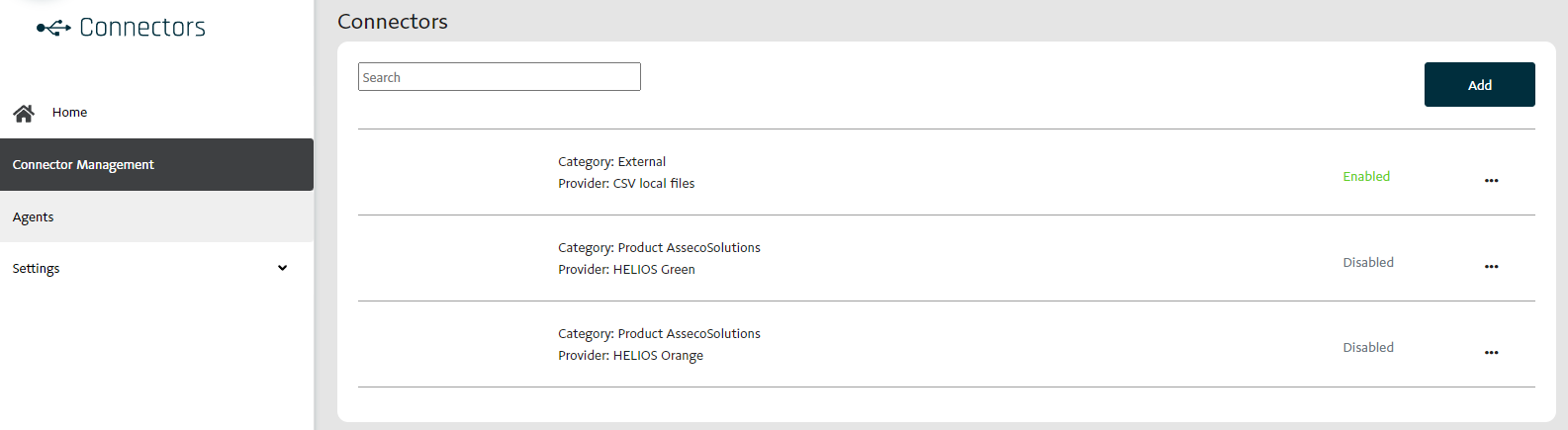
- Note: don't forget to Enable connector to turn on data-integration processing.
Register and configure data-agent
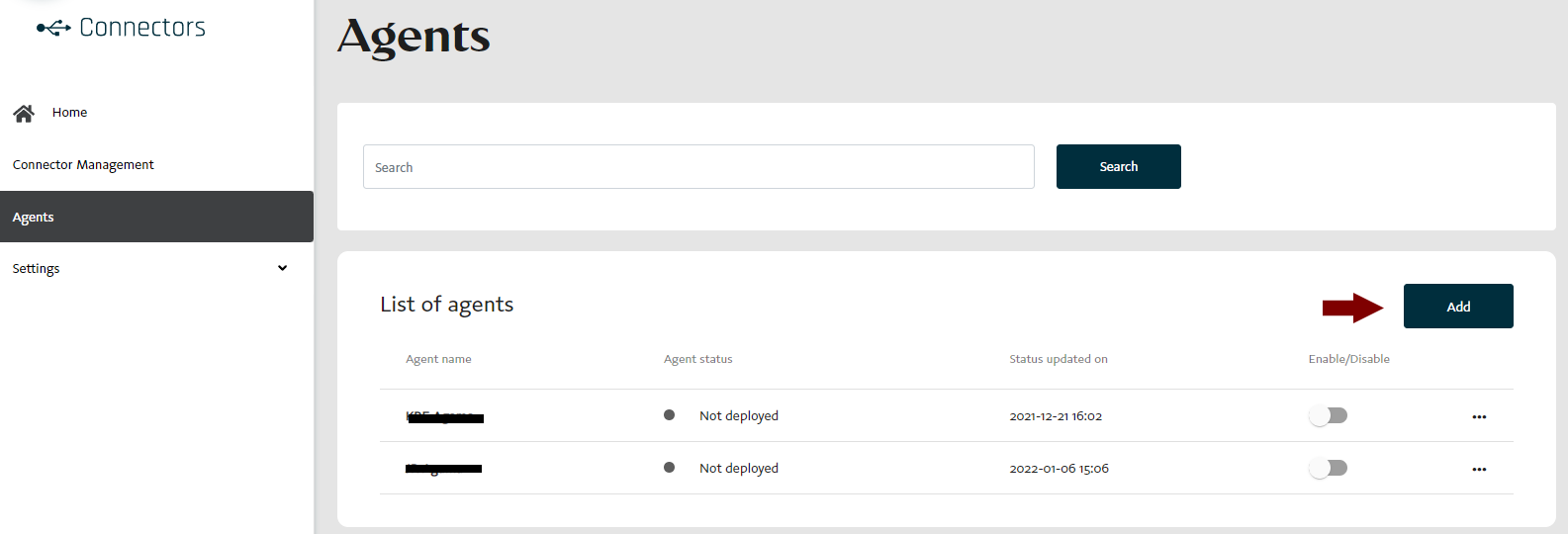
On-premise agent represents the technical level configuration. Each agent is associated to the specific connector and can have the multiple registrations per tenant. Each instance typically represents the on-premise installation of external application (e.g. ERP IS).
- Register agent for your agent instance
- Copy AgentCode, DataSourceId, TenantId and MandantCode settings and paste into appsettings.json
- => registered agent has dataAgentId and dataSourceId automatically assigned and ready to use
- Note: don't forget to Enable data-agent to turn on data-integration processing.
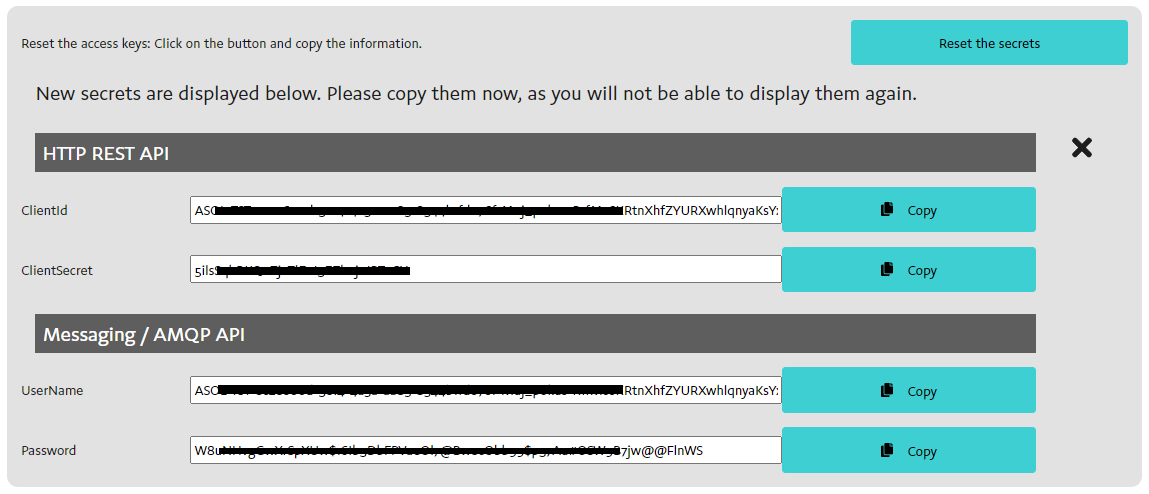
Generate secrets for data-agent
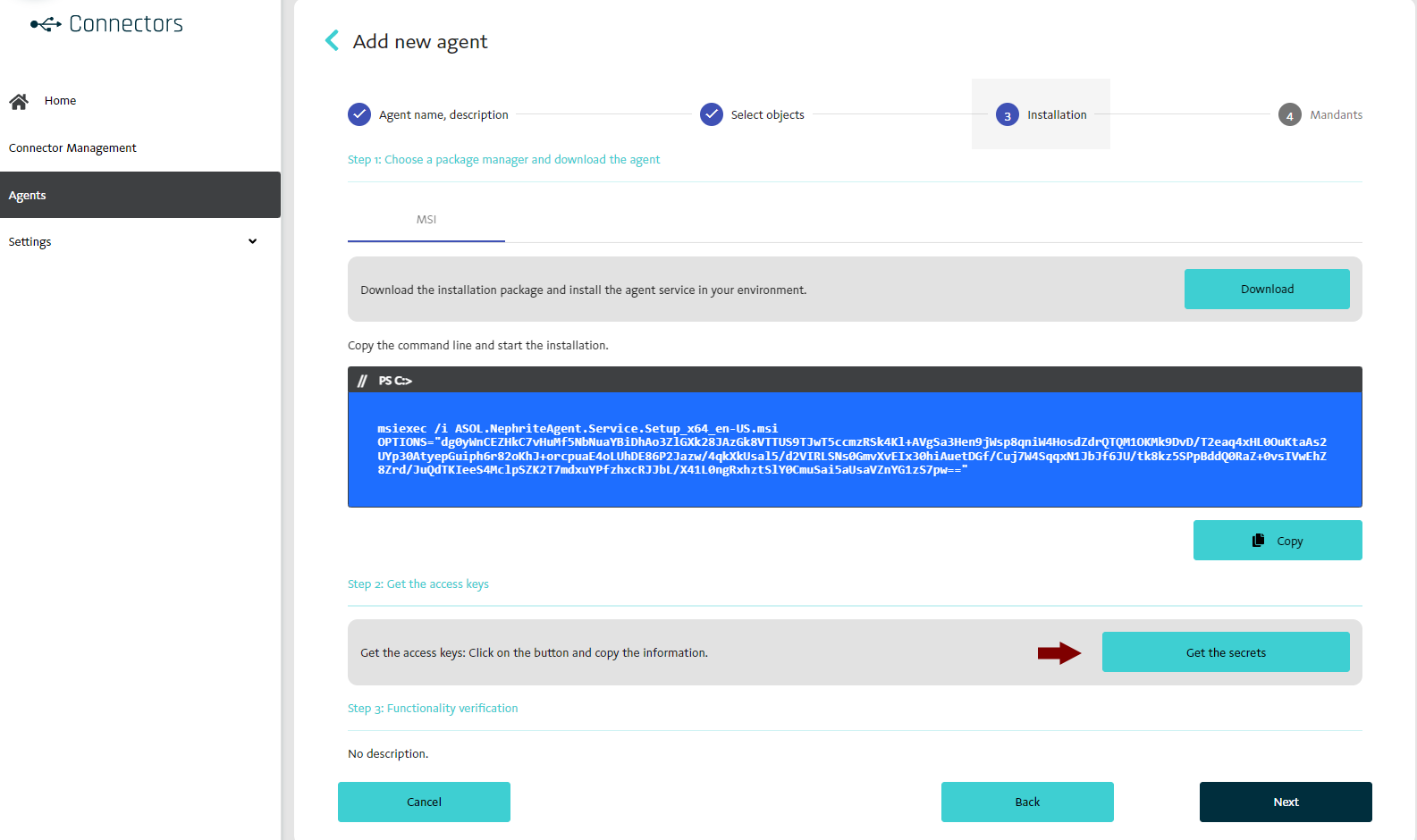
- Copy secrets and paste into appsettings.json / secrets.json
Register data-agent using REST API
The registration process of data-agent/data-source for single-tenant on-premise systems using Connector Catalogue backend service.
Prerequisites:
- Admin app role
ASOLEU-CONCATAPP-AP-.AdminorTenantAdminplatform role
ConnectorCatalogue API base URL: https://{hostname}/api/asol/cc
- Get available providers in connector catalogue
GET /api/v1/Providers
offset+limit- the client paging parameters (default values: offset = 0 and limit = 100)
- Register and release connector in connector catalogue if not yet
POST /api/v1/Connectors
- request body properties:
providerId- (mandatory) the GUID identifier of provider in connector catalogueenabled- the flag if connector is enabled or disabled
- sample request body:
{
  "providerId": "5e6203ab-2422-4aba-b65b-d1a33d5aab32",
  "enabled": true
}
Note: Connector must be released and enabled to be ready. Use Release and Enable actions if necessary using application or API.
- Register and release agent in connector catalogue
POST /api/v1/Agents
allowUpdate- (optional) flag if update of existing definition is allowed or not- request body properties:
connectorId- (mandatory) the GUID identifier of connector in connector catalogueintegrationTokenClientId- (optional) the clientId of existing integration token, otherwise the clientId is autogeneratedname- (mandatory) the human readable name of agent, the unique agentCode is autogeneratedenabled- the flag if agent is enabled or disabled
- sample request body:
{
  "connectorId": "680e7f17-dd36-402e-aa2b-7edf4c6c3c2b",
  "integrationTokenClientId": null,
  "name": "Demo",
  "enabled": true
}
Note: Agent must be released and enabled to be ready. Use Release and Enable actions if necessary using application or API.