The 1st method - Webhook Message Consumer
Overview
- This is the first way of communication:
- To register consumer and consume events of application domain services using message gateway
- Webhook API is following the REST API guidelines
- The event messages are supported by C# Contracts nuget package
- External cloud service can consume messages by Webhook channel
See more: OIDC/OAuth2 authentication
How to consume webhook message using message gateway
- Register MessageGateway consumer for data-agent using REST API
- Register consumer(s) for event(s) to consume filtered message queue(s) via Webhook URL
- Use HTTP client to obtain payload when a message is delivered
- Authenticate and validate the incoming request before processing the payload (see Webhook request authentication and validation)
Webhook URL template
- Consumer webhook URL is provided by developer partner, e.g.
https://yourwebhookapi.com/webhook - It is recommended to use different URL for each stage (DEMO and PROD)
POST {webhookUrl}/{messageType}/{contractType}/{messageId}
| path variable | description |
|---|---|
| messageType | name of the message type (routing key) |
| contractType | name of the class/contract |
| messageId | unique id of the message |
Webhook request headers
Sample of request headers (shortened):
Authorization: Bearer ...
Content-Type: application/json; charset=utf-8
X-Tenant-Id: ...
X-UserClaim-Actort: ...
X-UserClaim-client_id: ...
X-UserClaim-iss: ...
X-UserClaim-locale: ...
X-UserClaim-orgs_codes: ...
X-UserClaim-sub: ...
X-UserClaim-tid: ...
X-UserClaimsExtended: ...
| header | description |
|---|---|
| Authorization | JWT token created by MessageGateway. It identifies the service context of the communication channel and is not tenant-specific. |
| X-UserClaim-Actort | Person id (Actor) in user context. |
| X-UserClaim-client_id | Client identification in user or service context. |
| X-UserClaim-iss | Issuer in user or service context. |
| X-UserClaim-locale | Language and region context (RFC 5646 / ISO-639-2) in user or service context. |
| X-UserClaim-orgs_codes | Selected organizations (organization.code) - Organization national number|Country code. |
| X-UserClaim-sub | User identification (SSO unique identifier) in user context. |
| X-UserClaim-tid | Tenant identification of selected tenant in user or service context. |
| X-UserClaimsExtended | Extended claims in user or service context in Base64 encoded JSON format. |
| X-MessageSecurityCode | The legacy message security code for the message to keep compatibility with legacy systems. |
| X-Tenant-Id | Tenant context identification of the specific message. The value originates in the service that published the message. |
Sample of UserClaimsExtended request header (shortened):
[
  { "Key": "nbf", "Value": "..." },
  { "Key": "idp", "Value": "..." },
  { "Key": "http://schemas.xmlsoap.org/ws/2005/05/identity/claims/name", "Value": "..." },
  { "Key": "http://schemas.xmlsoap.org/ws/2005/05/identity/claims/emailaddress", "Value": "..." },
  { "Key": "http://schemas.xmlsoap.org/ws/2005/05/identity/claims/givenname", "Value": "..." },
  { "Key": "http://schemas.xmlsoap.org/ws/2005/05/identity/claims/surname", "Value": "..." },
  { "Key": "tname", "Value": "..." },
  { "Key": "organizations", "Value": "..." },
  { "Key": "auth_orgs", "Value": "..." },
  { "Key": "auth_orgs_codes", "Value": "..." },
  { "Key": "jti", "Value": "..." },
  { "Key": "iat", "Value": "..." }
]
Webhook request body
Message is sent in HTTP body in JSON format.
Securing incoming webhook requests
A webhook endpoint is publicly reachable over HTTPS, therefore the consumer must validate the incoming request before processing the notification. The current webhook security model combines a signed authentication token representing identification of communication channel with delivery-context headers of incoming http requests.
Authentication token
Each request contains Authorization: Bearer <token>.
MessageGateway creates this JWT as the authentication identity and context of the communication channel.
The token is intentionally not tied to a specific tenant or to the identity/context of an individual notification message.
It can therefore be used for messages with different tenants and different originating message contexts.
The token is signed using the RS256 algorithm. The consumer verifies its signature using public signing keys published through the AVAplace identity-provider configuration:
https://[hostname]/api/asol/idp/.well-known/openid-configuration
https://[hostname]/api/asol/idp/.well-known/jwks
For example, the DEMO signing keys are published at:
https://demo.avaplace.com/api/asol/idp/.well-known/jwks
Signing keys may be rotated. Consumers should therefore use the published OpenID Connect/JWKS configuration instead of embedding a certificate or public key permanently in application code.
A JWT header contains a key identifier (kid).
A standard JWT library uses this identifier to select the corresponding public key from the trusted JWKS and verifies the RS256 signature.
Do not hard-code the current kid, certificate, modulus or exponent because signing keys can be rotated.
In long-running applications, cache the discovery/JWKS configuration and allow it to refresh automatically. Do not download JWKS for every webhook request. Mature OIDC/JWT middleware normally provides this behavior.
A successful JWT validation authenticates the communication channel.
Claims contained in this token, such as iss, sub or client_id describe that channel authentication context.
They must not be interpreted as the identity or tenant context of every individual message delivered through the channel.
This distinction is important for multi-tenant processing. The notification-channel JWT is non-tenant specific, while the each message can carry own tenant and user context.
Message request headers
Headers such as X-Tenant-Id and X-UserClaim-* describe the tenant-context and user-context of the specific notification message.
These values are created by the originating platform service when that service publishes the notification message to the message bus.
They are propagated with the message and later included by MessageGateway into the webhook request.
A webhook consumer can therefore need the tenant header to process the notification in the correct tenant context.
X-UserClaim-tid- represents the specific tenant-context in user identity (so called runtime-context)X-Tenant-Id- represents the specific tenant-context explicitly assigned to message (so called tenant-context), typically used when user identity is impersonated by service context
Under normal circumstances, both values should be the same.
The message-context headers can also be used by the messaging infrastructure for message filtering/routing before the notification is delivered. On the webhook consumer side they describe the original message context and can be useful for processing, diagnostics, troubleshooting and correlation according to the integration contract.
X-MessageSecurityCode is a legacy proprietary mechanism that was introduced to protect propagated messages against spoofing or modification.
It is still present in the current webhook contract and legacy integrations may be required to validate it, but it is no longer recommended for new integrations.
Recommended validation order
Before the notification payload is accepted for business processing, the consumer should:
- Accept the webhook only over HTTPS.
- Require an
Authorizationheader using theBearerscheme. - Parse the token using a JWT library and reject malformed tokens.
- Cryptographically validate the JWT signature against a currently published identity-provider signing key and require the expected signing algorithm (
RS256). - Resolve the signing key from the trusted IdP discovery/JWKS endpoint and verify the cryptographic signature. The JWT
kidis used only to select a key from this trusted key set. - Validate standard JWT validity constraints, especially token lifetime (
expandnbfwhen present), and validate the expected issuer (iss) and audience (aud) when defined for the integration. Expected values must come from trusted consumer configuration. - Read the message-specific user identity and tenant context from the request headers required by the integration contract.
- Validate the request routing information (
messageType,contractType,messageId) and payload required by the integration before business processing. - Use
messageIdto make processing idempotent. A repeated delivery of the same message must not create the same business effect twice. - Process or enqueue the notification message only after the required authentication and request checks have succeeded.
- Return an HTTP 2xx response only after the notification has been accepted according to the consumer's processing strategy. A failed authentication/authorization check should normally result in
401 Unauthorizedor403 Forbidden. A malformed request may result in400 Bad Request.
The exact implementation depends on the consumer technology.
Standard JWT/OIDC libraries are recommended because they handle signature verification, key selection by kid, token lifetime validation and signing-key rotation.
See the technical webhook integration examples for implementation guidance.
Technology-neutral command-line example
The following Bash example demonstrates JWT verification with curl and the step CLI.
It is intended as a diagnostic/integration example; production applications should use the JWT/OIDC library native to their platform.
#!/usr/bin/env bash
set -euo pipefail

TOKEN="${TOKEN:?Set TOKEN to the received Bearer JWT}"
IDP_BASE_URL="${IDP_BASE_URL:-https://demo.avaplace.com/api/asol/idp}"
EXPECTED_ISSUER="${EXPECTED_ISSUER:-$IDP_BASE_URL}"
EXPECTED_AUDIENCE="${EXPECTED_AUDIENCE:?Set EXPECTED_AUDIENCE for this integration}"

JWKS_FILE="$(mktemp)"
trap 'rm -f "$JWKS_FILE"' EXIT

# Obtain currently published public signing keys from the trusted IdP.
curl --fail --silent --show-error \
  "$IDP_BASE_URL/.well-known/jwks" \
  --output "$JWKS_FILE"

# Verify signature, algorithm, issuer, audience and token validity.
printf '%s' "$TOKEN" | step crypto jwt verify \
  --jwks "$JWKS_FILE" \
  --alg RS256 \
  --iss "$EXPECTED_ISSUER" \
  --aud "$EXPECTED_AUDIENCE" \
  >/dev/null

echo "JWT is valid"
This command validates the JWT only. It does not authenticate X-Tenant-Id, other X-UserClaim-* headers, or the JSON body.
Those values remain part of the webhook delivery context and must be handled according to the integration contract described above.
If the integration does not define an aud claim, configure the chosen JWT library according to the agreed token contract rather than copying an arbitrary audience value into the example.
Recommended ASP.NET Core implementation
For ASP.NET Core, prefer JWT Bearer authentication middleware. It can use OpenID Connect metadata, cache signing keys and refresh them when keys are rotated.
Package reference (for projects where it is not already provided by the shared framework/project setup):
dotnet add package Microsoft.AspNetCore.Authentication.JwtBearer
Example configuration:
using Microsoft.AspNetCore.Authentication.JwtBearer;
using Microsoft.IdentityModel.Tokens;
var builder = WebApplication.CreateBuilder(args);

var idpBaseUrl = builder.Configuration["WebhookAuthentication:Authority"]
    ?? "https://demo.avaplace.com/api/asol/idp";

var expectedAudience = builder.Configuration["WebhookAuthentication:Audience"]
    ?? throw new InvalidOperationException("WebhookAuthentication:Audience is not configured.");

builder.Services
    .AddAuthentication(JwtBearerDefaults.AuthenticationScheme)
    .AddJwtBearer(options =>
    {
        options.MetadataAddress =
            $"{idpBaseUrl}/.well-known/openid-configuration";
        options.RequireHttpsMetadata = true;

        options.TokenValidationParameters = new TokenValidationParameters
        {
            ValidateIssuerSigningKey = true,

            ValidateIssuer = true,
            ValidIssuer = idpBaseUrl,

            ValidateAudience = true,
            ValidAudience = expectedAudience,

            ValidateLifetime = true,
            ClockSkew = TimeSpan.FromMinutes(1),

            ValidAlgorithms = new[] { SecurityAlgorithms.RsaSha256 }
        };
    });

builder.Services.AddAuthorization();

var app = builder.Build();

app.UseHttpsRedirection();
app.UseAuthentication();
app.UseAuthorization();

app.MapPost(
    "/webhook/{messageType}/{contractType}/{messageId}",
    async (
        HttpContext context,
        string messageType,
        string contractType,
        string messageId) =>
    {
        // The JWT has already been validated by JwtBearer middleware.
        // Use HttpContext.User for identity claims that are contained in the JWT.
        var subject = context.User.FindFirst("sub")?.Value;
        var clientId = context.User.FindFirst("client_id")?.Value;

        // Do not use X-UserClaim-sub/client_id/iss to override JWT claims.

        // Tenant is delivery context. With a multi-tenant token it may intentionally
        // not be fixed by the JWT, therefore the target tenant is read from the request.
        if (!context.Request.Headers.TryGetValue("X-Tenant-Id", out var tenantId)
            || string.IsNullOrWhiteSpace(tenantId))
        {
            return Results.BadRequest("Missing tenant context.");
        }

        // Recommended next steps:
        // 1. validate messageType / contractType if the endpoint expects fixed values;
        // 2. check whether messageId was already processed;
        // 3. deserialize and validate the JSON payload;
        // 4. execute or enqueue idempotent processing;
        // 5. persist the deduplication result before acknowledging success.

        return Results.Ok();
    })
    .RequireAuthorization();

app.Run();
Example configuration:
{
  "WebhookAuthentication": {
    "Authority": "https://demo.avaplace.com/api/asol/idp",
    "Audience": "<expected-audience>"
  }
}
The sample deliberately reads identity information from HttpContext.User and tenant context from X-Tenant-Id.
This reflects the current multi-tenant contract: the JWT can authenticate a multi-tenant caller while the concrete notification supplies the target tenant separately.
If the deployed identity provider cannot be consumed through its discovery document by the selected middleware, use the JWKS URI directly with the platform's JWT library.
The security requirements remain the same: trust only keys obtained from the configured IdP endpoint, restrict the accepted algorithm to RS256, validate the token's standard validity claims, and support key rotation.
Handling key rotation and temporary IdP/JWKS failures
- Cache signing keys or use middleware that does so automatically.
- When a token contains an unknown
kid, refresh the trusted JWKS once and retry validation. This allows normal signing-key rotation without accepting untrusted keys. - Never fetch a key from a URL supplied inside the incoming token.
- If the IdP/JWKS endpoint is temporarily unavailable, already cached and still applicable signing keys may continue to be used according to the JWT library's refresh/cache policy.
- Do not treat failure to obtain a required signing key as successful authentication.
- Avoid logging complete Bearer tokens or other credential material.
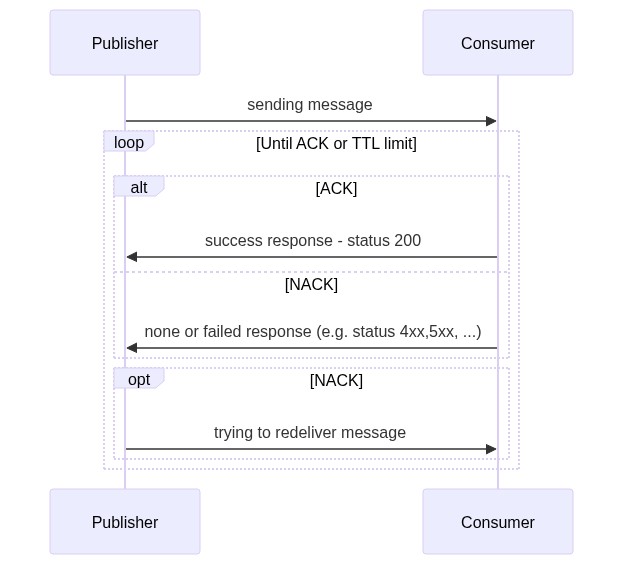
Message acknowledgment and redelivery
Examples - OrderReleased scenario
Webhook URL
POST https://yourwebhookapi.com/webhook/ASOL.PlatformStore.OrderReleased/OrderReleased/c0eb0000-5dfe-0015-8604-08dbd6ef8bf7
| path variable | value |
|---|---|
| messageType | ASOL.PlatformStore.OrderReleased |
| contractType | OrderReleased |
| messageId | unique for each receive message |
Webhook headers
Authorization: Bearer ...
Content-Type: application/json; charset=utf-8
X-MessageSecurityCode: Dx_...
X-Tenant-Id: ASOLEU-DEV-fd9ad6b9-2f29-4c7a-9a3a-c7469e19b1ff
X-UserClaim-Actort: c042e6ad-f293-4e36-8266-574b665792ff
X-UserClaim-client_id: plaza-pass
X-UserClaim-iss: https://demo.avaplace.com/api/asol/idp
X-UserClaim-locale: cs-CZ
X-UserClaim-orgs_codes: 64949541|CZ
X-UserClaim-sub: 6388701d4a20a1c1bc1f0831
X-UserClaim-tid: ASOLEU-DEV-fd9ad6b9-2f29-4c7a-9a3a-c7469e19b1ff
X-UserClaimsExtended: [{"Key":"nbf","Value":"1698409522"},{"Key":"idp","Value":"local"},{"Key":"http://schemas.xmlsoap.org/ws/2005/05/identity/claims/name","Value":"petr.tomala@assecosol.com"},{"Key":"http://schemas.xmlsoap.org/ws/2005/05/identity/claims/emailaddress","Value":"petr.tomala@assecosol.com"},{"Key":"http://schemas.xmlsoap.org/ws/2005/05/identity/claims/givenname","Value":"Petr"},{"Key":"http://schemas.xmlsoap.org/ws/2005/05/identity/claims/surname","Value":"Tomala"},{"Key":"tname","Value":"ASOLEU-DEV"},{"Key":"organizations","Value":"fff2d400-9838-4513-9c7b-535a03bd8c94"},{"Key":"auth_orgs","Value":"fff2d400-9838-4513-9c7b-535a03bd8c94"},{"Key":"auth_orgs_codes","Value":"64949541|CZ"},{"Key":"jti","Value":"9781FBFE8F78C7F7802F494947860804"},{"Key":"iat","Value":"1698409522"}]
Webhook body
{
  "orderId": "b0588700-f3a2-4bde-bbb4-d2022bf7851e",
  "productId": "98fa6110-ec8b-45a4-882f-b5a1e89812ca",
  "vendorCode": "64949541|CZ"
}
Examples - RefreshSourceStatus scenario
Webhook URL
POST https://yourwebhookapi.com/webhook/ASOL.DataService.RefreshSourceStatus/RefreshStatusEvent/01000000-d3ff-1268-1fe0-08df06d5fef7
| path variable | value |
|---|---|
| messageType | ASOL.DataService.RefreshSourceStatus |
| contractType | RefreshStatusEvent |
| messageId | unique for each receive message |
Bearer token
{
  "iss": "https://beta.avaplace.com/api/asol/idp",
  "exp": 1788286751,
  "iat": 1788283151,
  "aud": "apiim",
  "sub": "plaza-services",
  "client_id": "plaza-services",
  ...
}
Webhook headers
Authorization: Bearer ...
Content-Type: application/json; charset=utf-8
X-Tenant-Id: ASOLEU-DEV-fd9ad6b9-2f29-4c7a-9a3a-c7469e19b1ff
X-UserClaim-client_id: ASOLEU-DataService-AP-
X-UserClaim-tid: ASOLEU-DEV-fd9ad6b9-2f29-4c7a-9a3a-c7469e19b1ff
X-UserClaimsExtended: []
Webhook body
{
    "sourceId": "6049f30a-ce57-48e4-a97c-02e3e2edae1f",
    "checkConnection": true
}